Sunday, March 28, 2010

Best of this Week Summary 22 March - 28 March 2010

Sunday, March 21, 2010

Android SDKs, screensizes and resolutions: comparable hardware

Trying to get an overview of the possible combinations of Android SDKs and screensizes and resolutions, *and* what physical devices are comparable, I came to the below overview. If you know some more comparable hardware, please let me know, I'll update the tables.

The first table shows the different screensizes defined as per Supporting Multiple Screens | Android Developers, mapped on real existing devices.


Id


Screensize, resolution, physical


Comparable hardware


A


QVGA (240x320, low density, small screen, 3.3”)


-


B


HVGA (320x480, medium density, normal screen, 3.9”)


HTC Hero 1.5 but really has 3.2”


C


WVGA800 (480x800, high density, normal screen, 3.9”)


Google Nexus One but really has 3.7”


D


WVGA854 (480x854 high density, normal screen, 4.1”)


Motorola Droid (aka Milestone) but really has 3.7” and Sony Ericsson Xperia X10 (screensize unclear)


E


WQVGA400 (240x400, low density, normal screen, 3.9”)


-


F


WQVGA432 (240x432, low density, normal screen, 4,1”)


-


The table below shows which SDK supports the above screensizes.


SDK


Screensize Id


1.5


B


1.6


B-D


2.0


B-F


2.0.1


B-F


2.1


B-F


Remarks:
  • The total nr of possible sdk+screensize combinations is 19!

  • Android has organized the screensizes and resolutions into three generalized sizes and three generalized densities, see here.

  • To support all these resolutions, you don't have to create icons/images for all possible combinations. By default Android tries to scale resources. Up to a certain limit it could be acceptable to let it do it for you, minimizing the number of images to create.

  • An example setting is minSdkVersion = 3, targetSdkVersion = 4 (where 3 = 1.5, 4 = 1.6). Targeting 1.6 ensures that different screensizes can be supported if the device has 1.6 or higher.

  • Cool skins you can find here. If you look at the configuration files, you can validate whether the screensize and resolutions are actually what you expect.

  • Sources: Droid, Nexus One, Hero, Xperia X10.

Best of this Week Summary 15 March - 21 March 2010

  • Twitter and Digg are moving from MySQL to Cassandra (a highly scalable second-generation distributed database, bringing together Dynamo's fully distributed design and Bigtable's ColumnFamily-based data model; a Facebook opensourced project). The reason for Digg for the move "is the increasing difficulty of building a high-performance, write-intensive application on a data set that is growing quickly, with no end in sight. This growth has forced them into horizontal and vertical partitioning strategies that have eliminated most of the value of a relational database, while still incurring all the overhead".
    Twitter has about the same reason: "No single points of failure", "Highly scalable writes (we have highly variable write traffic)", and "A healthy and productive open source community".
    Twitter tried HBase, Voldemort, MongoDB, MemcacheDB, Redis, Cassandra, and HyperTable amongst others before deciding to go with Cassandra. Interesting to read is how they slowly rollout Cassandra to limited sets of users.
    An introduction to Cassandra to get it up and running can be found here.


  • A short post on how to implement Automatic testing Oracle Service Bus using Hudson, Maven and SoapUI.

  • What to expect from HTML5 for webdevelopers.

Sunday, March 14, 2010

Best of this Week Summary 8 March - 14 March 2010

Sunday, March 7, 2010

Sunday, February 28, 2010

Best of this Week Summary 22 February - 28 February 2010

Sunday, February 21, 2010

Best of this Week Summary 15 February - 21 February 2010

  • Expected that Mozilla uses Agile everywhere, and definitely on its flagship Firefox? Think again, only recently they started to combine Agile and more traditional Waterfall as their new development model, dubbed "Lorentz".

  • Tips for hardening your Tomcat installation. Other implementation guides, not only limited to Tomcat (also for example WebLogic) tips from U.S. DOD DISA (Defense Information Systems Agency) can be found here.

  • Always interesting to at least quickly browse through: a review of the 1993 code of Doom. And more "today": the code of Doom for the iPhone reviewed.

  • Think you know Javascript? Try one of these quizes!

Sunday, February 14, 2010

Best of this Week Summary 8 February - 14 February 2010

  • Five new features of Spring 3.0 described:

    • Spring Expression Language (SpEL)

    • Object/XML Mapping (OXM) module

    • Type-conversion system

    • Formatter SPI

    • RESTful web services support

    What new Ajax simplifications have been introduced can be found here.

  • The Java EE 6 web tier introduces with Servlet 3.0 spec the ability for asynchronous processing of requests so that the thread may return to the container and perform other tasks. It also "adds annotation based configuration (@WebServlet, @ServletFilter and @WebServletContextListener) making the web.xml file optional, and introduces a new concept of web fragments."

  • Introductionary article to Apache Click. One difference between Click and Wicket is that Click is stateless by design, while Wicket is stateful. Both can be configured their "opposite" model, though these have their own pros/cons.
    Another main difference is that that Click uses templates (Velocity by default) where Wicket does not.

    Sidestep: here's a bunch of nicely designed Wicket sites that scale (note: not really clear where the scalability statements come from).

  • A 60 minutes presentation on how SOA is a hit at eBay.

Sunday, February 7, 2010

Best of this Week Summary 1 February - 7 February 2010

Sunday, January 31, 2010

Attacking memory problems on Android

Yay, my first post on Android :) Immediately attacking a difficult one: memory problems.


You might not run into them that quickly, but when you do, with a bit of bad luck, you've got a lot of work to do.
I've split the memory problems in two parts: out of memory (OOM) problems (this post) and stack overflow problems (a next post).

The maximum heap memory an process (app) gets in Android is 16M. That's not that much, a basic app takes already several MBs after you've only just started it.
So in the LogCat output you see something like when you run out of (heap) memory:


09-12 16:33:43.357: ERROR/dalvikvm-heap(157): 528640-byte external allocation too large for this process.
09-12 16:33:43.357: ERROR/(157): VM won't let us allocate 528640 bytes
09-12 16:33:43.357: DEBUG/AndroidRuntime(157): Shutting down VM
09-12 16:33:43.367: WARN/dalvikvm(157): threadid=3: thread exiting with uncaught exception (group=0x40010e28)
09-12 16:33:43.367: ERROR/AndroidRuntime(157): Uncaught handler: thread main exiting due to uncaught exception
09-12 16:33:43.387: ERROR/AndroidRuntime(157): java.lang.RuntimeException: can't alloc pixels
09-12 16:33:43.387: ERROR/AndroidRuntime(157): at android.graphics.Bitmap.nativeCreate(Native Method)
09-12 16:33:43.387: ERROR/AndroidRuntime(157): at android.graphics.Bitmap.createBitmap(Bitmap.java:343)


Now it could be you are just using too much memory. Trying to load 100 images of 800x600 pixels will just not fit into 16M when decoded to bitmaps.
But for any other "normal" app you can still run OOM after using it for a little while. For example even when you just open/close the same screen (Activity) for 20 times. That means you've got a memory leak. So where is it leaking, what memory can't the garbage collector (GC) set free?

With


adb shell procrank


you can get some information about your app's memory usage, but only a very rough idea.
A bit more specific information you can find by executing


adb shell dumpsys meminfo


DDMS also gives some rough info, but only some quite high-level info about objects being freed and allocated.

So still not enough info to really figure out what's going on: you'll see the memory usage will go over the 16MB limit at some point, at which the JVM will start complaining in the LogCat output it can't allocate the requested memorory.
But that you already knew :)

So you need something more detailed about what is when allocated and GC'ed. This is where the Eclipse Memory Analyzer Tool (MAT) comes into play.
Below I'll just give the steps you could apply to figure out where you're not freeing memory correctly and thus have a memory leak(s). All steps apply for a Windows + Eclipse environment, but should not be hard to apply to other setups.
The steps are based on input from several posts:


Analyzing memory usage steps

Make sure you've got your app running in the emulator via Eclipse. A real device should also work but I didn't try it. Probably sending the signal 10 needs to be done from w/in the code, see here. I'll assume you've already installed the MAT plugin.
  1. Start a Windows cmd shell. Go to the directory where you installed the Android SDK and go into the 'tools' subdirectory.

  2. First the directory /data/misc needs to be in mode 777 for the heap dump to be written. So execute:


    adb shell chmod 777 /data/misc


  3. Now you probably already have an idea which Activity is causing the OOM or might have a memory leak. To be able to easily spot it, open and close that Activity about 5 times. This makes sure it will stand out in the heap data. And, if you've opened/closed it 5 times, it should be fully GC'ed right? So if later on we see it still has 5 or 4 instances around, you know something is not cleaned up correctly!

  4. Find the process id (PID) you want an heap dump for. That is your app, identified by the package path of your app. So execute to look it up:


    adb shell ps


    Take the first column (named PID). Send a signal 10 to that process via:


    adb shell kill -10


    In your LogCat output you should see the VM heap being dump with lines similar to:


    01-31 15:29:34.112: INFO/dalvikvm(210): SIGUSR1 forcing GC and HPROF dump
    01-31 15:29:34.112: INFO/dalvikvm(210): hprof: dumping VM heap to "/data/misc/heap-dump-tm1264948174-pid210.hprof-hptemp".
    01-31 15:29:35.873: INFO/dalvikvm(210): hprof: dumping heap strings to "/data/misc/heap-dump-tm1264948174-pid210.hprof".
    01-31 15:29:36.652: INFO/dalvikvm(210): hprof: heap dump completed, temp file removed


  5. Now you need to copy the generated .hprof file from the emulator (or device) to your Windows machine, so execute:


    adb pull /data/misc/heap-dump-tm1264948174-pid210.hprof myheapdump.hprof


    Note that the bold part in the command matches the bold part in the 3rd LogCat line above.

  6. Since the hprof output from the Dalvik VM is not in the format the standard Java tools (including MAT) recognize, you need to fix that with this command (it just prepends a header or something):


    hprof-conv myheapdump.hprof mat_myheapdump.hprof


  7. As an extra step you can move the mat_myheapdump.prof file to another directory, so you won't fill up your working directory with .hprof files.

  8. Switch to the MAT perspective and open the file mat_myheapdump.prof you just created above. MAT will give you the option to already look at a few standard reports that could already give you an indication on what is using up a lot of memory. But often it will report 'java.lang.Class' and 'java.lang.string' as suspects, thus not telling you that much. Therefore: see next step.

  9. Click on the histogram icon:

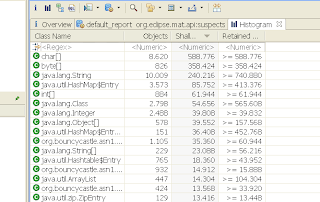
    That gives something like this:

    That just shows all classes in the heap dump. Note that again on top are String related classes/types.
    To make sure you only see your app's classes, type in the first row (named <Regex>) your app's package name. It is the same you entered for the 'dumpsys' command, at the start of this article. After you hit enter, you'll see only classes from that package onwards are shown.
    You see already immediately at the top which classes (instances) appear more than once and how much memory is retained by them. Getting there!

    Legend: "Shallow heap is the memory consumed by one object. Retained set of X is the set of objects that will be garbage collected if X is garbage collected. Retained heap of X is the sum of shallow sizes of all objects in the retained set of X , i.e. memory kept alive by X."

  10. Since at the start of these steps I recommended (and so do some of the referenced articles :) to repeat opening and closing the offending Activity a couple of times (say 5), you can now already see if the Activity you opened & closed is cleaning up correctly. If the row with its classname has a number > 1 in the Objects column (maybe even 5) you know it's not cleaned/cleaning up properly.
    Note that even after you fixed all your memory leaks, you still might see one entry present. When you drill down that one entry (see steps below) you'll see it has unknown beside its classname. My guess is that it means it is being cleaned up, or will be at the next GC cycle, so won't need further investigation.

  11. Drilling down: right-click on a row you expected to be 1 or not even present. Select


    List ojbects --> with incoming references


    (thus those objects that refer to the selected object). That gives just 1 row. If you click on that row, on the left in the Inspector view, you see what that object is "holding". Very interesting is the Attributes tab. There you can see which member variables it holds (and you might have expected to be null for example). Objects referencing the selected object appears when you unfold the row.

  12. Right-click the row and select


    Path to GC Roots --> exclude weak/soft references


    That shows the paths of the GC for the objects that are referencing the object you started drilling down on 1 step ago. So now your knowledge of the app comes in to play: should those objects still be referencing the object under scrutiny? If not why are they still doing that? Check your code, maybe need to null them explicitly in onDestroy() etc. See for more tips below.
    The reason for excluding weak and soft references is that they should get garbage collected on time anyway (by definition), so don't need to worry about them.
    Note: selecting "Merge Shortest Paths to GC roots" is also useful sometimes (less clutter).


Lessons learned

  • You might have to set all anonymous listeners to null in your onDestroy()

  • Watch that drawable callback stuff. Even if you have no static drawables, a library you're using might still keep an Activity context to a Drawable (and vice versa) around!

  • So what I did to solve the above two lessons is put the objects that refer to them in a list, which I cleanup in onDestroy(), i.e setOnClickListener(null) and object = null. Setting object to null should not really be necessary but might make it getting picked up by the GC a bit faster.

  • Handy trick (but error-prone) is to set all "big" objects to null in onDestroy() anyway. Helps you quicker see in MAT which are still around. Error-prone because: you might still have a background thread running when the onDestroy() is called. in onDestroy() you then might set objects to null, which the running thread still needs... (before onDestroy() itself finishes and thus the Activity). And thus you get NullPointerExceptions.

  • Images (Bitmaps) are not allocated in a standard Java way but via native calls; the allocations are done outside of the virtual heap, but are
    counted against it! Posts mentioning/related to this: one, two, and three.

    And that matches with what I see using MAT: the memory usage shown with 'procrank' and 'dumpsys' is much higher than what the MAT overview reports show.

    So to tackle OOMs with images, at least make sure all your references are cleaned up as described in the above steps. Also only loading in memory what you really need for an image helps. See also the next lesson learned.

  • Loading images from for example the internet are hard to handle in Android. You can get away with loading 1 or 2 images of say 200x200 pixels, but still memory usage goes really fast. BIG post on this here. Notice also that the Drawable callback is mentioned again too. Another one showing some computations of memory usage here. Biggest thing to learn from here: a PNG of 20K for an image of 200x200 pixels needs as Bitmap already about 160K (assuming 4 bytes per pixel).
    A recommended approach is this (ideas based on the Photostream demo app):

    1. First only get the image sizes via:


      BitmapFactory.Options options = new BitmapFactory.Options();
      options.inJustDecodeBounds = true;
      Bitmap tmpBitmap = BitmapFactory.decodeStream(new ByteArrayInputStream(new URL(url).openStream()), null, options);
      int height = options.outHeight;
      int width = options.outWidth;


      Now you know how big it is before even downloading it! You probably know how big the image should be drawn. So compute the scaling needed for that (normally Android would do the scaling for you at drawing time).

    2. Only then get the image with those sizes:


      options = new BitmapFactory.Options();
      options.inSampleSize = sampleSize;
      bitmap = BitmapFactory.decodeStream(new ByteArrayInputStream(new URL(url).openStream()), null, options);


    3. A further improvement (also handy for caching of images) is to just download the images as raw bytes and store that on disk. Then when it's time to create a bitmap/drawable out of it, determine if you need to rescale by reading those stored raw bytes. Just replace in the above code 'new URL(url).openStream()' with your byte array (byte[]).
      And: if you're really sure you don't need a given bitmap any more, use bitmap.recyce() to release it permantently.


  • For ListViews and their ListAdapters: use the convertView.

  • Debuggers usually keep objects alive, preventing them from being freed, so when doing this memory analysis, don't run in debug mode. Also make sure to force a GC a couple of times on your process before taking a heap dump. As tipped by Romain in this post.

Update: apparently some of the steps have been automated in the meantime, see this message for details.

Update: From this article "As of Android 3.0 (Honeycomb), the pixel data for Bitmap objects is stored in byte arrays (previously it was not stored in the Dalvik heap), and based on the size of these objects, it's a safe bet that they are the backing memory for our leaked bitmaps." So it will be much easier to track allocations. Note that this TTLNews blogpost is from before Honeycomb! The article also shows how to compare heap dumps with MAT, might come in handy some times.

Best of this Week Summary 25 January - 31 January 2010

Sunday, January 24, 2010

Best of this Week Summary 11 January - 24 January 2010

Sunday, January 10, 2010

Best of this Week Summary 28 December - 10 January 2010

  • "An interview with Duane Nickull, Senior Technical Evangelist at Adobe Systems as he revisits the notion of 'Web 2.0', and discusses some of the new architectural and human interaction patterns that are shaping the way in which we build RIA Web applications today. He talks about some of the new Flash authoring tools for the iPhone, the Open Screen Project, as well as the impact HTML 5 will have on Flash adoption." Transcription of the interview below the interview. Summary in four words: "Don't piss off users". He also mentions the Open Screen Project: "It is an industry-wide initiative, led by Adobe with the participation of other industry leaders, to enable the delivery of rich multiscreen experiences built on a consistent runtime environment for open web browsing and standalone applications."

  • Blogpost using Ehcache and Spring 3 for implementing over 100K of RSS feeds, with certain feeds under very high load. A follow-up post describes the use of Ehcache DX Monitor Module (beta).

  • Fun: a ZX-81 chess program in 1K. Actually only 672 bytes were available for the program!

Sunday, December 27, 2009

Best of this Week Summary 21 December - 27 December 2009

Sunday, December 20, 2009

Best of this Week Summary 14 December - 20 December 2009

Sunday, December 13, 2009

Best of this Week Summary 07 December - 13 December 2009

Sunday, December 6, 2009

Best of this Week Summary 30 November - 06 December 2009

Sunday, November 29, 2009

Best of this Week Summary 17 November - 29 November 2009

Sunday, November 22, 2009

Best of this Week Summary 16 November - 22 November 2009

Sunday, November 15, 2009

Best of this Week Summary 09 November - 15 November 2009

Sunday, November 8, 2009

Best of this Week Summary 02 November - 08 November 2009

  • A summary of an interview with Erich Gamma, Richard Helm, and Ralph Johnson, three of the Gang of Four who wrote Design Patterns: Elements of Reusable Object-Oriented Software 15 years ago. The full interview here.

  • Five web frameworks comparison: Shale, Struts, Wicket, WebWork, Rails, JBossSeam, MyFaces and Spring.

  • Jeff Dean (Google Fellow) on large-scale computing (PDF) during Ladis 2009. Interesting numbers regarding reliability and availability for hardware, like 1-5% of your disks will die. And even if you got very reliable servers with MTBF of 30 years, if you have 10000 of those, that means see one fail each day! And: "a web search touches 50+ separate services, 1000s machines". Some more of these quotes:

    • "Better to give users limited functionality than an error page"

    • "Ensure your design works if scale changes by 10X or 20X but the right solution for X often not optimal for 100X"

    • Monitoring: "If your system is slow or misbehaving, can you figure out why?"

    • "Future scale: ~106 to 107 machines, ~1013 directories, ~1018 bytes of storage, spread at 100s to 1000s of locations around the world, ~109 client machines"

    Other subjects touched: MapReduce and BigTable.

  • Blogpost that briefly touches a few types of complexity encountered in large software (web) projects.

Sunday, November 1, 2009

Best of this Week Summary 26 October - 01 November 2009

Sunday, October 25, 2009

Best of this Week Summary 19 October - 25 October 2009

Sunday, October 18, 2009

Best of this Week Summary 12 October - 18 October 2009

  • Last week was Oracle Open World 2009. Beside for Oracle DBMS and SOA specialists, these days the event is definitely also very relevant to Java professionals because of Oracle's (almost official) acquisition of Sun this year. Here's a set of relevant information from OOW:

    • The keynote on sunday which also describes the plans Oracle has with Java, MySQL and Sun hardware

    • James Gosling explaining to the developer audience what Sun was doing, what the scale is of Java activity around the world and across technology platforms.

    • The Dutch software company Amis also did quite a few presentations at OOW. Some of those presentations were already online before they were actually presented! All were interesting:

      • Good overview of what will be in the Patch Set 1 for the Oracle Fusion Middleware 11g stack, including JSF and ADF (mobile!). It's more than a patch!

      • Edition Based Redefinition (EBR): "Every database object (well, almost every database object - not tables!) can have different implementations/incarnations/versions in various editions. The object versions are all in the same schema - they only differ in the Edition they are created in."
        So no more direct table access! No big bang needed anymore. Challenges: what if a mandatory column is removed or added from the current EBR view (answer: special triggers). Including 2 suggestions for best practices.

      • XML processing/design tips.

      • This "session introduces SOA and the new Oracle SOA Suite 11g to the realm of database professionals from which it sometimes seems so far removed. What are the key SOA concepts and objectives? What is at the heart of Oracle SOA Suite 11g: composite applications, BPEL PM, and the mediator. The session shows how SOA services can be leveraged from the database, from triggers, PL/SQL units, or even SQL and how the database can publish events to the event delivery network. It covers how the SOA infrastructure can access the database, primarily using Oracle Database and Oracle Advanced Queueing adapter and how database developers can help in doing so efficiently. It ends with hints for applying SOA concepts to "normal" database development."

        Bit oriented at the database professional, but still interesting for those who want to stay up to date with Oracle's DMBS possibilities. And a bit scary too: it is possible in 11g to make webservice calls and publish them from the database(!). For example from PL/SLQ and put a webservice in front of PL/SQL... I haven't come up with a practical situation where you'd want to do this from an architectural point of view: large risk to getting tightly coupled systems and dependencies. If you have heavily invested (i.e built) in PL/SQL, it might be a valid option though.


  • There is currently a renewed focus on the role of code generation in developing enterprise Java applications. Springsource recently released Roo, Skyway Software released Skyway Builder Community Edition version 6.3 and Blu Age released M2Spring. What should the software architects and developers look for in a Code Generation framework?

  • Seven Wicket Do's and Don'ts.

Sunday, October 11, 2009

Best of this Week Summary 05 October - 11 October 2009

  • A quite in-depth article on creating highly-scalable components in Java. Described are the ideas used to create the concurrent Java components in the Amino Library Project (a set of concurrent building blocks).

  • Another SOA Design Pattern sample chapter from Thomas Erl' book "SOA Design Patterns": "Service Governance Patterns, comprising a number of 8 patters. Compatible Change and Version Identification deal with service versioning. Termination Notification addresses the final phase of a service, it’s retirement. Service Refactoring explains how to deal with changing service contracts. Service Decomposition, Proxy Capability, and Decomposed Capability include techniques needed to express coarse-grained services through multiple fine-grained ones. Distributed Capability helps increasing service scalability through processing deferral."

  • To ESB or not to ESB? Including a nine points checklist. Note that the article is from the creator of Mule (a lightweight ESB). Check also the comments here.

  • Interesting hack to reduce startup latency for mobile devices with HTML5: put the Javascript code in comments (thus /* */), such that is immediately downloaded but not evaluated. Then to load it when needed, parse the text, strip out the comment-tags & do an eval().

Sunday, October 4, 2009

Best of this Week Summary 28 September - 04 October 2009

  • "Tony Hoare introduced Null references in ALGOL W back in 1965 “simply because it was so easy to implement”, says Mr. Hoare. He talks about that decision considering it “my billion-dollar mistake”. Tony Hoare, is a British computer scientist, probably best known for the development in 1960, at age 26, of Quicksort. He also developed Hoare logic, the formal language Communicating Sequential Processes (CSP), and inspired the Occam programming language."

  • "Peter Thomas has updated his web framework performance benchmark with Grails and Tapestry. Apache Wicket still leads the best of breed frameworks in terms of request times and memory usage." Other observations:

    • Grails was far more productive than Tapestry 5. This was mainly due to the documentation quality of Grails compared to the scattered and not very well organized Tapestry documentation.

    • Ease of writing custom tag-libraries is IMO one of the best things about Grails.

    • Grails still has some way to go in terms of performance. I am told that significant performance optimizations for GSP will make it into 1.2

    • Session usage of the Seam + JSF combination is significantly higher compared to all the rest, around 760 KB per session."


  • "At the JVM Languages Summit, Josh Bloch expressed his concern about what he called the "semantic gap" between the source code we write and its performance at runtime: As performance improves, our ability to predict the performance consequences of our source code degrades." Feedback from people on this subject can also be found here.

  • "Mckoi Distributed Database (MckoiDDB) is a database system used by software developers to create applications that store data over a cluster of machines in a network. It is designed to be used in online environments where there are very large sets of both small and big data items that need to be stored, accessed and indexed efficiently in a network cluster. The focus of the MckoiDDB architecture is to support low latency query performance, provide strong data consistency through snapshot transaction isolation, and provide tools to manage logical data models that may change dramatically in physical network environments that may experience similar dramatic change.
    MckoiDDB is written in 100% Java and runs on any operating system that supports Java 1.6. MckoiDDB is released under the GPLv3 open source license."

Sunday, September 27, 2009

Best of this Week Summary 21 September - 27 September 2009

  • Always feeling a bit less up-to-date when using RSS/Atom feeds? Well, convince your RSS/Atom provider to implement the PubSubHubBub protocol: it provides a callback-hook, which when registered to as feed subscriber, causes an immediate update (ping) to the subscriber (instead of waiting for the next RSS/Atom feed request).
    Or will rssCloud be the winner of this realtime RSS extension? Here's the basic (simpler) flow of rssCloud:


    Differences between the two are described here (including some issues) and here. A real old-fashioned flame-war has even started between the creators of the two protocols.
    And a good comparison which explains quite well why PuSH is the better choice of the two. Note that both protocols seem to be server-to-server only! (e.g think when you're behind a firewall or NAT...)
    See this article for an explanation of the PuSH flow of notifications/information in below's diagram:


    Update: PubSubHubbub explained by co-creator Brett Slatkin (an engineer at Google).

  • Want to get to know Hadoop? In short "Hadoop allows you to write and run your application in a distributed manner and process large amounts of data with it. It consists out of a MapReduce implementation and a distributed file system." Check the rest of this introduction for more details.

  • Five Java anti-patterns to prevent (out-of) memory problems.

  • Three Best and three worst practices in BPM and SOA.

  • "Tom Killalea, Vice President of technology with responsibility for infrastructure and distributed systems engineering at Amazon.com wrote an article on ACM queue on building scalable web services. He outlines guiding principles to building scalable web services with a lot of real-world examples, the core theme of which is “build only what you need”."

Sunday, September 20, 2009

Best of this Week Summary 14 September - 20 September 2009

  • Scala is slowly getting some more and more traction lately. Is it a potential long term replacement for Java?
    Interview with Scala creator Martin Odersky where he tells its history, future and why it's so interesting (like combining OO- and functional techniques).

  • Six valid "takeaways on what most REST adopters can and should do to get the most from their use of this increasingly popular architectural style" summarised by Dion Hinchcliffe.

  • Article that describes using Benerator, which is a data generator tool that can be used to feed database with pseudo-random test data.

  • Tip that shows you how to implement composite keys with JPA and Hibernate. Check also the comments here.

Sunday, September 13, 2009

Best of this Week Summary 07 September - 13 September 2009

  • Wondering whether you should add this new piece of functionality quick & dirty or take a bit longer, but cleaner? Taking the first one sets you up for a Technical Debt, as some more explained by Martin Fowler.

  • "Test logic can be buried in this unrelated code, which has nothing to do with test logic itself, making test code hard to read and maintain. In this article, the layered architecture of test automation is presented to solve this problem. In this layered architecture, the test automation code is divided into three layers: (1) test cases, focusing on the test logic of the application, (2) the domain layer, modeling the system under test in domain terms, encapsulating http requests, browser control, result parsing logic and providing an interface for the test cases layer, (3) the system under test, which layer 2 will operate directly on."

  • A good explanation of the Canonical Message Model in the context of an ESB, and why you'd need one within an SOA. Great description of different approaches for implementing a CMM in an ESB and their pros and cons.
    A short introduction to CMM modelling (data model and message model) is described here.

  • From The Open Group two free PDF books: "The Open Group SOA Integration Maturity Model (OSIMM) provides consultants and IT practitioners with a means to assess an organization’s Service Oriented Architecture (SOA) maturity level."
    "This document describes a framework that provides context and definitions to enable organizations to understand and deploy SOA Governance."

  • The JavaServer Faces 2.0 specification (included in JEE6) got finalised last May. Here's a reference to it and a set of references related to this specification.

Sunday, September 6, 2009

Best of this Week Summary 24 August - 06 September 2009

  • Great introduction to Solr, a search server (and more). The article describes how to get it running, send it some documents to index and how to search those documents in a controlled way.

  • More details on Google Wave: the draft specification for the Google Wave Federation Protocol and the Java source code for the Google Wave Federation Prototype Server

  • An extensive comparison of Spring and Seam. And, recently added chapter 5, comparing them with Wicket 1.3.6. Too long for you to read? Then at least read the conclusion :)
    Talking about Wicket, here are some
    experiences written down on migrating an existing Wicket application to the new 1.4 version.

  • This article provides a short overview on the basics of RESTful HTTP and discusses typical issues that developers face when they design RESTful HTTP applications. It shows how to apply the REST architecture style in practice. It describes commonly used approaches to name URIs, discusses how to interact with resources through the Uniform interface, when to use PUT or POST and how to support non-CRUD operations.
    Related to that, here's 8 great tips/lessons learned for creating an API.