Showing posts with label spring. Show all posts

Friday, April 21, 2023

OWASP Dependency Check plugin suppressions.xml examples

Introduction

One of the features of the OWASP dependency check plugin is to be able to suppress reported vulnerabilities, for example because they are false-positives for your configuration, or no new version is available yet, so you want to suppress the alert for a certain period of time.


Those suppressions you specify in the suppressions.xml file. The format is specified here.

But not all possibilities of suppressing have examples. Especially those where you just want to exclude a whole set of packages, e.g. everything of the Spring framework starting with 'spring-', like 'spring-webflux', 'spring-web' etc for a given version.

After some trial and here I came up with some more additional useful examples.

Solution

Setup

  • Kotlin 1.8.10
  • Gradle
  • Spring Boot 2.7.9
  • failBuildOnCVSS set to 7
  • OWASP plugin versions tested: 7.2.1, 8.0.0

Examples

Reported vulnerabilities as HIGH

  • logback-core-1.3.0.jar
  • logback-classic-1.3.0.jar
Suppressions:
  • <packageUrl regex="true">^pkg:maven/ch\.qos\.logback/logback-core@1.3.*$</packageUrl>
    Will not show logback-core anymore in the report as HIGH.

  • <packageUrl regex="true">^pkg:maven/ch\.qos\.logback/logback.*@1.3.*$</packageUrl>
    Will not report neither logback-core nor logback-classic anymore as vulnerabilities.
Full example of the suppression:

    <suppress until="2023-10-01Z">
        <notes><![CDATA[
        No new version exists yet for any version after this version.
        ]]></notes>
        <packageUrl regex="true">^pkg:maven/ch\.qos\.logback/logback.*@1.3.*$</packageUrl>
        <vulnerabilityName>CVE-2021-42550</vulnerabilityName>
    </suppress>


Reported vulnerabilities as HIGH

  • spring-webflux-5.3.25.jar
  • spring-messaging-5.3.25.jar
Suppressions:
    • <packageUrl regex="true">^pkg:maven/org\.springframework/spring-.*@5.3.25$</packageUrl>
      Will not report neither of the two as vulnerabilities anymore.
    Notice the ".*" used!

    Full example of the suppression:

        <suppress until="2023-10-01Z">
            <notes><![CDATA[
            No new version exists yet for any version after 5.3.26, which has the same issue.
            ]]></notes>
            <packageUrl regex="true">^pkg:maven/org\.springframework/spring-.*@5.3.25$</packageUrl>
            <vulnerabilityName>CVE-2023-20860</vulnerabilityName>
            <vulnerabilityName>CVE-2016-1000027</vulnerabilityName>
        </suppress>


    And here some examples that don't work:
    • <packageUrl regex="true">^pkg:maven/ch\.qos\.logback/logback-*@1.3.*$</packageUrl>
      Shows both logback-core and logback-classic again in the report.

    • <packageUrl regex="true">^pkg:maven/ch\.qos\.logback/logback*@1.3.*$</packageUrl>
      Shows both logback-core and logback-classic again in the report.
    Another thing to know from here: the vulnerabilities report can show an issue as MEDIUM, while the vulnerability reports as a 8.5 in the CVSSv2 ranking, while the CVSSv3 rates it at 6.6. So the report seems to take only the CVSSv3 value into account for the Highest Severity level.


    Thursday, November 19, 2020

    Spring @Scheduled using DynamoDB AWS X-Ray throws SegmentNotFoundException: failed to begin subsegment

    Introduction

    AWS X-Ray is designed to automatically intercept incoming web requests, see at this introduction.  And also here

    But when you start your own thread (either via a Runnable or plain new Thread() or @Scheduled), X-Ray cannot initialise itself: there are no web requests to intercept for it. Then it throws an exception like this: 

    Suppressing AWS X-Ray context missing exception (SegmentNotFoundException): Failed to begin subsegment named 'AmazonDynamoDBv2': segment cannot be found.

    In the above example the distributed DynamoDB Lock Client was used, which uses DDB in its implementation for acquiring and releasing a lock.

    Regular web requests were not throwing this X-Ray exception.

    Investigation

    Amazon explains that crucial bit of knowledge that web requests are "automagically" setting up the X-Ray recorder a bit here

    But that was not fully explaining it with an example. E.g only adding 

    AWSXRay.beginSubsegment("AmazonDynamoDBv2") 

    (and ending it) but that didn't fix it. That then gave this exception:

    Suppressing AWS X-Ray context missing exception (SubsegmentNotFoundException): Failed to end subsegment: subsegment cannot be found.

    My suspicion here is that the lock-client already closed the exactly same named subsegment "AmazonDynamoDBv2".
    Also, I'm not creating any worker thread myself, Spring is doing it for me.

    Note that you at least can avoid exceptions be thrown by setting environment variable AWS_XRAY_CONTEXT_MISSING   to LOG_ERROR. That will only log the above exception.

    Solution

    Creating a 'parent' segment and setting the trace entity and the subsegment did the job:

    Entity parentSegment = AWSXRay.beginSegment("beginSegmentForSomeScheduledTask");
    AWSXRay.getGlobalRecorder().setTraceEntity(parentSegment);
    AWSXRay.beginSubsegment("AmazonDynamoDBv2");

    I did test only creating the subsegment and only creating and setting the parentSegment. But those raised the exception again.
    I did not further investigate whether the "AmazonDynamoDBv2" name of the subsegment is essential.
    And of course the matching closeSegment() and closeSubsegment() calls of course; not the reverse order: close the last one begun as first.

    This thread pointed me in the right direction. This was a next option I would have tried next: setting up my own filter to run it earlier in the (filter) chain; though the @Scheduled task of course does not have a filter. Another workaround would have been to put the X-Ray logging at a very high level:

    logging.level.com.amazonaws.xray = SEVERE

    Also helped in explaining is this X-Ray reported issue.

    Update: additionally, the error was also due to DynamoDB Lock Client! I did not specify withCreateHeartbeatBackgroundThread() when creating the lock client, but the exception of X-Ray showed that it was trying to send a heartbeat. After explicitly setting withCreateHeartbeatBackgroundThread(false) the exception (and error) regarding segment cannot found was fully fixed.


    Thursday, July 3, 2014

    Vaadin 7 + Spring 3 + JPA project summary and lessons learned

    This blogpost is a short summary of the Vaadin 7.0 project I did last year, including tools used, lessons learned and a bunch of screenshots to show the results.

    Tools used

    • Spring 3.2 including annotation based configuration, Spring Task*Executor framework
    • JPA2 with Hibernate 4.2 + JPA modelgen, including Envers for auditing
    • JMS 2
    • Vaadin 7.0.1
    • JAXB 2.1
    • Spring WS 2.1
    • Shiro 1.2
    • JUnit 4.8
    • Mockito
    • Eclipse 3.7
    • SOAP + SoapUI
    • MySql 5.5 + H2
    • Tomcat 7
    • Jenkins
    • Fisheye/Crucible
    • Sonar
    • Subversion
    • Maven 3
    • Java 6

    Lessons learned

    • Don't only trust SoapUI of being able to validate your WSDL. Also try to generate stubs with Axis2 and JAXWS generators. *AND* actually make sure you can make a call to the webservice, because on our project it did work perfectly fine in SoapUI, but not in Axis nor JAXWS. Example: soap fault in operation but not in porttype defined. It required the project to defining one or more xyz.jaxb files for JAX-WS  (using .episodes dit not work for us). Then use these in the wsimport etc. Related links: Compiling multiple WSDLs that share a common schema and Customizing Java Packages.
    • If sources not found of e.g junit-4.11 (junit.org is also giving a lot of 404s), then run mvn clean dependency:sources, that will download the sources too into the .m2 repo.
    • Try to keep the WSDL and XSD as semantic as possible, so use Strings instead of IDs for for example lookup /reference values like: started, finished. Makes the interface much more readable and understandable by just looking at it.
    • count(case ...) is NOT supported by Hibernate criteria API, when using it it gives: java.lang.IllegalArgumentException: org.hibernate.hql.internal.ast.QuerySyntaxException: unexpected token: case near line 1, column 92 [...  Use sum(case) since that is supported.

      So instead of:

      cb.count(cb.selectCase().when(cb.equal(workOrder.get(WorkOrder_.priority), 1), workOrder.get(WorkOrder_.priority)).otherwise(0)),
      Use:

      cb.sum(cb.selectCase().when(cb.equal(workOrder.get(WorkOrder_.priority), 1), 1).otherwise(0)) 

      SQL equivalent:

      Instead of:

      COUNT(CASE WHEN priority = 1 THEN priority ELSE NULL END) AS prio1,

      Use:

      SUM(CASE WHEN priority = 1 THEN 1 ELSE 0 END) AS prio1,

      Links about this:

      https://forum.hibernate.org/viewtopic.php?f=1&t=992497
      https://forum.hibernate.org/viewtopic.php?p=2393060
      http://stackoverflow.com/questions/11011151/jpa-criteria-query-order-by-enum-values
      Sums replacement for count
      JPA 2.0 spec including 'case expressions' and this one and this one.
      http://stackoverflow.com/questions/775787/plsql-get-sum-for-each-day-of-week-and-total-sum-for-week-in-a-single-query
    • When trying to upgrade from Vaadin from version 7.0.1 to 7.0.4 by updating the version number in the pom.xml, a serial UID problem occurred when generating the widgetset for this new version:

      [INFO]  at com.google.gwt.dev.Compiler.main(Compiler.java:177)
      [INFO] Caused by: java.io.InvalidClassException: com.google.gwt.dev.jjs.ast.JMethod; local class incompatible: stream classdesc serialVersionUID = 5017484276333252513, local class serialVersionUID = 9103713597467037978

      Tried it then with 7.0.2, that one worked fine! 7.0.3 gave the same error. This post talks about maybe the GWT cache being the problem. So I deleted the directory (even though the timestamp on that directory was recent!) and that worked. In my case the directory to delete was:

      D:\workspace\xyz\frontend\app-web\src\main\webapp\VAADIN\gwt-unitCache 

    The application

    Below you can find a bunch of screenshots of the resulting application Planning Optimizer or ePOp.


    The login screen, authentication via Shiro with a custom Realm that does a SOAP call to the backend:


    The dashboard so the planner can immediately see the status + what needs attention first:

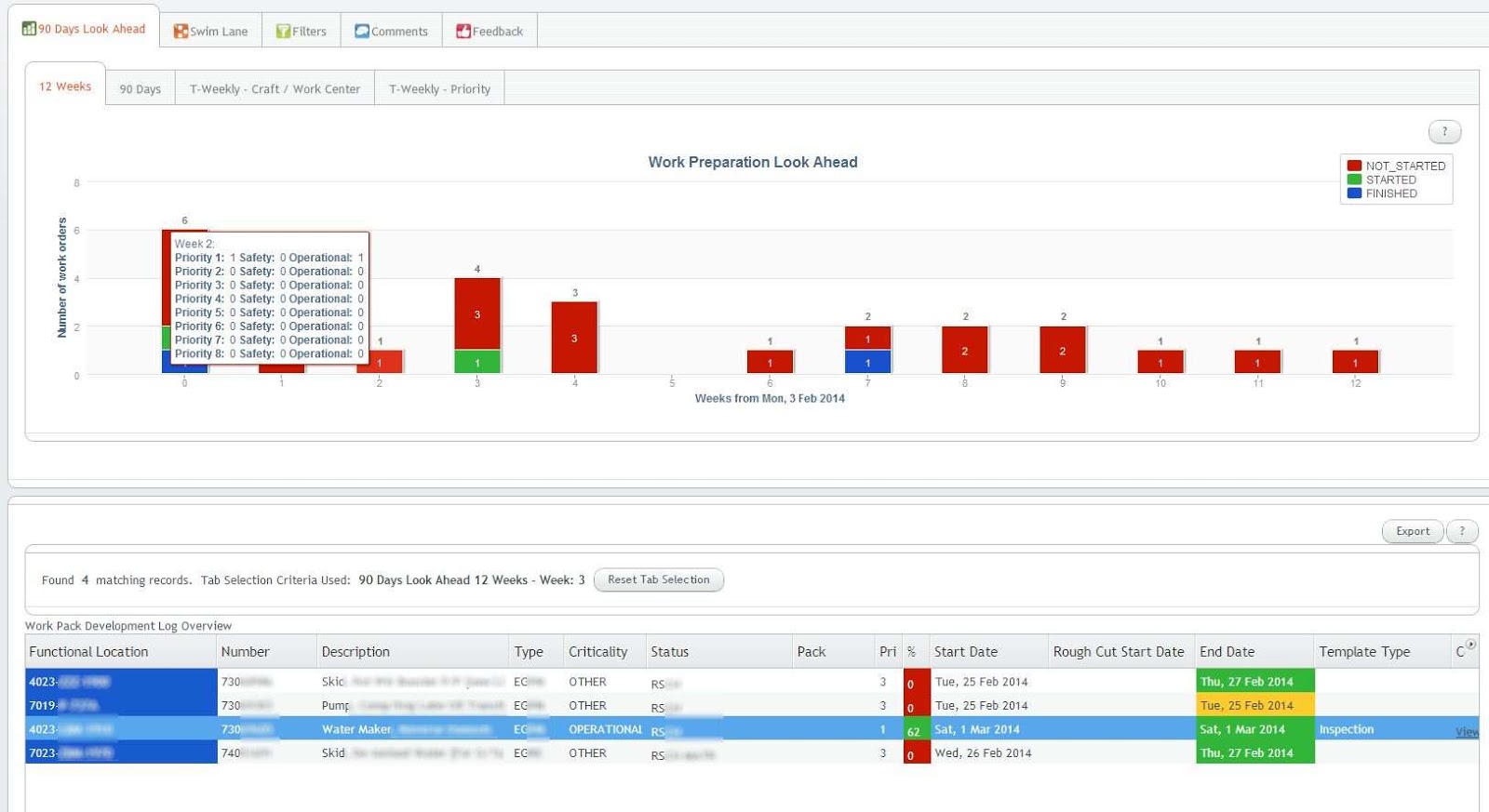
    The Vaadin Charts 90 days look ahead graph shows the status for the coming 90 days. Clicking on a bar shows the orders at the bottom table for that day. A similar 12 weeks graph is available on another tab:


    Different ways of looking at the status exist, for example these week-based graphs, the first one based on craft, the second one on priority:
    Notice in the above graph the multiple y-axis: the bars are for the left y-axis, the lines for the right y-axis.

    And other filters:


    When clicking on a row in the bottom table, details for that order can be filled in:

    Links (from a whitelist) and documents can be attached too (including drag 'n drop), and in the end a PDF can be generated with all the info (including the attachments + where the links are pointing to!) included:

    Saturday, July 27, 2013

    JPA @Version annotation: when is the version updated?


    In JPA you can annotate a field of an entity with @Version to specify that property as its optimistic lock value.
    But the above documentation does not say when the version number is validated and updated (increased).
    The short answer is: at commit time!

    I came across this because I was having trouble passing on the updated version number back to the caller, after a merge() operation.

    The setup

    Example and the solution

    A client class (not in a transaction) invokes the method 

       /** 
        * Updates the order and returns the new version number for the order
        *
        * @param order the entity to update. Must be provided with the current version of the order.
        *             If not provided, StaleObjectStateException will be thrown
        */
       Date updateMe(Order orderWithNewValues);

    on a service class, which is annotated with Spring @Service and Spring @Transactional

    That method invokes 

       /** 
        * Similar java doc
        */
       Date updateMe(SomeEntity orderWithNewValues)

    in a DAO which is annotated with Spring @Transactional(propagation = Propagation.MANDATORY) and @Repository.  The DAO searches for the entity to update using its name, sets the version number to the currently known version number, updates it and should return the new version number.

    The class Order is annotated (amongst other things) with @Version as follows:

       @Version
       @Column(nullable = false)
       @Temporal(TemporalType.TIMESTAMP)
       private Date version;
       ...
       DateTime getVersion() {
           return version;
       }

    The implementation of the DAO method implementing the update originally was:

       Order order = orderDao.findByName(name);
       if (order == null) {
           throw new IllegalArgumentException("No order with name '" + name + "' exists");
       }

       Order updatedOrderNotManaged = new Order(order);
       updatedOrderNotManaged.setVersion(orderWithNewValues.getVersion());
       updatedOrderNotManaged.setTotal(orderWithNewValues.getTotal());

       Order updatedOrderManaged = orderDao.merge(updatedOrderNotManaged);

       return updatedOrderManaged.getVersion();


    Expecting that the last line (return updatedOrderManaged.getVersion()) would return the new version number, since the non-managed entity was now managed.

    But it isn't! What seems to be the reason is that:
    • The JPA implementation (in this case Hibernate) can do some caching, deferring the actual database access to a later moment, causing the changes to not hit the database yet.
    • Not hitting the database also doesn't cause the @Version to be "triggered" (it seems).
    • So the version is still at its old value!
    But after the service method had returned the (old) version to the client calling it (so the transaction was committed), in the database you can see the new increased timestamp in the version column.

    The solution is to force the JPA implementation to flush() to the database, such that the @Version annotation gets triggered and thus the version gets updated.
    Therefor the following was added, just before the "return"  statement: 


       orderDao.flush();

    That did it, now return updatedOrderManaged.getVersion()) is returning the updated version number. Should the transaction commit fail later, then no harm is done since the whole transaction is rolled back and the client should get an exception or similar so it knows it should ignore the returned version number.


    Wednesday, July 10, 2013

    Vaadin error: A connector with id 7 is already registered!


    This post describes a short analysis and possible solution when getting the error java.lang.RuntimeException: A connector with id 7 is already registered!


    Setup

    • Vaadin 7.0.4 with Spring using the SpringVaadinIntegration plugin 1.6.5 and Shiro 1.2.1
    • The UI class has @Component en @Scope("prototype") as annotations
    • All components extend CustomComponent
    • All components but one component also have the @Scope("prototype") annotation
    • One component, let's call that the HelpWindow, it extends Window, has no @Scope annotation, and thus is a Spring singleton. The reason for it being a singleton is that it seemed the only solution to always have a sub-window on top of another sub-window (using UI.addWindow()). At least one situation in the project made the sub-window appear beneath another sub-window sometimes...
    • No @VaadinView used anywhere.
    • Spring 3.1.2
    • Tomcat 7 as application server.

    Scenario

    This is the reproducible scenario that causes the A connector with id 7 is already registered! error to appear: 
    1. Log in for first time, so authentication is via Shiro: all fine, the HelpWindow is shown.
    2. Log out.
    3. Log in again. I can see the UI constructor and its init() getting invoked.
    4. Exception in the logfile:

      java.lang.RuntimeException: A connector with id 7 is already registered!
      ....... stuff deleted.....
      SEVERE: 

      java.lang.RuntimeException: A connector with id 7 is already registered!
      at com.vaadin.ui.ConnectorTracker.registerConnector(ConnectorTracker.java:131)
      at com.vaadin.server.AbstractClientConnector.attach(AbstractClientConnector.java:599)
      at com.vaadin.ui.AbstractComponent.attach(AbstractComponent.java:554)
      at com.vaadin.ui.Label.attach(Label.java:430)
      at com.vaadin.server.AbstractClientConnector.setParent(AbstractClientConnector.java:586)
      at com.vaadin.ui.AbstractComponent.setParent(AbstractComponent.java:457)
      at com.vaadin.ui.Table.registerComponent(Table.java:2350)
      at com.vaadin.ui.Table.parseItemIdToCells(Table.java:2337)
      at com.vaadin.ui.Table.getVisibleCellsNoCache(Table.java:2147)
      at com.vaadin.ui.Table.refreshRenderedCells(Table.java:1668)
      at com.vaadin.ui.Table.getVisibleCells(Table.java:3921)
      at com.vaadin.ui.Table.beforeClientResponse(Table.java:3155)
      at com.vaadin.server.AbstractCommunicationManager.writeUidlResponse(AbstractCommunicationManager.java:799)
      at com.vaadin.server.AbstractCommunicationManager.paintAfterVariableChanges(AbstractCommunicationManager.java:728)
      at com.vaadin.server.AbstractCommunicationManager.handleUidlRequest(AbstractCommunicationManager.java:599)
      at com.vaadin.server.VaadinServlet.service(VaadinServlet.java:315)
      at com.vaadin.server.VaadinServlet.service(VaadinServlet.java:201)
      at javax.servlet.http.HttpServlet.service(HttpServlet.java:728)
      at org.apache.catalina.core.ApplicationFilterChain.internalDoFilter(ApplicationFilterChain.java:305)
      at org.apache.catalina.core.ApplicationFilterChain.doFilter(ApplicationFilterChain.java:210)
      at org.apache.shiro.web.servlet.AbstractShiroFilter.executeChain(AbstractShiroFilter.java:449)
      at org.apache.shiro.web.servlet.AbstractShiroFilter$1.call(AbstractShiroFilter.java:365)
      at org.apache.shiro.subject.support.SubjectCallable.doCall(SubjectCallable.java:90)
      at org.apache.shiro.subject.support.SubjectCallable.call(SubjectCallable.java:83)
      at org.apache.shiro.subject.support.DelegatingSubject.execute(DelegatingSubject.java:383)
      at org.apache.shiro.web.servlet.AbstractShiroFilter.doFilterInternal(AbstractShiroFilter.java:362)
      at org.apache.shiro.web.servlet.OncePerRequestFilter.doFilter(OncePerRequestFilter.java:125)
      at org.springframework.web.filter.DelegatingFilterProxy.invokeDelegate(DelegatingFilterProxy.java:346)
      at org.springframework.web.filter.DelegatingFilterProxy.doFilter(DelegatingFilterProxy.java:259)
      at org.apache.catalina.core.ApplicationFilterChain.internalDoFilter(ApplicationFilterChain.java:243)
      at org.apache.catalina.core.ApplicationFilterChain.doFilter(ApplicationFilterChain.java:210)
      at org.apache.catalina.core.StandardWrapperValve.invoke(StandardWrapperValve.java:222)
      at org.apache.catalina.core.StandardContextValve.invoke(StandardContextValve.java:123)
      at org.apache.catalina.authenticator.AuthenticatorBase.invoke(AuthenticatorBase.java:472)
      at org.apache.catalina.core.StandardHostValve.invoke(StandardHostValve.java:171)
      at org.apache.catalina.valves.ErrorReportValve.invoke(ErrorReportValve.java:99)
      at org.apache.catalina.valves.AccessLogValve.invoke(AccessLogValve.java:936)
      at org.apache.catalina.core.StandardEngineValve.invoke(StandardEngineValve.java:118)
      at org.apache.catalina.connector.CoyoteAdapter.service(CoyoteAdapter.java:407)
      at org.apache.coyote.http11.AbstractHttp11Processor.process(AbstractHttp11Processor.java:1004)
      at org.apache.coyote.AbstractProtocol$AbstractConnectionHandler.process(AbstractProtocol.java:589)
      at org.apache.tomcat.util.net.JIoEndpoint$SocketProcessor.run(JIoEndpoint.java:312)
      at java.util.concurrent.ThreadPoolExecutor.runWorker(ThreadPoolExecutor.java:1145)
      at java.util.concurrent.ThreadPoolExecutor$Worker.run(ThreadPoolExecutor.java:615)
      at java.lang.Thread.run(Thread.java:722)

      The exception occurs at the moment UI.addWindow(helpWindow) is invoked (not included in this exception-dump).
    5. After this, even appending ?restartApplication to the URL won't save you anymore. Only a full restart of the application server (Tomcat) fixes the problem.
    6. BUT: if after the log out I press ctrl-F5 (so full browser refresh) once, the problem still occurs after logging in again.
    7. BUT: if after the log out I press ctrl-F5 twice, the problem does not occur! All works fine. 

    Investigation and Solution

    So very strange that Vaadin's ConnectorTracker thinks/sees the HelpWindow's connectorId already registered, because the user logged out and the UI's constructor and its init() method were invoked, so a completely new UI is created.
    After pressing ctrl-F5 twice, I did see that the HelpWindow's connectorId is cleared (null).
    Also changing the HelpWindow's scope to prototype fixed the problem, no exception; but prototype isn't an option for the project for above mentioned reason.

    So something somewhere doesn't get fully cleared at logout time. Potentially the reasoning could be: since the HelpWindow is a singleton, Spring won't re-instantiate it (it's a singleton), Vaadin won't clear its connectorId either for some reason, so the ConnectorTracker (see the stacktrace) detects that it is already registered --> exception!

    Several posts on the Vaadin forum indicated that the singleton vs prototype might be the problem. Like this one which indicates a potential problem right there. And in this one another caching-like problem is mentioned.

    Also not "everything" getting cleared at logout was pointed out as a potential problem. So for that, the code invoked when logging out I changed from only doing currentUser.logout() and the setLocation() to:

    // currentUser.logout() might also clear the Vaadin session, but better safe than sorry...
    UI.getCurrent().getSession().close();
    UI.getCurrent().getSession().getService().closeSession(VaadinSession.getCurrent());
    UI.getCurrent().close();

    Subject currentUser = SecurityUtils.getSubject(); // Shiro
    currentUser.logout(); // Shiro

    // It's apparently essential to do the redirect too
    UI.getCurrent().getPage().setLocation(VaadinServlet.getCurrent().getServletContext().getContextPath());

    For readability, the try/catch around each statement is omitted. And, as mentioned in the first comment, currentUser.logout() might already be sufficient to clear the session, did not further investigate this.

    Together with a colleague another solution came to mind: try @Scope("request")! Using that as scope, within an HTTP request the HelpWindow bean exists only once, but a new one is created for each new HTTP request.
    And yes, that did it! And it also keeps the 'sub-window on top of a sub-window' problem away.

    Sufficient work-around for now!

    PS: note that there might be something not 100% ok regarding scope in the SpringVaadinIntegration add-on; see this discussion on what the scope of the UI should be. The last comment (from the user pointing out this potential issue) also refers to using this post as a reference to integrating Spring with Vaadin....

    Tip: talking about injection/CDI: integration Vaadin with JEE 6? This might be a good one to read.


    Sunday, October 3, 2010

    JBoss Application Server 5.1/ESB 4.5 GA and ActiveMQ 5.4 integration

    On one of my last projects I had to integrate JBoss ESB 4.5 GA with ActiveMQ 5.4.0 and Spring 3. NOTE: the fixes below also work for integration with JBoss 5.1 Application Server.


    My starting point was of course this post: Integrating Apache ActiveMQ with JBoss. (Or is this the original?)
    Part of the requirements mentioned in that article (Apache ActiveMQ 4.0.1+ and JBoss 4.0.4+) got me worried that the steps described might not work for my version of JBoss and ActiveMQ. Even though there's a '+' after the version numbers :)

    First I had quite a hard time finding the .rar file! Finally found it in \lib\optional in the ActiveMQ zip: activemq-rar-5.4.0.rar

    After that I followed the steps including up to 'Configuring JBoss'. In there you also have to start JBoss again.
    I didn't see any exceptions fly around so thought all was fine, so I started the consumer ('ant consumer').
    But there I got:


    [java] javax.jms.JMSException: Could not connect to broker URL:
    tcp://localhost:61616. Reason: java.net.ConnectException:
    Connection re[Thread-2] Caught: javax.jms.JMSException: Could not
    connect to broker URL: tcp://localhost:61616. Reason:
    java.net Connection Exception : connection refused


    Strrrange, because I thought the server started fine. After quite some searching, I figured out the error message probably indicates that there's just nothing listening at localhost:61616.
    After carefully checking the startup log (searching for 'activemq') I found out it hadn't started!


    17:17:31,566 INFO [XBeanXmlBeanDefinitionReader] Loading XML bean
    definitions from class path resource [broker-config.xml]
    17:17:31,768 WARN [ActiveMQResourceAdapter] Could not start up embeded
    ActiveMQ Broker 'xbean:broker-config.xml': Line 29 in XML document from
    class path resource [broker-config.xml] is invalid; nested exception is
    org.xml.sax.SAXParseException: cvc-elt.1: Cannot find the declaration
    of element 'beans'.


    That's weird, some namespace problem?
    Searching on the biggg internet I found this page (via), explaining that the namespaces are different from 5.1 onwards.

    Since I'm using AMQ 5.4.0 I tried in broker-config.xml:


    <beans xmlns="http://activemq.apache.org/schema/core">


    But that still gave:


    17:23:38,638 WARN [ActiveMQResourceAdapter] Could not start up embeded
    ActiveMQ Broker 'xbean:broker-config.xml': Line 29 in XML document from
    class path resource [broker-config.xml] is invalid; nested exception is
    org.xml.sax.SAXParseException: cvc-elt.1: Cannot find the declaration
    of element 'beans'.


    So now I just tried all the namespace definitions:


    <beans xmlns="http://www.springframework.org/schema/beans"
    xmlns:amq="http://activemq.apache.org/schema/core"
    xmlns:xsi="http://www.w3.org/2001/XMLSchema-instance"
    xsi:schemaLocation="
    http://www.springframework.org/schema/beans
    http://www.springframework.org/schema/beans/spring-beans.xsd
    http://activemq.apache.org/schema/core
    http://activemq.apache.org/schema/core/activemq-core-5.2.0.xsd
    ">
    </beans>


    Darn, still not ok:


    17:27:42,265 WARN [ActiveMQResourceAdapter] Could not start up embeded
    ActiveMQ Broker 'xbean:broker-config.xml': Line 49 in XML document from
    class path resource [broker-config.xml] is invalid; nested exception is
    org.xml.sax.SAXParseException: cvc-complex-type.2.4.c: The matching wildcard
    is strict, but no declaration can be found for element 'persistenceAdapter'.


    But that was easy, missing the namespace prefix. So I modified:


    <amq:persistenceAdapter>
    <amq:journaledJDBC journalLogFiles="5" dataDirectory="activemq-data"/>
    <!-- To use a different datasource, use th following syntax : -->
    <!--
    <journaledJDBC journalLogFiles="5" dataDirectory="../data" dataSource="#postgres-ds"/>
    -->
    </amq:persistenceAdapter>


    But again an error:


    17:29:50,840 WARN [ActiveMQResourceAdapter] Could not start up embeded
    ActiveMQ Broker 'xbean:broker-config.xml': Line 50 in XML document from
    class path resource [broker-config.xml] is invalid; nested exception is
    org.xml.sax.SAXParseException: cvc-complex-type.2.4.a: Invalid content was
    found starting with element 'amq:journaledJDBC'. One of
    '{"http://activemq.apache.org/schema/core":amqPersistenceAdapter,
    "http://activemq.apache.org/schema/core":jdbcPersistenceAdapter,
    "http://activemq.apache.org/schema/core":journalPersistenceAdapter,
    "http://activemq.apache.org/schema/core":kahaDB,
    "http://activemq.apache.org/schema/core":kahaPersistenceAdapter,
    "http://activemq.apache.org/schema/core":memoryPersistenceAdapter,
    WC[##other:"http://activemq.apache.org/schema/core"]}' is expected.


    So journaledJDBC is unknown. There must be something with a wrong namespace version or something. From the XSDs from here it seemed there was an element in the wrong place. So I just removed the whole persistenceAdapter element.

    I also noted that there is a persistenceFactory element in the AMQ 450 broker-config.xml, which is not present in the Integrating Apache ActiveMQ with JBoss post.
    So I also changed that one's dataDirectory to be the same as in the (just removed) persistenceAdapter:


    <amq:persistenceFactory>
    <amq:journalPersistenceAdapterFactory journalLogFiles="5" dataDirectory="${jboss.server.data.dir}/activemq"/>
    </amq:persistenceFactory>


    Yes that did it! See the log part below:


    17:45:01,215 INFO [XBeanXmlBeanDefinitionReader] Loading XML bean definitions
    from classpath resource [broker-config.xml]
    17:45:01,542 INFO [DefaultListableBeanFactory] Pre-instantiating singletons
    in org.springframework.beans.factory.support.DefaultListableBeanFactory@157402b:
    defining beans [org.apache.activemq.xbean.XBeanBrokerService#0]; root of
    factory hierarchy
    17:45:01,697 INFO [PListStore] PListStore:activemq-data\bruce.broker1\tmp_storage
    started

    ... stuff deleted ...

    17:45:02,896 INFO [BrokerService] ActiveMQ 5.4.0 JMS Message Broker
    (bruce.broker1) is starting
    17:45:02,911 INFO [BrokerService] For help or more information please
    see: http://activemq.apache.org/
    17:45:03,083 INFO [SchedulerBroker] Scheduler using directory:
    activemq-data\scheduler
    17:45:03,145 INFO [JournalPersistenceAdapter] Journal Recovery Started from:
    Active Journal: using 5 x 20.0 Megs at: C:\jbossesb-server-4.5.GA\bin\${jboss.server.data.dir}\activemq\journal
    17:45:03,176 INFO [JournalPersistenceAdapter] Journal Recovered: 0 message(s)
    in transactions recovered.
    17:45:03,207 INFO [TransportServerThreadSupport] Listening for connections at:
    tcp://localhost:61616
    17:45:03,223 INFO [TransportConnector] Connector bruce.broker1 Started
    17:45:03,223 INFO [BrokerService] ActiveMQ JMS Message Broker (bruce.broker1,
    ID:PC555-4930-1389432149-0:0) started


    Also after that the consumer and producer worked fine.

    And as a final optimization to not having to change the namespace for each new ActiveMQ version, I removed the version from the activemq-core xsd:


    <beans
    xmlns="http://www.springframework.org/schema/beans"
    xmlns:amq="http://activemq.apache.org/schema/core"
    xmlns:xsi="http://www.w3.org/2001/XMLSchema-instance"
    xsi:schemaLocation="http://www.springframework.org/schema/beans
    http://www.springframework.org/schema/beans/spring-beans-2.0.xsd
    http://activemq.apache.org/schema/core
    http://activemq.apache.org/schema/core/activemq-core.xsd
    ">


    To summarize, this is the final broker-config.xml (some comments deleted for space):


    <?xml version="1.0" encoding="UTF-8"?>
    <!-- START SNIPPET: xbean -->
    <beans
    xmlns="http://www.springframework.org/schema/beans"
    xmlns:amq="http://activemq.apache.org/schema/core"
    xmlns:xsi="http://www.w3.org/2001/XMLSchema-instance"
    xsi:schemaLocation="http://www.springframework.org/schema/beans
    http://www.springframework.org/schema/beans/spring-beans-2.0.xsd
    http://activemq.apache.org/schema/core
    http://activemq.apache.org/schema/core/activemq-core.xsd
    ">

    <!-- shutdown hook is disabled as RAR classloader may be gone at shutdown -->
    <amq:broker useJmx="true" useShutdownHook="false" brokerName="bruce.broker1">

    <amq:managementContext>
    <!-- use appserver provided context instead of creating one,
    for jboss use: -Djboss.platform.mbeanserver -->
    <amq:managementContext createConnector="false"/>
    </amq:managementContext>

    <amq:persistenceFactory>
    <amq:journalPersistenceAdapterFactory journalLogFiles="5" dataDirectory="${jboss.server.data.dir}/activemq"/>
    </amq:persistenceFactory>

    <amq:transportConnectors>
    <amq:transportConnector name="bruce.broker1" uri="tcp://localhost:61616" discoveryUri="multicast://default"/>
    </amq:transportConnectors>

    </amq:broker>
    </beans>


    JBoss 5.1 AS specific stuff:

    I just copied over the above created .rar dir to the jboss-5.1.0.GA/server/default/deploy/activemq-ra.rar/META-INF directory and started it.

    Got one error trying:


    18:00:48,611 ERROR [AbstractKernelController] Error installing to Parse:
    name=vfsfile:/C:/jboss-5.1.0.GA/server/default/deploy/activemq-ra.rar/
    state=Not Installed mode=Manual requiredState=Parse
    org.jboss.deployers.spi.DeploymentException: Error creating managed object
    for vfsfile:/C:/jboss-5.1.0.GA/server/default/deploy/activemq-ra.rar/
    at org.jboss.deployers.spi.DeploymentException.rethrowAsDeploymentException(
    DeploymentException.java:49)
    ...
    Caused by: org.jboss.xb.binding.JBossXBException: Failed to parse source:
    cvc-complex-type.2.4.d: Invalid content was found starting with element
    'config-property-value'. No child element is expected at this point. @
    vfsfile:/C:/jboss-5.1.0.GA/server/default/deploy/
    activemq-ra.rar/META-INF/ra.xml[100,36]


    Ah for some reason I had an empty in ra.xml. Removing that made the 5.1 server start fine and the producer produce and the consumer consume!

    PS: the example consumer & producer now send out 2000 messages instead of the 10 you see in the Integrating Apache ActiveMQ with JBoss post.

    Hope this might help somebody some time :)

    Sunday, September 12, 2010

    Best of this Week Summary 06 September - 12 September 2010

    • Small tuturial for sending emails with Spring Framework, which provides some abstraction from the underlying mailing system.

    • Nice: "HTML5 Boilerplate is the professional badass's base HTML/CSS/JS template for a fast, robust and future-proof site.
      After more than two years in iterative development, you get the best of the best practices baked in: cross-browser normalization, performance optimizations, even optional features like cross-domain ajax and flash. A starter apache .htaccess config file hooks you the eff up with caching rules and preps your site to serve HTML5 video, use @font-face, and get your gzip zipple on.
      Boilerplate is not a framework, nor does it prescribe any philosophy of development, it's just got some tricks to get your project off the ground quickly and right-footed."

    • Different existing logging strategies described and a new one: grammar based event logging.

    • Be cautious to not over-engineer your software solutions...


    • Are Spock, Geb and WebDriver the future of functional web testing?

    Sunday, August 15, 2010

    Best of this Week Summary 9 August - 15 August 2010

    Sunday, July 4, 2010

    Lessons learned Wicket + Spring + Hibernate + Mod4J project

    At a recent project we used the following tools & frameworks:


    Below are a couple of lessons learned which I remembered to write down:

    Wicket
    • In a ModalWindow you'd probably want to use a AjaxSubmitLink, not a SubmitLink, if you want to use modalWindow.setWindowClosedCallback(). See here for explanation.

    • ajaxrequesttarget.addComponent: addComponent name might be a bit confusing for beginners. It means "add the component to the list of components be re-rendered/refreshed".

    • An AjaxSubmitLink doesn't update the model when setDefaultFormProcessing() is set to false. Not totally illogical, but you still might run it to it when you don't expect it.

    • Here are tips to validate related fields. (In the original the example code is missing.)

    • AjaxSubmitLink: if you get a "Component-targetted feedback message was left unrendered. This could be because you are missing a FeedbackPanel on the page" warning in your Tomcat server console, it seems you have to tell in the onError() of the AjaxSubmitLink which feedback panel(s) you want to have updated.
      You get the warning even when you have feedback panels higher up in the tree of the (Base)Page. An example to update those panels could be:

      Component infoFeedback = getPage().get("infoPanel");
      target.addComponent(infoFeedback);
      Component warnFeedback = getPage().get("warningPanel");
      target.addComponent(warnFeedback);
      Component errorFeedback = getPage().get("errorPanel");
      target.addComponent(errorFeedback);

      This solution was inspired by these posts: post1, post2, post3, post4.

    • To show/hide any HTML markup block dynamically, just wrap it with a WebMarkupContainer. In the code create that wrapper and make it visible or not depending on your requirements:

      boolean makeVisible = false;
      WebMarkupContainer blockContainer = new WebMarkupContainer("blockWrapper");
      blockContainer.setVisible(makeVisible);
      add(blockContainer);


    • Sometimes you might get a popup when using a ModalWinow that says "Reloading this page will cause modal window to disappear" when you don't expect it. Check the logs/console, you might just got an exception in your app (after which Wicket tries to redirect to the error page, which causes the popup to show; at least that's my reasoning).

    JUnit
    • If JUnit can't find the Spring context.xml in the resources directory, then you have to add the resources dir to your Build path

    Mod4J
    • Does not really support LazyLoading so not very efficient for large "graphs" of data/dependencies. In those cases you could decide to skip the DTO layer and directly access the domain model.

    • The Maven plugin IAM in Eclipse can be turned off for the Mod4J models project in Eclipse, otherwise it runs twice: once by Mod4J features, once by Maven (plugin).

    Sunday, June 6, 2010

    Best of this Week Summary 30 May - 6 June 2010

    • Google Web Toolkit vs. Smart GWT: Which should you choose as front-end? Start immediately with Smart GWT, or start with GWT and pick SGWT components when needed? Some insights here.
      Related to that, you might want to check Vaadin: "Vaadin is an open source web application framework for rich Internet applications. In contrast to Javascript libraries and browser-plugin based solutions it features a server-side architecture, which means that the majority of the logic runs on the servers. Ajax technology is used at the browser-side to ensure a rich and interactive user experience. On client-side Vaadin is built on top of and can be extended with Google Web Toolkit. Vaadin utilizes Google Web Toolkit for rendering the resulting web page. While Google Web Toolkit operates only client-side (i.e. a browser's JavaScript engine) – which could lead totrust issues – Vaadin adds server-side validation to all actions. This means that if the client data is tampered with, the server notices this and doesn't allow it.
      Historically, Vaadin has been compared to Echo and ZK frameworks that use similar of server-side programming model. The server-side APIs are quite similar providing both events and GUI components, but the client-side (i.e. web browser) interaction differs in the way that Vaadin uses Java programmed GWT widgets, while ZK is jQuery based, and Echo has its own implementation. Currently, the most frequently compared frameworks include Adobe Flex, Google Web Toolkit, Apache Wicket and ICEfaces."

    • A new open spec collaboration has started: OExchange, which is an open protocol for sharing any URL with any service on the web. Bigger parties involved are LinkedIn, Microsoft, Google.

    • A new way of phishing: TabNabbing - phishing by switching background tab content. Discovered by Firefox's creative lead Aza Raskin. Biggest challenge seems to get the malicious Javascript on a site the user goes to.

    • Google announced a partnership with VMWare (and thus SpringSource and thus Spring) at I/O by adding its (GTW) widgets to Spring and deployment to the VMWare cloud. In marketing speak: "This is VMware and Google's view of the power of using Spring along with Google's presentation widgets to get apps started in hours, delivered in days, and deployed in minutes". Below it's shown in a diagram:


    • The iPad isn't without "errors" in its usability (UI) according to Jakob Nielsen. For example: cross-app UI experience is inconsistent, and for some reason almost no app supports scrolling and shows information only per page.

    • "An overview of how to design websites and optimise them for Maemo, iPhone, Android, and a variety of touch and non-touch devices based on S60 on Symbian OS. After reading the document, you will have the basic knowledge you need to start developing mobile web pages that provide cross-browser-compatible content in a user-friendly manner. Furthermore, with the tips and advice contained in the document, you can avoid making design choices that could eventually lead to a dead end or poor design, thus saving time in implementing and debugging features that will not work".

    • Show Slow: an open source tool that helps monitor various website performance metrics over time. It captures the results of YSlow and Page Speed rankings and graphs them, to help you understand how various changes to your site affect its performance

    Sunday, April 25, 2010

    Best of this Week Summary 19 April - 25 April 2010

    • An introduction to Gizzard, an open sourced sharding framework (store data across multiple computers instead of on just one) which is used by Twitter.

    • A hands-on tutorial of creating a Spring application that uses Hibernate as JPA provider and JTA for transaction demarcation. A simple Order Processing Message Driven Bean is implemented that showcases this integration. It is deployed on a WebLogic 10.3 server.

    • Last week Jira from the Apache Foundation was compromised. Here's a description of how the hackers gained access via XSS.

    Sunday, April 18, 2010

    Best of this Week Summary 12 April - 18 April 2010

    Sunday, December 6, 2009

    Best of this Week Summary 30 November - 06 December 2009

    Sunday, November 29, 2009

    Best of this Week Summary 17 November - 29 November 2009

    Sunday, November 22, 2009

    Best of this Week Summary 16 November - 22 November 2009