Showing posts with label vaadin. Show all posts

Thursday, July 3, 2014

Vaadin 7 + Spring 3 + JPA project summary and lessons learned

This blogpost is a short summary of the Vaadin 7.0 project I did last year, including tools used, lessons learned and a bunch of screenshots to show the results.

Tools used

  • Spring 3.2 including annotation based configuration, Spring Task*Executor framework
  • JPA2 with Hibernate 4.2 + JPA modelgen, including Envers for auditing
  • JMS 2
  • Vaadin 7.0.1
  • JAXB 2.1
  • Spring WS 2.1
  • Shiro 1.2
  • JUnit 4.8
  • Mockito
  • Eclipse 3.7
  • SOAP + SoapUI
  • MySql 5.5 + H2
  • Tomcat 7
  • Jenkins
  • Fisheye/Crucible
  • Sonar
  • Subversion
  • Maven 3
  • Java 6

Lessons learned

  • Don't only trust SoapUI of being able to validate your WSDL. Also try to generate stubs with Axis2 and JAXWS generators. *AND* actually make sure you can make a call to the webservice, because on our project it did work perfectly fine in SoapUI, but not in Axis nor JAXWS. Example: soap fault in operation but not in porttype defined. It required the project to defining one or more xyz.jaxb files for JAX-WS  (using .episodes dit not work for us). Then use these in the wsimport etc. Related links: Compiling multiple WSDLs that share a common schema and Customizing Java Packages.
  • If sources not found of e.g junit-4.11 (junit.org is also giving a lot of 404s), then run mvn clean dependency:sources, that will download the sources too into the .m2 repo.
  • Try to keep the WSDL and XSD as semantic as possible, so use Strings instead of IDs for for example lookup /reference values like: started, finished. Makes the interface much more readable and understandable by just looking at it.
  • count(case ...) is NOT supported by Hibernate criteria API, when using it it gives: java.lang.IllegalArgumentException: org.hibernate.hql.internal.ast.QuerySyntaxException: unexpected token: case near line 1, column 92 [...  Use sum(case) since that is supported.

    So instead of:

    cb.count(cb.selectCase().when(cb.equal(workOrder.get(WorkOrder_.priority), 1), workOrder.get(WorkOrder_.priority)).otherwise(0)),
    Use:

    cb.sum(cb.selectCase().when(cb.equal(workOrder.get(WorkOrder_.priority), 1), 1).otherwise(0)) 

    SQL equivalent:

    Instead of:

    COUNT(CASE WHEN priority = 1 THEN priority ELSE NULL END) AS prio1,

    Use:

    SUM(CASE WHEN priority = 1 THEN 1 ELSE 0 END) AS prio1,

    Links about this:

    https://forum.hibernate.org/viewtopic.php?f=1&t=992497
    https://forum.hibernate.org/viewtopic.php?p=2393060
    http://stackoverflow.com/questions/11011151/jpa-criteria-query-order-by-enum-values
    Sums replacement for count
    JPA 2.0 spec including 'case expressions' and this one and this one.
    http://stackoverflow.com/questions/775787/plsql-get-sum-for-each-day-of-week-and-total-sum-for-week-in-a-single-query
  • When trying to upgrade from Vaadin from version 7.0.1 to 7.0.4 by updating the version number in the pom.xml, a serial UID problem occurred when generating the widgetset for this new version:

    [INFO]  at com.google.gwt.dev.Compiler.main(Compiler.java:177)
    [INFO] Caused by: java.io.InvalidClassException: com.google.gwt.dev.jjs.ast.JMethod; local class incompatible: stream classdesc serialVersionUID = 5017484276333252513, local class serialVersionUID = 9103713597467037978

    Tried it then with 7.0.2, that one worked fine! 7.0.3 gave the same error. This post talks about maybe the GWT cache being the problem. So I deleted the directory (even though the timestamp on that directory was recent!) and that worked. In my case the directory to delete was:

    D:\workspace\xyz\frontend\app-web\src\main\webapp\VAADIN\gwt-unitCache 

The application

Below you can find a bunch of screenshots of the resulting application Planning Optimizer or ePOp.


The login screen, authentication via Shiro with a custom Realm that does a SOAP call to the backend:


The dashboard so the planner can immediately see the status + what needs attention first:

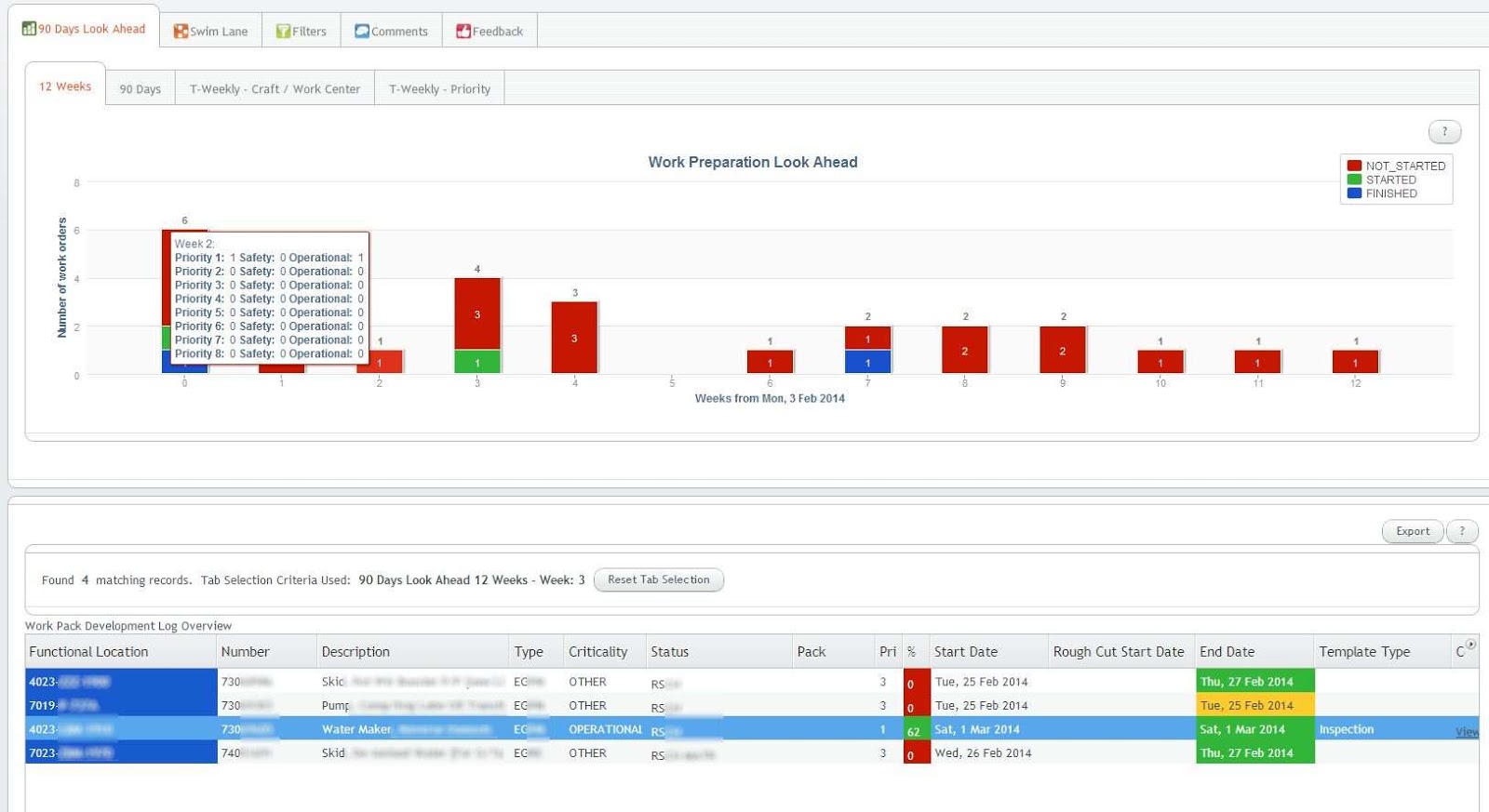
The Vaadin Charts 90 days look ahead graph shows the status for the coming 90 days. Clicking on a bar shows the orders at the bottom table for that day. A similar 12 weeks graph is available on another tab:


Different ways of looking at the status exist, for example these week-based graphs, the first one based on craft, the second one on priority:
Notice in the above graph the multiple y-axis: the bars are for the left y-axis, the lines for the right y-axis.

And other filters:


When clicking on a row in the bottom table, details for that order can be filled in:

Links (from a whitelist) and documents can be attached too (including drag 'n drop), and in the end a PDF can be generated with all the info (including the attachments + where the links are pointing to!) included:

Wednesday, December 11, 2013

Vaadin TextFields in a Table empty/null value not propagated for required field

Setup

Problem

When you create a table in Vaadin with a .setTableFieldFactory(), and you have a Field which is set to .setRequired(true), and a user puts in an empty value for that field after first putting in a non-empty value, the field won't be set to that empty value when iterating through the table to read the current values.

Solution

Make sure you invoke .setInvalidCommitted(true) on that field to have the empty value also be passed through; i.e "committed" even though validation fails.

For example:

urlTable.setTableFieldFactory(new DefaultFieldFactory() {

    @Override
    public Field createField(final Container container, final Object itemId, final Object 
                    propertyId, Component uiContext) {

    if (URL_PROPERTY_ID.equals(propertyId)) {
        
        final TextField urlText = new TextField();
        urlText.setRequired(true);

        // Add the below line to have also the empty string be
        // passed on!!
        // See: https://vaadin.com/forum#!/thread/1129126
        urlText.setInvalidCommitted(true);
        urlText.setImmediate(true);
        urlText.setNullRepresentation("");
        urlText.setInputPrompt("Enter a URL");
        return field;

}

Note the bold line.

And for completeness here an example of the iterating over the table to get the current entered values:

List result = new ArrayList();
int sequence = 1;
for (Iterator iterator = urlTable.getItemIds().iterator(); iterator.hasNext();) {

    // Get the current item identifier
    String itemId = (String) iterator.next();

    // Now get the actual item from the table.
    Item item = linksTable.getItem(itemId);
    @SuppressWarnings("unchecked")
    Property urlProperty = item.getItemProperty(URL_PROPERTY_ID);
    String url = urlProperty.getValue();

    // Fill the object
    UrlInfo urlInfo = new UrlInfo();
    urlInfo.setUrl(url);
    // ... set other stuff
    result.add(urlInfo);
    sequence++;
}

return result;

Related resources

The forum thread that put me on the right track can be found here.
Long thread related to required vs validation problems can be found here.
@NotNull bean validator annotation combined with setRequired() also has some issues.


Wednesday, July 10, 2013

Vaadin error: A connector with id 7 is already registered!


This post describes a short analysis and possible solution when getting the error java.lang.RuntimeException: A connector with id 7 is already registered!


Setup

  • Vaadin 7.0.4 with Spring using the SpringVaadinIntegration plugin 1.6.5 and Shiro 1.2.1
  • The UI class has @Component en @Scope("prototype") as annotations
  • All components extend CustomComponent
  • All components but one component also have the @Scope("prototype") annotation
  • One component, let's call that the HelpWindow, it extends Window, has no @Scope annotation, and thus is a Spring singleton. The reason for it being a singleton is that it seemed the only solution to always have a sub-window on top of another sub-window (using UI.addWindow()). At least one situation in the project made the sub-window appear beneath another sub-window sometimes...
  • No @VaadinView used anywhere.
  • Spring 3.1.2
  • Tomcat 7 as application server.

Scenario

This is the reproducible scenario that causes the A connector with id 7 is already registered! error to appear: 
  1. Log in for first time, so authentication is via Shiro: all fine, the HelpWindow is shown.
  2. Log out.
  3. Log in again. I can see the UI constructor and its init() getting invoked.
  4. Exception in the logfile:

    java.lang.RuntimeException: A connector with id 7 is already registered!
    ....... stuff deleted.....
    SEVERE: 

    java.lang.RuntimeException: A connector with id 7 is already registered!
    at com.vaadin.ui.ConnectorTracker.registerConnector(ConnectorTracker.java:131)
    at com.vaadin.server.AbstractClientConnector.attach(AbstractClientConnector.java:599)
    at com.vaadin.ui.AbstractComponent.attach(AbstractComponent.java:554)
    at com.vaadin.ui.Label.attach(Label.java:430)
    at com.vaadin.server.AbstractClientConnector.setParent(AbstractClientConnector.java:586)
    at com.vaadin.ui.AbstractComponent.setParent(AbstractComponent.java:457)
    at com.vaadin.ui.Table.registerComponent(Table.java:2350)
    at com.vaadin.ui.Table.parseItemIdToCells(Table.java:2337)
    at com.vaadin.ui.Table.getVisibleCellsNoCache(Table.java:2147)
    at com.vaadin.ui.Table.refreshRenderedCells(Table.java:1668)
    at com.vaadin.ui.Table.getVisibleCells(Table.java:3921)
    at com.vaadin.ui.Table.beforeClientResponse(Table.java:3155)
    at com.vaadin.server.AbstractCommunicationManager.writeUidlResponse(AbstractCommunicationManager.java:799)
    at com.vaadin.server.AbstractCommunicationManager.paintAfterVariableChanges(AbstractCommunicationManager.java:728)
    at com.vaadin.server.AbstractCommunicationManager.handleUidlRequest(AbstractCommunicationManager.java:599)
    at com.vaadin.server.VaadinServlet.service(VaadinServlet.java:315)
    at com.vaadin.server.VaadinServlet.service(VaadinServlet.java:201)
    at javax.servlet.http.HttpServlet.service(HttpServlet.java:728)
    at org.apache.catalina.core.ApplicationFilterChain.internalDoFilter(ApplicationFilterChain.java:305)
    at org.apache.catalina.core.ApplicationFilterChain.doFilter(ApplicationFilterChain.java:210)
    at org.apache.shiro.web.servlet.AbstractShiroFilter.executeChain(AbstractShiroFilter.java:449)
    at org.apache.shiro.web.servlet.AbstractShiroFilter$1.call(AbstractShiroFilter.java:365)
    at org.apache.shiro.subject.support.SubjectCallable.doCall(SubjectCallable.java:90)
    at org.apache.shiro.subject.support.SubjectCallable.call(SubjectCallable.java:83)
    at org.apache.shiro.subject.support.DelegatingSubject.execute(DelegatingSubject.java:383)
    at org.apache.shiro.web.servlet.AbstractShiroFilter.doFilterInternal(AbstractShiroFilter.java:362)
    at org.apache.shiro.web.servlet.OncePerRequestFilter.doFilter(OncePerRequestFilter.java:125)
    at org.springframework.web.filter.DelegatingFilterProxy.invokeDelegate(DelegatingFilterProxy.java:346)
    at org.springframework.web.filter.DelegatingFilterProxy.doFilter(DelegatingFilterProxy.java:259)
    at org.apache.catalina.core.ApplicationFilterChain.internalDoFilter(ApplicationFilterChain.java:243)
    at org.apache.catalina.core.ApplicationFilterChain.doFilter(ApplicationFilterChain.java:210)
    at org.apache.catalina.core.StandardWrapperValve.invoke(StandardWrapperValve.java:222)
    at org.apache.catalina.core.StandardContextValve.invoke(StandardContextValve.java:123)
    at org.apache.catalina.authenticator.AuthenticatorBase.invoke(AuthenticatorBase.java:472)
    at org.apache.catalina.core.StandardHostValve.invoke(StandardHostValve.java:171)
    at org.apache.catalina.valves.ErrorReportValve.invoke(ErrorReportValve.java:99)
    at org.apache.catalina.valves.AccessLogValve.invoke(AccessLogValve.java:936)
    at org.apache.catalina.core.StandardEngineValve.invoke(StandardEngineValve.java:118)
    at org.apache.catalina.connector.CoyoteAdapter.service(CoyoteAdapter.java:407)
    at org.apache.coyote.http11.AbstractHttp11Processor.process(AbstractHttp11Processor.java:1004)
    at org.apache.coyote.AbstractProtocol$AbstractConnectionHandler.process(AbstractProtocol.java:589)
    at org.apache.tomcat.util.net.JIoEndpoint$SocketProcessor.run(JIoEndpoint.java:312)
    at java.util.concurrent.ThreadPoolExecutor.runWorker(ThreadPoolExecutor.java:1145)
    at java.util.concurrent.ThreadPoolExecutor$Worker.run(ThreadPoolExecutor.java:615)
    at java.lang.Thread.run(Thread.java:722)

    The exception occurs at the moment UI.addWindow(helpWindow) is invoked (not included in this exception-dump).
  5. After this, even appending ?restartApplication to the URL won't save you anymore. Only a full restart of the application server (Tomcat) fixes the problem.
  6. BUT: if after the log out I press ctrl-F5 (so full browser refresh) once, the problem still occurs after logging in again.
  7. BUT: if after the log out I press ctrl-F5 twice, the problem does not occur! All works fine. 

Investigation and Solution

So very strange that Vaadin's ConnectorTracker thinks/sees the HelpWindow's connectorId already registered, because the user logged out and the UI's constructor and its init() method were invoked, so a completely new UI is created.
After pressing ctrl-F5 twice, I did see that the HelpWindow's connectorId is cleared (null).
Also changing the HelpWindow's scope to prototype fixed the problem, no exception; but prototype isn't an option for the project for above mentioned reason.

So something somewhere doesn't get fully cleared at logout time. Potentially the reasoning could be: since the HelpWindow is a singleton, Spring won't re-instantiate it (it's a singleton), Vaadin won't clear its connectorId either for some reason, so the ConnectorTracker (see the stacktrace) detects that it is already registered --> exception!

Several posts on the Vaadin forum indicated that the singleton vs prototype might be the problem. Like this one which indicates a potential problem right there. And in this one another caching-like problem is mentioned.

Also not "everything" getting cleared at logout was pointed out as a potential problem. So for that, the code invoked when logging out I changed from only doing currentUser.logout() and the setLocation() to:

// currentUser.logout() might also clear the Vaadin session, but better safe than sorry...
UI.getCurrent().getSession().close();
UI.getCurrent().getSession().getService().closeSession(VaadinSession.getCurrent());
UI.getCurrent().close();

Subject currentUser = SecurityUtils.getSubject(); // Shiro
currentUser.logout(); // Shiro

// It's apparently essential to do the redirect too
UI.getCurrent().getPage().setLocation(VaadinServlet.getCurrent().getServletContext().getContextPath());

For readability, the try/catch around each statement is omitted. And, as mentioned in the first comment, currentUser.logout() might already be sufficient to clear the session, did not further investigate this.

Together with a colleague another solution came to mind: try @Scope("request")! Using that as scope, within an HTTP request the HelpWindow bean exists only once, but a new one is created for each new HTTP request.
And yes, that did it! And it also keeps the 'sub-window on top of a sub-window' problem away.

Sufficient work-around for now!

PS: note that there might be something not 100% ok regarding scope in the SpringVaadinIntegration add-on; see this discussion on what the scope of the UI should be. The last comment (from the user pointing out this potential issue) also refers to using this post as a reference to integrating Spring with Vaadin....

Tip: talking about injection/CDI: integration Vaadin with JEE 6? This might be a good one to read.


Wednesday, April 17, 2013

Vaadin Charts add-on showing custom properties in tooltip hover

Recently I had to investigate if it is possible to show other data than the X and Y value when hovering over a stacked bar graph in the Vaadin Charts add-on. And yes it is possible!
Nowhere I could find an example on how to do this, so that's why I wrote this blogpost. Hope it helps some people :)

Setup:
- Vaadin 7.0.1
- Charts add-on 1.0.1. In version 1.0.0 you can't set the color of the stacked bars using PlotOptions and ContainerDataSeries. This version has a fix for that.
- Note: I had to manually modify some labels of the hover in the screenshot since I can't use the real data used in the project. Same goes for the code, did not check if it still compiles. Let me know if something essential is missing :) Oh yeah and this is all demo-code so no quality complaints please....

Goal:
- Be able to add a custom field to the hover. And even better: be able to add an array to the hover tooltip.

Here's a screenshot of what the goal was. Click on it for a larger image:


The code:
Notice the Grapes ok: 7 Total: 16 in the hover text. These are the standard x and y values you can show easily via:


        Tooltip tooltip = new Tooltip();
        tooltip.setFormatter("function() { return ''+ this.x +'"+ " '+ this.series.name +': '+ this.y 
+' '+'Total: '+ this.point.stackTotal;}");

        conf2.setTooltip(tooltip);


But also note the extra this.point.custom = 708. That's an example of adding a custom value. The tooltip code then looks like:


tooltip.setFormatter("function() {"return ''+ this.x +'"+ " '+this.series.name +': '+ this.y +' '+
'Total: '+ this.point.stackTotal + ' this.point.custom = ' + this.point.custom + "''"


And then below that line you see a set of table-like data: Quality 1: 2 Stored: 3 Interesting: 4. This is the data that comes from three arrays. The tooltip code then looks like this:


tooltip.setFormatter("function() { var qualityValuesArray = JSON.parse(this.point.qualities); " +
        "var storedValuesArray = JSON.parse(this.point.stored); " + 
        "var interestingValuesArray = JSON.parse(this.point.interesting); " + 
        "return ''+ this.x +'"+ " '+this.series.name +': '+ this.y +' '+
        'Total: '+ this.point.stackTotal + ' this.point.custom = ' + this.point.custom + " +
        "'
Quality 1: ' + qualityValuesArray[0]  + " + "'Stored: ' + storedValuesArray[0]  + " + "'Interesting: ' + interestingValuesArray[0]  + " +
        "'
Quality 2: ' + qualityValuesArray[1]  + " + "'Stored: ' + storedValuesArray[1]  + " + "'Interesting: ' + interestingValuesArray[1]  + " +
        "'
Quality 3: ' + qualityValuesArray[2]  + " + "'Stored: ' + storedValuesArray[2]  + " + "'Interesting: ' + interestingValuesArray[2]  + " +
        "'
Quality 4: ' + qualityValuesArray[3]  + " + "'Stored: ' + storedValuesArray[3]  + " + "'Interesting: ' + interestingValuesArray[3]  + " +
        "'
Quality 5: ' + qualityValuesArray[4]  + " + "'Stored: ' + storedValuesArray[4]  + " + "'Interesting: ' + interestingValuesArray[4]  + " +
        "'
Quality 6: ' + qualityValuesArray[5]  + " + "'Stored: ' + storedValuesArray[5]  + " + "'Interesting: ' + interestingValuesArray[5]  + " +
        "'
Quality 7: ' + qualityValuesArray[6]  + " + "'Stored: ' + storedValuesArray[6]  + " + "'Interesting: ' + interestingValuesArray[6]  + " +
        "'
Quality 8: ' + qualityValuesArray[7]  + " + "'Stored: ' + storedValuesArray[7]  + " + "'Interesting: ' + interestingValuesArray[7]  + " +
        "'.';}");


The span can also be replaced by a HTML b tag of course.
Too bad you can't use the setHTML() for better formatting, like putting in a HTML table tag. This is a known issue, see here.

Essential in constructing the data is to use the BeanItemContainer, ContainerDataSeries and the addAttributeToPropertyIdMapping() in which you can put custom class (bean) OrderChartItem:


 /**
  * Class with custom value and 3 arrays to be displayed in tooltip
  */
    public class OrderChartItem {

     private static final int NR_QUALITIES = 8;
     
     private final String name;
  private final int x;
  private final Number y;
  private final int someValue;
  
  private final Number[] quality = new Number[NR_QUALITIES];
  private final Number[] stored = new Number[NR_QUALITIES];
  private final Number[] interesting = new Number[NR_QUALITIES];

  public OrderChartItem(String name, int x, Number y, int someValue) {
   this.name = name;
   this.x = x;
   this.y = y;
   this.someValue = someValue;
   
   for (int i = 0; i < NR_QUALITIES; i++) {
    quality[i] = i + 2;
    stored[i] = i + 3;
    interesting[i] = i + 4;
   }
  }

  public String getName() {
   return name;
  }

  public int getX() {
   return x;
  }

  public Number getY() {
   return y;
  }

  public int getSomeValue() {
   return someValue;
  }

  public List getQualities() {
   return java.util.Arrays.asList(quality);
  }
  public List getStored() {
   return java.util.Arrays.asList(stored);
  }
  public List getInteresting() {
   return java.util.Arrays.asList(interesting);
  }
    }


I made the arrays the same size because of its table data, but that doesn't have to be of course.

The basic mechanism is:
  1. Set up a BeanItemContainer with values of OrderChartItem. Take special care when putting in 0 values. The graph then shows the number 0. To avoid that, put in 'null' as a value.


    BeanItemContainer containerGood = new BeanItemContainer(OrderChartItem.class);
    containerGood.addBean(new OrderChartItem("some name good", 1, null, 701));


     So the OrderChartItem has the properties that can be reached from the tooltip Javascript. Note the OrderChartItem just gets some name, later it is overwritten by setting the ContainerDataSeries names:


    seriesGood.setName("good");


  2. Then wrap each BeanItemContainer in a ContainerDataSeries:


    ContainerDataSeries seriesGood = new ContainerDataSeries(containerGood);


  3. Then add the custom properties for each container. First the one value:


    seriesGood.addAttributeToPropertyIdMapping("custom", "someValue");


    Then the arrays:
    
    
    seriesGood.addAttributeToPropertyIdMapping("qualities", "qualities");


  4. And add the series to the configuration:


    conf2.addSeries(seriesGood);


In summary: the OrderChartItem is used as data-provider by adding them to the ContainerDataSeries. The properties-mappings of the custom OrderChartItem are then added to the series, after which they are accessible in the tooltip Javascript. Note the "trick" of using JSON.parse() in the formatter and the List getQualities() to get the arrays in the correct format.

Full source code can be found here.
The widgetsets directory has been cleared out because of distribution issues.


Wednesday, February 27, 2013

Vaadin add-on Timeline vs Vaadin Charts add-on comparison


Introduction

For a recent project I had to evaluate the Vaadin Charts and Timeline add-ons for their capabilities.

Setup
- Vaadin 7.0.1
- Vaadin Charts 1.0.0
- Vaadin Timeline which is included in Vaadin Charts since Vaadin 7.0

Requirements
- Be able to see data for 90 days, and the same data but then per week (same graph, just other view).
- Be able to click on a bar and perform some action like retrieving other data based on the selected bar.
- Customizable three code coloring stacked bars.
- Display more details when hovering over a bar.


Comparison

Timeline

This type of graph is very flexible and elaborate in the ways it can display data. It has a "selection bar" below the actual graph so you can determine the values being displayed in the graph above it. See below for a screenshot:


You can try it out yourself in an online demo here and here.

Pros

- The graph is scrollable thus no worries about the bars/lines getting too close to each-other.
- You can zoom in and out, also with your mouse.
- Different charts (graph modes) provided by default, changeable in one click: line, bar and scatter.
- A quick zoom per period (1d, 5d, 1w, 5m etc).

Cons

- Can't attach any action to clicking on a bar. What you can do is react on the area selected with the selection bar, so a work-around might be to have the user select exactly one bar to mimic a kind of "clicking" on that bar. And then take the appropriate action.
- You can only show days on the x-axis it seems. You can't show a bar per week for example (thus one bar representing 1 week). A work-around might be to create your own Zoom period for 1 week, which is quite easy to do.
- Currently as of this writing there are at least two bugs regarding hovering: the timeline moves down a few pixels when hovering for the first time, and the stacked bars have a hovering problem.


Untested

- Can you also add an hover-over tooltip to the bars?


Chart
This type of graph does not have the fancy zooming possibilities, but has more possibilities regarding customization and reacting to events. See below screenshot for an example:


You can try it out yourself here.

Pros

- The bars are clickable and that event can be handled, indicating the x and y of the item clicked.
- The graph is more customizable; for example the numbers in the bars can be removed.
- Different values (like week number) on the x-axis is probably possible (still out for investigating).
- All data is always visible in the current view.
- Customizable hover-over tooltip.
- Does not have the two (smaller) timeline bugs.

Cons

- No horizontal scrollbar or similar, thus for example showing 90 days looks quite "cramped", see the above screenshot. When making the browser smaller, day numbers start to overlap. Do-able, but not optimal. A horizontal scrollbar would be great!
- No space for showing a full date at the bottom. As a work-around the actual date could be added to the tooltip when hovering over a bar (in the screenshot it only says 26).
- No zooming.
- No out-of-the-box other graph modes (i.e like in the Timeline those are provided with it always).


Conclusion

For the project we chose the chart because it is a bit more customizable and the ability to click on a bar and do something with that event was most important requirement.


Sunday, June 6, 2010

Best of this Week Summary 30 May - 6 June 2010

  • Google Web Toolkit vs. Smart GWT: Which should you choose as front-end? Start immediately with Smart GWT, or start with GWT and pick SGWT components when needed? Some insights here.
    Related to that, you might want to check Vaadin: "Vaadin is an open source web application framework for rich Internet applications. In contrast to Javascript libraries and browser-plugin based solutions it features a server-side architecture, which means that the majority of the logic runs on the servers. Ajax technology is used at the browser-side to ensure a rich and interactive user experience. On client-side Vaadin is built on top of and can be extended with Google Web Toolkit. Vaadin utilizes Google Web Toolkit for rendering the resulting web page. While Google Web Toolkit operates only client-side (i.e. a browser's JavaScript engine) – which could lead totrust issues – Vaadin adds server-side validation to all actions. This means that if the client data is tampered with, the server notices this and doesn't allow it.
    Historically, Vaadin has been compared to Echo and ZK frameworks that use similar of server-side programming model. The server-side APIs are quite similar providing both events and GUI components, but the client-side (i.e. web browser) interaction differs in the way that Vaadin uses Java programmed GWT widgets, while ZK is jQuery based, and Echo has its own implementation. Currently, the most frequently compared frameworks include Adobe Flex, Google Web Toolkit, Apache Wicket and ICEfaces."

  • A new open spec collaboration has started: OExchange, which is an open protocol for sharing any URL with any service on the web. Bigger parties involved are LinkedIn, Microsoft, Google.

  • A new way of phishing: TabNabbing - phishing by switching background tab content. Discovered by Firefox's creative lead Aza Raskin. Biggest challenge seems to get the malicious Javascript on a site the user goes to.

  • Google announced a partnership with VMWare (and thus SpringSource and thus Spring) at I/O by adding its (GTW) widgets to Spring and deployment to the VMWare cloud. In marketing speak: "This is VMware and Google's view of the power of using Spring along with Google's presentation widgets to get apps started in hours, delivered in days, and deployed in minutes". Below it's shown in a diagram:


  • The iPad isn't without "errors" in its usability (UI) according to Jakob Nielsen. For example: cross-app UI experience is inconsistent, and for some reason almost no app supports scrolling and shows information only per page.

  • "An overview of how to design websites and optimise them for Maemo, iPhone, Android, and a variety of touch and non-touch devices based on S60 on Symbian OS. After reading the document, you will have the basic knowledge you need to start developing mobile web pages that provide cross-browser-compatible content in a user-friendly manner. Furthermore, with the tips and advice contained in the document, you can avoid making design choices that could eventually lead to a dead end or poor design, thus saving time in implementing and debugging features that will not work".

  • Show Slow: an open source tool that helps monitor various website performance metrics over time. It captures the results of YSlow and Page Speed rankings and graphs them, to help you understand how various changes to your site affect its performance