Showing posts with label lessons learned. Show all posts

Wednesday, April 6, 2022

Configuring MySQL test-containers in your Spring Boot Java Integration Tests

Introduction

In your Integration Tests (IT) you often try to use the H2 in-memory database, to improve the speed of your integration tests. But on the other hand you want to mimic the production database as much as possible in your integration-tests.

Setting H2 in MySQL database compatibility mode tries to emulate MySQL as much as possible, but only a small subset of the differences are implemented. What for example not works correctly in H2 for JSON fields is that it escapes strings with "". For that reason you usually want to switch to for example starting a Docker database testcontainer in your IT tests, which uses a real MySQL database. With the Java-specific version in https://github.com/testcontainers/testcontainers-java.


Configuration

There are several good-to-know tips when configuring the testcontainers in your ITs.

  1. The simplest configuration is using a datasource URL in the Spring Boot properties file. This has the disadvantage that whatever database name you specify, the testcontainers library still creates a DB named 'test'. So below it will be named 'integration_test_db' you'd think, but it is still named 'test' when the IT runs:

    spring.datasource.url=jdbc:tc:mysql:5.7.32:///integration_test_db?sessionVariables=sql_mode='STRICT_TRANS_TABLES'&TC_MY_CNF=mysql&TC_INITSCRIPT=mysql/init_mysql_integration_tests.sql

    To be able to do everything on the started database, including giving it the name you want, use this URL (or see below the Java version). Notice the user 'root' in the URL:
    spring.datasource.url=jdbc:tc:mysql:5.7.32:///integration_test_db?user=root&password=&sessionVariables=sql_mode='STRICT_TRANS_TABLES'&TC_MY_CNF=mysql&TC_INITSCRIPT=mysql/init_mysql_integration_tests.sql

    Via: https://github.com/testcontainers/testcontainers-java/issues/932

  2. To initialize your database, specify the script via this extra datasource URL variable:

    TC_INITSCRIPT=mysql/init_mysql_integration_tests.sql

    Note the default directory it looks in is ..../resources for the scripts. So the full path is ..../resources/mysql/

  3. An example to prevent GROUP BY error from strict mode, add this in your TC_INITSCRIPT:

    SET GLOBAL sql_mode = 'STRICT_TRANS_TABLES';
    SET SESSION sql_mode = 'STRICT_TRANS_TABLES';


  4. To configure it in the IT Java class itself:

    @RunWith(SpringRunner.class)
    @SpringBootTest(classes = { SomeClassA.class, SomeClassB.class, ApplicationConfiguration.class}, webEnvironment = SpringBootTest.WebEnvironment.RANDOM_PORT)
    @TestPropertySource(locations = {
            "classpath:/application-test-mysql.properties" })
    @ContextConfiguration(initializers = {ThisITClass.Initializer.class})

    static class Initializer implements ApplicationContextInitializer<ConfigurableApplicationContext> {
            public void initialize(ConfigurableApplicationContext configurableApplicationContext) {
                TestPropertyValues.of(
                        "spring.datasource.url=" + mySQLContainer.getJdbcUrl(),
                        "spring.datasource.username=" + mySQLContainer.getUsername(),
                        "spring.datasource.password=" + mySQLContainer.getPassword()
                ).applyTo(configurableApplicationContext.getEnvironment());
            }
        }

    @ClassRule
    public static MySQLContainer mySQLContainer = new MySQLContainer<>("mysql:5.7.31")
                .withUsername("root") // So now you can do a GRANT too for example
                .withPassword("") // Only possible for user 'root'
                .withEnv("MYSQL_ROOT_HOST", "%")
                .withDatabaseName("integration_test_db") // So this name will now be used, not 'test'
                .withInitScript("mysql/init_mysql_integration_tests.sql")

                ;

  5. The MySQL docker image used in the tests is retrieved from DockerHub https://hub.docker.com/_/mysql

Wednesday, April 12, 2017

Lessons learned Docker microservices architecture with Spring Boot

Introduction

During my last project consisting of a Docker microservices architecture, built with Spring Boot, using RabbitMQ as communication channel, I learned a bunch of lessons, here's a summary of them.

Architecture

Below is a high level overview of the architecture that was used.


Docker

  • Run 1 process/service/application per docker container (or put stuff in init.d but that's not intended use of docker)

  • Starting background processes in the CMD cause container to exit. So either have a script waiting at the end (e.g tail -f /dev/null) or keep the process (i.e the one prefixed with CMD) running in the foreground. Other useful Dockerfile tips you can find here

  • As far as I can tell Docker checks if Dockerfile has changed, and if so, creates a new image instance (diffs only?)

  • Basic example to start RabbitMq docker image, as used in the build tool:

    $ docker pull 172.18.19.20/project/rabbitmq:latest
    docker rm -f build-server-rabbitmq
    $ # Map the RabbitMQ regular and console ports
    $ docker run -d -p 5672:5672 -p 15672:15672 --name build-server-rabbitmq 172.18.19.20/rabbitmq:latest

  • If there's no docker0 interface (check by running command ifconfig) then probably there are ^M characters in the config file at /etc/default/docker/docker.config. To fix it, perform a dos2unix on that file.

  • Check for errors at startup of docker in /var/log/upstart/docker.log

  • If your docker push <image> asks for a login (and you don't expect that) or it returns some weird html like "</html>" then you're probably missing the host in front of the image name, e.g: 172.18.19.20:6000/projectname/some-service:latest

  • Stuff like /var/log/messages is not visible in a Docker container, but is in its host! So look there for example to find out why a process is not starting/gets killed at startup without any useful logging (like we had with clamd)

  • How to remove old dangling unused docker images: docker rmi $(docker images --filter "dangling=true" -q --no-trunc)

Spring Boot

  • Some jackson2 dependencies were missing from the generated Spring Initializr project, noticed when creating unittests. These dependencies were additionally needed in scope test:

    <dependency>
      <groupid>com.fasterxml.jackson.core</groupid>
      <artifactid>jackson-databind</artifactid>
      <version>2.5.0</version></dependency>
    <dependency>
      <groupid>com.fasterxml.jackson.core</groupid>
      <artifactid>jackson-annotations</artifactid>
      <version>2.5.0</version></dependency>
    <dependency>
      <groupid>com.fasterxml.jackson.core</groupid>
      <artifactid>jackson-core</artifactid>
      <version>2.5.0</version></dependency>


    Not sure anymore why these then didn't get <scope>test</scope> then... Guess it was needed also in some regular code... :)

  • In the Spring Boot AMQP Quick Start the last param has name .with(queueName) during binding, but that's the topic key! (which is related to the binding key used at sending), so not the queue name.

  • Spring Boot Actuator's /health will check all related dependencies! So if you have a dependency in your pom.xml to a project which uses spring-boot-starter-amqp, /health will check now for an AMQP queue being up! So add a for those if you don't want that.

  • Spring Boot's default AppAplicationIT probably needs a @DirtiesContext for your tests, otherwise the tests might re-use or create more beans than you think (we saw that in our message receiver tests helper class).

  • @Transactional in Spring: by default only for unchecked exceptions!! It's documented but still a thing to watch out for.

  • And of course: Spring's @Transactional does not work on private methods (due to proxy stuff it creates)

  • To see in Spring Boot the transaction logging, put this in application.properties:

    logging.level.org.springframework.jdbc=TRACE
    logging.level.org.springframework.transaction=TRACE


    Note that by default @Transactional just rolls back, it does not log anything, so if you don't log your runtime exceptions, you won't see much in your logs.

  • mockMvc from spring is not really invoking from "outside", our spring sec context filter (for which you can use @Secured(role)) was allowing calls while no authentication was provided for. RestTemplate seems to work from "the outside".

  • Scan order can mess up @ControllerAdvice error handler it seems. Had to change the order sometimes:

    Setup:
    - Controller is in: com.company.request.web.
    - General error controller is in com.company.common package.

    Had to change
    @ComponentScan(value = {"com.company.security", "com.company.common", "com.company.cassandra", "com.company.module", "com.company.request"})

    to

    @ComponentScan(value = {"com.company.security", "com.company.cassandra", "com.company.module", "com.company.request", "com.company.common"})

    Note that the general error controller has now been put in last

  • Spring Boot footprint seems relatively big especially for microservices. At least 500MB or something is needed, so we have quite big machines for about 20 services. Maybe plain Spring (iso Spring boot) might be more lightweight...

Bamboo build server

  • When Bamboo gets slow and the CPU seems quite busy and memory availability on its server seems fine, increase the Xmss and Xmsx (or related). Found this out because the java Bamboo process was running out of heap sometimes, increasing heap also fixed performance.

  • To have Bamboo builds fail on quality gates not met in SonarQube, install in Sonar the build breaker plugin. See the plugin docs and Update Center. This FAQ says so.

Stash

  • The Stash (now called Bitbucket) API: in /rest/git/1.0/projects/{projectKey}/repos/{repositorySlug}/tags a 'slug' is just a repository name. 

Microservices with event based architecture

  • When you do microservices, IMMEDIATELY take into account during coding + reviews that multiple instances can do concurrent access to database.

    This has affect on your queries. Most likely correct implementation for uniqueness check on inserts:
    1- add unique constraint
    2- run insert
    3- catch uniqueness exception --> you know it already exists. Solution with SELECT NOT EXISTS is not guaranteed unique.

  • Also take deleting of data (e.g user deletes himself) into account from the start. Especially when using events and/or eventual consistency in combination with an account-balance or similar. Because what if one services in the whole chain of things to execute for a delete fails? Has the user still some money left on his/her account then? In short: take care of CRUD.

  • Multiple services are sending the same event? That can indicate 2 services are doing the same thing --> Not good probably.

  • Microservices advantages:

    - Forces you to better think about where to put stuff in comparison to monolith where you more often can be tempted to "just do a quick fix".
    - language independency for service implementation: choose the best language for the job

    Disadvantages:
    - more time needed for design
    - eventual consistency is quite tough to understand & work with, also conceptually
    - infrastructure is more complex including all communication between services

    More cons can be found here.

Tomcat

  • Limit the maximum size of what can be posted to a servlet is not as easy as it seems for REST services:

    - maxPostSize in Tomcat is enforced only for specific contenttype: Tomcat only enforces that limit if the content type is application/x-www-form-urlencoded

    - And the other 3 below XML options are for multipart only:

    <multipart-config>
      <!-- 52MB max -->
      <max-file-size>52428800</max-file-size>
      <max-request-size>52428800</max-request-size>
      <file-size-threshold>0</file-size-threshold></multipart-config>


    So that one won't work for uploading just a byte[]. The only solution is in the servlet (e.g Spring @Controller) you'll have to check for the limit you want to allow.

  • maxthreads seems set to be unlimited by default or something. 50 seems to perform better. (workerthreads) 

Security

  • To securely generate a random number: SecureRandom randomGenerator = SecureRandom.getInstance("NativePRNG");

  • Good explanation of secure use of a salt to use for hashing can be found here

Cassandra

  • Unique constraints are not possible in Cassandra, so there you will even have to implement unique constraints in the business logic (and make it eventually consistent)

  • CassandraOperations query for one field:

    Select select = QueryBuilder.select(MultiplePaymentRequestRequesterEntityKey.ID).from(MultiplePaymentRequestRequesterEntity.TABLE_NAME);
    select.setConsistencyLevel(ConsistencyLevel.LOCAL_QUORUM);
    select.where(QueryBuilder.eq(MultiplePaymentRequestRequesterEntityKey.REQUESTER, requester));
    return cassandraTemplate.queryForList(select, UUID.class);


    See also here.

  • Note below two keys don't seem to get picked up by Cassandra in the Spring Data Cassandra version 1.1.4.RELEASE:  

    <groupid>org.springframework.data</groupid>
    <artifactid>spring-data-cassandra</artifactid>

    @PrimaryKeyColumn(name = OTHER_USER_ID, ordinal = 0, type = PrimaryKeyType.PARTITIONED)
    @CassandraType(type = DataType.Name.UUID)
    private UUID meUserId;

    @PrimaryKeyColumn(name = ME_USER_ID, ordinal = 1, type = PrimaryKeyType.CLUSTERED)
    @CassandraType(type = DataType.Name.UUID)
    private UUID meId;

    This *does* get picked up: put it into a separate class:

    @Data
    @AllArgsConstructor
    @PrimaryKeyClass
    public class HistoryKey implements Serializable {

      @PrimaryKeyColumn(name = HistoryEntity.ME_USER_ID, ordinal = 0, type = PrimaryKeyType.PARTITIONED)
      @CassandraType(type = DataType.Name.UUID)
      private UUID meUserId;

      @PrimaryKeyColumn(name = HistoryEntity.OTHER_USER_ID, ordinal = 1, type = PrimaryKeyType.PARTITIONED)
      @CassandraType(type = DataType.Name.UUID)
      private UUID otherUserId;

      @PrimaryKeyColumn(name = HistoryEntity.CREATED, ordinal = 2, type = PrimaryKeyType.CLUSTERED, ordering = Ordering.DESCENDING)
      private Date created;

    }

  • Don't use Cassandra for all types of use cases. An RDMS still has its value, e.g for ACID requirements. Cassandra is eventually consistent.

Kubernetes

Miscellaneous

  • Use dig for DNS resolving problems

  • Use pgAdmin III for PostgreSQL GUI

  • To stop SonarQube complaining about unused private fields when using Lombok @Data annotation: add to each of those classes @SuppressWarnings("PMD.UnusedPrivateField")

  • Managed to not need transactions nor XA transactions for message publishing, message reading, store db, message sending, by using the confirm + ack mechanism.
    And allow message to be read again. DB then sees: oh already stored (or do an upsert).
    So,when processing message from the queue:
    1- store in db
    2- send message on queue
    3- only then ack back to queue that read was successful

  • Performance: instantiate the Jackson2 ObjectMapper once as static, not in each call, so:
    private static final ObjectMapper mapper = new ObjectMapper();
  • Javascript: when an exception occurs in a callback and it is not handled, processing just ends. Promises have better error handling.

  • clamd would not start correctly; it would try to start but then show 'Killed' when started via the commandline. Turns out it runs out of memory when starting up.  Though we had enough RAM (16G total, 3G free), it turns out clamd needs swap configured!

  • Linux bash shell script to loop through projects for tagging with projects with spaces in their name:

    PROJECTS="
      project1
      project space2
    ";
    IFS=$'\n'
    for PROJECT in $PROJECTS
    do
      TRIM_LEADING_SPACE_PROJECT="$(echo -e "${PROJECT}" | sed -e 's/^[[:space:]]*//')"
      echo "Cloning '$TRIM_LEADING_SPACE_PROJECT'"
      git clone --depth=1 http://$USER:$GITPASSWD@github.com/projects/$TRIM_LEADING_SPACE_PROJECT.git
    done

  • OpenVPN in Windows 10: Sometimes it hangs on "Connecting..."  It doesn't show the popup to enter username/pwd. Go to View logs. Then when you see: Enter management password in the logs: ???? you have to kill the OpenVPN Daemon under Processes tab (windows taskmanager). The service is stopped when exiting the app but that's not enough!

  • javascript/nodejs log every call that comes in:

    app.use(function (req, res, next) {
      console.log('Incoming request = ' + new Date(), req.method, req.url);
      logger.debug('log at debug level');
      next()
    }

  • If ever your mouse is suddenly not working anymore your VirtualBox guest, kill the process in your guest-machine mentioned in comment 5 here. After that the mouse works again in your vbox guest.

  • Fix Firefox to version 45.0.0 for selenium driver tests:

    sudo apt-get install -y firefox=45.0.2+build1-0ubuntu1
    sudo apt-mark hold firefox

  • Setting the cookie attribute Secure (indicating cookie should only be sent over httpS) can be seen when using curl to request the URL(s) that should send that cookie plus the new attribute, even when using HTTP. See also my previous post.

    But when using a browser and HTTP, you probably won't see the secure cookie appear in the cookie store. This is (probably) because the browser knows not to store it in that case because it's HTTP being used.

  • Idempotency within services is key for resilience and be able to resend an event or perform an API call again.

Thursday, July 3, 2014

Vaadin 7 + Spring 3 + JPA project summary and lessons learned

This blogpost is a short summary of the Vaadin 7.0 project I did last year, including tools used, lessons learned and a bunch of screenshots to show the results.

Tools used

  • Spring 3.2 including annotation based configuration, Spring Task*Executor framework
  • JPA2 with Hibernate 4.2 + JPA modelgen, including Envers for auditing
  • JMS 2
  • Vaadin 7.0.1
  • JAXB 2.1
  • Spring WS 2.1
  • Shiro 1.2
  • JUnit 4.8
  • Mockito
  • Eclipse 3.7
  • SOAP + SoapUI
  • MySql 5.5 + H2
  • Tomcat 7
  • Jenkins
  • Fisheye/Crucible
  • Sonar
  • Subversion
  • Maven 3
  • Java 6

Lessons learned

  • Don't only trust SoapUI of being able to validate your WSDL. Also try to generate stubs with Axis2 and JAXWS generators. *AND* actually make sure you can make a call to the webservice, because on our project it did work perfectly fine in SoapUI, but not in Axis nor JAXWS. Example: soap fault in operation but not in porttype defined. It required the project to defining one or more xyz.jaxb files for JAX-WS  (using .episodes dit not work for us). Then use these in the wsimport etc. Related links: Compiling multiple WSDLs that share a common schema and Customizing Java Packages.
  • If sources not found of e.g junit-4.11 (junit.org is also giving a lot of 404s), then run mvn clean dependency:sources, that will download the sources too into the .m2 repo.
  • Try to keep the WSDL and XSD as semantic as possible, so use Strings instead of IDs for for example lookup /reference values like: started, finished. Makes the interface much more readable and understandable by just looking at it.
  • count(case ...) is NOT supported by Hibernate criteria API, when using it it gives: java.lang.IllegalArgumentException: org.hibernate.hql.internal.ast.QuerySyntaxException: unexpected token: case near line 1, column 92 [...  Use sum(case) since that is supported.

    So instead of:

    cb.count(cb.selectCase().when(cb.equal(workOrder.get(WorkOrder_.priority), 1), workOrder.get(WorkOrder_.priority)).otherwise(0)),
    Use:

    cb.sum(cb.selectCase().when(cb.equal(workOrder.get(WorkOrder_.priority), 1), 1).otherwise(0)) 

    SQL equivalent:

    Instead of:

    COUNT(CASE WHEN priority = 1 THEN priority ELSE NULL END) AS prio1,

    Use:

    SUM(CASE WHEN priority = 1 THEN 1 ELSE 0 END) AS prio1,

    Links about this:

    https://forum.hibernate.org/viewtopic.php?f=1&t=992497
    https://forum.hibernate.org/viewtopic.php?p=2393060
    http://stackoverflow.com/questions/11011151/jpa-criteria-query-order-by-enum-values
    Sums replacement for count
    JPA 2.0 spec including 'case expressions' and this one and this one.
    http://stackoverflow.com/questions/775787/plsql-get-sum-for-each-day-of-week-and-total-sum-for-week-in-a-single-query
  • When trying to upgrade from Vaadin from version 7.0.1 to 7.0.4 by updating the version number in the pom.xml, a serial UID problem occurred when generating the widgetset for this new version:

    [INFO]  at com.google.gwt.dev.Compiler.main(Compiler.java:177)
    [INFO] Caused by: java.io.InvalidClassException: com.google.gwt.dev.jjs.ast.JMethod; local class incompatible: stream classdesc serialVersionUID = 5017484276333252513, local class serialVersionUID = 9103713597467037978

    Tried it then with 7.0.2, that one worked fine! 7.0.3 gave the same error. This post talks about maybe the GWT cache being the problem. So I deleted the directory (even though the timestamp on that directory was recent!) and that worked. In my case the directory to delete was:

    D:\workspace\xyz\frontend\app-web\src\main\webapp\VAADIN\gwt-unitCache 

The application

Below you can find a bunch of screenshots of the resulting application Planning Optimizer or ePOp.


The login screen, authentication via Shiro with a custom Realm that does a SOAP call to the backend:


The dashboard so the planner can immediately see the status + what needs attention first:

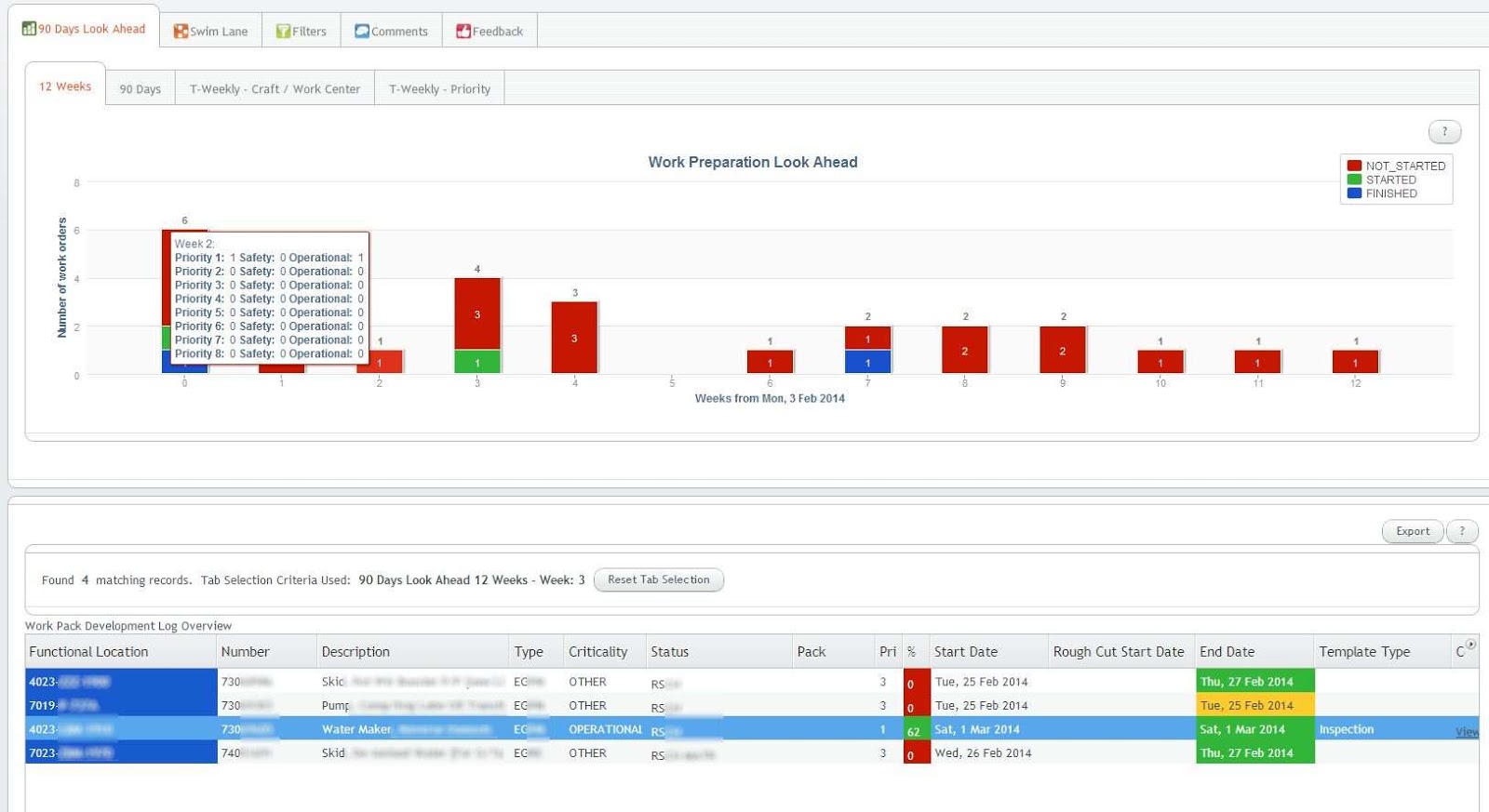
The Vaadin Charts 90 days look ahead graph shows the status for the coming 90 days. Clicking on a bar shows the orders at the bottom table for that day. A similar 12 weeks graph is available on another tab:


Different ways of looking at the status exist, for example these week-based graphs, the first one based on craft, the second one on priority:
Notice in the above graph the multiple y-axis: the bars are for the left y-axis, the lines for the right y-axis.

And other filters:


When clicking on a row in the bottom table, details for that order can be filled in:

Links (from a whitelist) and documents can be attached too (including drag 'n drop), and in the end a PDF can be generated with all the info (including the attachments + where the links are pointing to!) included:

Wednesday, February 27, 2013

Vaadin add-on Timeline vs Vaadin Charts add-on comparison


Introduction

For a recent project I had to evaluate the Vaadin Charts and Timeline add-ons for their capabilities.

Setup
- Vaadin 7.0.1
- Vaadin Charts 1.0.0
- Vaadin Timeline which is included in Vaadin Charts since Vaadin 7.0

Requirements
- Be able to see data for 90 days, and the same data but then per week (same graph, just other view).
- Be able to click on a bar and perform some action like retrieving other data based on the selected bar.
- Customizable three code coloring stacked bars.
- Display more details when hovering over a bar.


Comparison

Timeline

This type of graph is very flexible and elaborate in the ways it can display data. It has a "selection bar" below the actual graph so you can determine the values being displayed in the graph above it. See below for a screenshot:


You can try it out yourself in an online demo here and here.

Pros

- The graph is scrollable thus no worries about the bars/lines getting too close to each-other.
- You can zoom in and out, also with your mouse.
- Different charts (graph modes) provided by default, changeable in one click: line, bar and scatter.
- A quick zoom per period (1d, 5d, 1w, 5m etc).

Cons

- Can't attach any action to clicking on a bar. What you can do is react on the area selected with the selection bar, so a work-around might be to have the user select exactly one bar to mimic a kind of "clicking" on that bar. And then take the appropriate action.
- You can only show days on the x-axis it seems. You can't show a bar per week for example (thus one bar representing 1 week). A work-around might be to create your own Zoom period for 1 week, which is quite easy to do.
- Currently as of this writing there are at least two bugs regarding hovering: the timeline moves down a few pixels when hovering for the first time, and the stacked bars have a hovering problem.


Untested

- Can you also add an hover-over tooltip to the bars?


Chart
This type of graph does not have the fancy zooming possibilities, but has more possibilities regarding customization and reacting to events. See below screenshot for an example:


You can try it out yourself here.

Pros

- The bars are clickable and that event can be handled, indicating the x and y of the item clicked.
- The graph is more customizable; for example the numbers in the bars can be removed.
- Different values (like week number) on the x-axis is probably possible (still out for investigating).
- All data is always visible in the current view.
- Customizable hover-over tooltip.
- Does not have the two (smaller) timeline bugs.

Cons

- No horizontal scrollbar or similar, thus for example showing 90 days looks quite "cramped", see the above screenshot. When making the browser smaller, day numbers start to overlap. Do-able, but not optimal. A horizontal scrollbar would be great!
- No space for showing a full date at the bottom. As a work-around the actual date could be added to the tooltip when hovering over a bar (in the screenshot it only says 26).
- No zooming.
- No out-of-the-box other graph modes (i.e like in the Timeline those are provided with it always).


Conclusion

For the project we chose the chart because it is a bit more customizable and the ability to click on a bar and do something with that event was most important requirement.


Saturday, February 2, 2013

Lessons learned Spring 3.0 project

Another quick post with some bullet points of lessons learned during my last Spring 3.0 project.
Tools used were:

  • Spring 3.0 (3.1.2 when moving to Hibernate 4)
  • Spring MVC
  • Spring WebFlow 2
  • Spring Batch
  • Spring Agent Framework
  • Hibernate 3.2.6
  • Apache CXF
  • JBehave (Behavior Driven Development)
  • Tiny bit of GXT, which is a Google Web Toolkit extension based on GWT and ExtJS technology. Formally known as Ext GWT, GXT is a Java library for building rich internet applications with the Google Web Toolkit (GWT)
  • JBoss jBPM 5.2.0
  • JBoss Drools 5.3.1
  • Jenkins for CI
  • Crucible for code reviews
  • Jira for issue tracking en sprint user stories and tasks and progress tracking
  • SpringSource Tool Suite 2.9.1 as Eclipse based IDE
  • JUnit 4.8
  • EasyMock 2.5.2, EasyMockSupport
  • Java 6
  • Cargo-itest (introduction here) for integration testing
  • Tomcat 6
  • Oracle SQL Developer (free version)
Besides learning new tools like JBehave an Cargo-itest, below are some things picked up using above tools.

Spring MVC
Had some issues getting REST-like services available, mainly from inexperience, but good to know what's working and what not:

    @GET
    @Path("some-path/?role={roleId}")
    Response getSomeOtherUrlParams(@PathParam(value = "roleId") final String roleId);
    // Unable to call it, because PathParam is not existing (it's not really part of the path)

    @GET
    @Path("some-path2/role/{roleId}")
    Response getSomeOtherUrlParamsNotAsRequest(@PathParam(value = "roleId") final String roleId);
    // Works

    @GET
    @Path("some-path3/")
    Response getSomeOtherUrlParamsAsQueryParam(@QueryParam("role") final String roleId);
    // Works, will have clients of this service (like SoapUI) already generate a ?role= parameter

    @GET
    @Path("some-path4/")
    Response getSomeOtherUrlParamsAsRequestParam(@RequestParam("role") final String roleId);
    // Won't generate a ?role= parameter for clients, the WADL also looks different for this method/parameter

Don't use @FormParam for submitting XML because if the mediatype is text/xml for example, the mapping on the REST method fails because JAXRS expects HTML (default if not specified at the service definition).
So suppose the service is defined as:

    @POST
    @Path("message/{messageCode}/send")
    Response sendMessage(@PathParam(value = "messageCode") final String messageCode, 
                                         @FormParam("moduleName") String moduleName,
                                         @FormParam("userId") String userId, 
                                         final MessageContentsRequest messageContents);

When invoking the above method by POSTing to 

http://localhost:8080/webservice/v1/message/SECRET_MESSAGE_CODE/send 

with as POST body parameters moduleName and userId + the MessageContentsRequest XML, that gives the following error in the log:

2013-01-05 11:24:38,491 WARN  [http-8890-1] JAXRSUtils#processFormParam - An application/x-www-form-urlencoded form request is expected but the request media type is text/xml;charset=UTF-8. Consider removing @FormParam annotations.
2013-01-05 11:24:38,493 WARN  [http-8890-1] WebApplicationExceptionMapper#toResponse - WebApplicationException has been caught : no cause is available

The same error occurs when invoking: ..../send/?moduleName=abc&userId=ttl  (so adding them as POST URL name/value parameters).

So make sure you use in that case:

    @POST
    @Path("message/{messageCode}/send")
    Response sendMessage(@PathParam(value = "messageCode") final String message ode, 
                                         @QueryParam("moduleName") String moduleName,
                                         @QueryParam("userId") String userId, 
                                         final MessageContentsRequest messageContents);

The moduleName and userId can then be passed in via the POST URL name/value parameters.


EasyMock
Use replayAll() and verifyAll() instead of replay(mock) and verify(mock) for each mock seperately. Requires extending EasyMockSupport.


SQL Developer
The free SQL Developer can't export clob column values. Nor can it import clob values larger than 4K.


Wednesday, October 17, 2012

Lessons learned Seam 2.2 project

Quick post with some bullet points of lessons learned during my last (and first) Seam project:

  • Seam 2.2
  • Hibernate 3.3.1
  • JEE 5
  • EJB 3.0
  • JSF 1.2
  • Richfaces 3.3
  • JBoss 5.1
  • Drools 5
  • SQLServer 2008
  • MySql 5.x
  • TestNG
  • Hudson
Seam
- To have a navigation for a method with a parameter like exportSelected(String value): see Seam navigation based on a function with parameters
- If your Seam app keeps re-deploying (restarting) when using JBoss within Eclipse: delete all files that end with 'dia' in your WEB-INF dir. See: Seam keeps redeploying For example, I modified pages.xml, which apparently created a pagesdia (or similar) file... after removing that one, it worked fine again.

Hibernate
- To see which validator fails on a persist():


    try {
        entityManager.persist(verbinding);
    } catch (InvalidStateException e) {     
        for (InvalidValue invalidValue : e.getInvalidValues()) {         
            System.err.println("--------------> create(): exception Instance " +
               "of bean class: " + 
               invalidValue.getBeanClass().getSimpleName() +                  
               " has an invalid property: " + invalidValue.getPropertyName() +
               " with message: " + invalidValue.getMessage());     
        } 
	throw new RuntimeException(e);
    }


MySql
- To see data in better format in MySQL: show engine innodb status\G (so add the \G to a query)

Hibernate/JPA
- NamedQueries are loaded and parsed at startup time, so that's an advantage above em.createQuery() which are only parsed and evaluated at runtime. So with NamedQueries you get the errors sooner.

Drools
To solve this error in Drools decision table .XLS spreadsheet:


   [testng] DEBUG [test.service.drools.DroolsHandling] getKnowledgeBase: getting path info from settings service
   [testng] DEBUG [test.service.drools.DroolsHandling] getting test.service.drools.DroolsHandling ruletable file: HandlingModelTest.xls
   [testng] DEBUG [test.service.drools.DroolsHandling] getKnowledgeBase: Trying to open a File
   [testng] WARN  [jxl.read.biff.NameRecord] Cannot read name ranges for Excel_BuiltIn__FilterDatabase_1 - setting to empty
   [testng] WARN  [test.service.drools.DroolsHandling] There are errors in the decision table file
   [testng] WARN  [test.service.drools.DroolsHandling] Decision table error: message=[ERR 102] Line 9:16 mismatched input '"DroolsHandling6"' expecting ']' in rule "DroolsData_12" in pattern stringDataset
   [testng] WARN  [test.service.drools.DroolsHandling]     line: 9
   [testng] WARN  [test.service.drools.DroolsHandling] Decision table error: message=[ERR 102] Line 9:35 mismatched input '"Prefab"' expecting ']' in rule "DroolsData_12" in pattern stringDataset
   [testng] WARN  [test.service.drools.DroolsHandling]     line: 9
   [testng] WARN  [test.service.drools.DroolsHandling] Decision table error: message=[ERR 102] Line 22:16 mismatched input '"DroolsHandling6"' expecting ']' in rule "DroolsData_12" in rule "DroolsData_13" in pattern stringDataset
   [testng] WARN  [test.service.drools.DroolsHandling]     line: 22


Make sure your definition has all the cells merged that contain a condition! For example, check the red arrow pointing at the border of the cells between G9 and H9.
The last cell for the condition Prefab is not merged (i.e one cell) with all the other conditions. Here's now how it should be: see again the red arrow, there's no cell separation anymore, all condition columns are now merged into 1 cell.


- A space in a condition in a decision spreadsheet can cause a non-match! E.g GATE VALVE is not matched. Fixed it by always replacing a ' ' with an '_'.

Sunday, May 20, 2012

BlackBerry Playbook Tablet for Android porting

Houston, we got it in the mail: a free RIM Blackberry Playbook Tablet because I submitted on time an Android app to the BlackBerry App World. The Android app runs within the Playbook Android emulator (yes so the app is native Android! Pretty cool I'd say!

Booting
Below a few bootup screenshots:

The bootup time for the device is quite long, definitely longer than the Samsung Galaxy Tab 10.1 for example.

Home-screen and taskmanager
This is what the home-screen looks like:
This is what the taskmanager looks like:
The way to go back to the home-screen or switch to another app is by swiping from the button of the screen up.

The simpel app running
And the app runs fine on the real device too :) Those Android figures are also checking it out as you can see...
Those four buddies are called: Don Pablo Calaveroid, Longevity, Fortune and Blessing. The last three were released because of the chinese Year of the Dragon. Too bad they sent one with still the USA power plug attached to it. Luckily I had a converter (as the globetrotter I am ;)...
This is how the tablet 7" screen compares to the Samsung 10.1 (note both screens are very clear, the picture is only trying to show the difference in size of 10" vs 7"):
Tetris just runs fine on it (but that's a native app), the screen is very clear:


Some generic feedback:
  • The tablet smells rubbery because it has rubber on the back. Probably done as anti-slip, but even your fingers start to smell like it.
  • A bit annoying was that you have to watch the Basics tutorials when doing the setup.
  • Like the virtual keyboard, feels like lot less typos than similar sized touch screens


Porting
During converting the app to the PlayBook Android 2.3.3 or higher runtime, I ran into a few issues:
  • For emailIntent.putExtra(android.content.Intent.EXTRA_TEXT, emailBody) statements needed to add .toString() to emailBody because otherwise you get an exception telling that EXTRA_TEXT is not a String.
  • After each re-install of the app on the emulator, nothing seems to be remembered of the preferences. E.g had to accept the EULA each time after a new deploy, while this does not happen on the "regular" Android emulator. Also works fine on the real Playbook device.
  • In my app the user can swipe left to right and vice versa to browse through tips. On the Playbook emulator the text on bottom of the screen was not always correctly updated. It was lagging behind.
  • When trying to open the browser with an Intent and URL in the simulator, it says 'No network connection'. Strange, the pre-installed browser on the home screen works just fine... Seems similar to this reported issue.

Thursday, February 16, 2012

Summary of presentation with tips on creating visually appealing Android applications that scale to various screen sizes

Interesting points from a presentation in which Eric Burke shares tips on creating visually appealing Android applications that scale to various screen sizes.
The session focuses on custom views, rounded corners, scalable drawables, gradients, shine, holograms etc.
Eric is the St. Louis Engineering Manager and Android Tech Lead with Square.

06:00 Use alpha compositing with anti-aliasing, not canvas.clipPath() because you get jagged pixelated corners

17:25 triangular shine

29:00 Check the imeOptions for EditTexts/keyboard input. E.g imeOptions="actionNext" for example. Or "actionDone". NOTE: does not work on HTC Sense UI! So "actionNext" seems safest (might work, might not, but no harm done). For "actionDone" you still need a button for it on your screen anyway.
31:00 SafeViewFlipper code because the standard one crashes your app eventually (guaranteed) on pre-HoneyComb!
35:00 Holograms! Using the accelerator it acts as if it's shiny. Cool!
39:00 demo of cards sliding in/out and hologram on emulator

Wednesday, February 1, 2012

Android Tablet project lessons learned

A little while ago I had the opportunity to work on a tablet-only app, running Android 3.1 or higher.
The app consists of only one screen, on which everything can be done.Therefore the app basically consists of one Activity and several Fragments (about 4 to be precise).
The Activity controls the Fragments for potential re-use of the Fragments, as recommended. As a basis the official Honeycomb Gallery project was used. Quite unique to this app was though that it has to have 3 columns instead of the usual 2...

To get a feeling for the app, here are some screenshots:


The very first time the user has to log in, after which a sync with the server is done. Note the progress bars showing in the background.


Synchronisation in progress... Notice that the title is indented for some reason. Needs some investigation why it shows here, and not in the Login DialogFragment...


After the data has been loaded, the user can filter all data by selecting from the dropdowns, and selecting items in the lists. The rightmost column then shows a list of questions, dependent on the selected filters. Many types of questions and actions had to be supported; beside the ones you see, also built were dropdowns, multiple radiobuttons, view images and PDFs, etc.

Lessons learned

  • Prevent EditText in a ListView from losing focus/text disappearing:

    android:windowSoftInputMode="adjustPan"


  • Sometimes Eclipse/DDMS loses the connection with the emulator, it just can't "see it" anymore. For example when you want to run an app in the emulator, the start dialog does not show your running emulator. To fix that run 'adb kill-server', that restarts the server. After this the emulator should be detected again.

  • You can't disable a RadioGroup such that it disables it contained radiobuttons. You have to disable each radiobutton within that radiogroup seperately.

  • Note that all Activities in your app might have had onDestroy() called, but the Application instance might still be around! So watch this when you have static variables, like a reference to the database... it might still be open when your Activity's onCreate() is called again!

  • The 4.0 emulator was taking ages to start up (gave up after about 30mins). Then I compared the settings of my 3.1 AVD with the new 4.0 AVD. It turns out that the hardware property 'Abstract LCD density' setting of the 4.0 AVD is set by default to 240, which means high density. That implies a lot of pixels to draw. Read somewhere that that's one of the issues of a slow starting AVD. So I changed that property to be the same as of the 3.1 AVD, so made it 160. After that, the 4.0 AVD started about as fast as the 3.1 AVD (several minutes).
    I also reduced the 'Device ram size' setting from 512 to 256, but don't think that was the one that fixed it. See also here.

  • The monkeyrunner recorder script records really slow on a 160 density Android 3.1 AVD. Playback is a lot faster. Here's a bunch of instructions, including 2 scripts for recording/playback which you can also find here and here.

  • Had a problem trying to show the progress indicator in a ListFragment with the correct top margin. Tried adding addHeaderView() on the fragment to show some text above a fragment list. That works fine, except: when showing the progress indicator, it does not take into account any (top margin) LayoutParams being set! The app needs to set that to stay below the Action Bar which is in "overlay" mode. As soon as the adapter is set, the margin is taken into account correctly. I found the following here: in onCreateView() there is also a similar problem, they set the layoutparams explicitly again:


    // For some reason, if we omit this, NoSaveStateFrameLayout thinks we are
    // FILL_PARENT / WRAP_CONTENT, making the progress bar stick to the top of the activity.
    ... code where LayoutParams are set ...

    Tried several combinations of setting the LayoutParams, but those didn't work either. As a workaround now I have added a FrameLayout above the <fragment> in the main Activity xml. It is a <fragment> with a FrameLayout with a LinearLayout with some TextViews in it. For that one the top margin is set, and since the ListFragment is below it, it is pushed down correctly, even when the progress indicator is shown. Maybe the FrameLayout is causing the problems? Maybe a custom list fragment element would fix it.

  • How to open a PDF from an app's local private storage:


    // Assuming you have stored a file like this (note the mode):
    FileOutputStream f = context.openFileOutput("theFilenameYouStoredThePdfAs", Context.MODE_WORLD_READABLE);

    ... write bytes to f, do other stuff...

    // Then you can get a reference for it for an external app via:
    File file = activity.getFileStreamPath("theFilenameYouStoredThePdfAs");
    if (file.exists()) {
    Toast.makeText(activity, activity.getString(R.string.openingFile), Toast.LENGTH_SHORT).show();
    Uri path = Uri.fromFile(file);
    Intent intent = new Intent(Intent.ACTION_VIEW);
    intent.setDataAndType(path, "application/pdf");
    intent.setFlags(Intent.FLAG_ACTIVITY_CLEAR_TOP);
    activity.startActivity(intent);
    }


  • Definitely take a look at the latest Google I/O app, that's always a good reference for figuring out how to do specific things; I consider it a best-practices app (I've also seen it being referred to in blog posts/presentations from the Android team, can't find them now :).

Thursday, August 18, 2011

Android project lessons learned

Quick post with some bullet points of lessons learned during my last Android project:

  • To be able to keep strings in strings.xml apart, prefix them with the name of the Activity they belong to. So listOrdersOrderNr instead of just orderNr.

  • If you inflate() a view without the parent, it won't take into account the parent's attributes like padding! Sadly apparently that trick does not seem to work in the getView() method. For that you'd have to compute the padding in dp and then set the padding of the view. E.g:


    float scale = getContext().getResources().getDisplayMetrics().density;
    float dpSize = 10 * scale; // So 10 would be the number of dp you want
    buttonRow.setPadding((int) dpSize, (int) dpSize, (int) dpSize, (int) dpSize);


  • When using a RelativeLayout, make sure you refer to other elements using "@id/someId", and not "@+id/someId". If you use the latter, Android will just create a new id named "someId" and will place the layout starting from the top of your Activity. Pretty obvious this one (the docs say the "+" creates a new id) but still an easy one to miss... So don't do:


    android:layout_below="@+id/feedbackEmailLogsSeparator"


    But use:


    android:layout_below="@id/feedbackEmailLogsSeparator"


Monday, July 4, 2011

Android pro tips for advanced expert Android developers

Short summary of the Google I/O 2011 session "Android Protips: Advanced Topics for Expert Android App Developers". Full presentation can be found here.

6:35: the parallel Activity pattern: based on SDK version, start another "parallel" code line. Easy check to see what your SDK version is so you can distinguish use of more advanced APIs as for example available since HoneyComb.
8:20: use interfaces for backward compatibility
9:09: get real user feedback before launching. Note you can also of course use Analytics to log an exception!
10:38: example of doing A/B testing
11:35: use Android Market for beta testing. It seems there's no special facility for this in the market, you just have to control it yourself... e.g password protect, obscure the name.
12:31: But don't forget to protect your package name before someone else takes it! So upload and save it but don't publish it.
13:43: don't assume the default (natural) orientation on a device is portrait, e.g most tablets start in landscape. The orientation sensor's default is also 90degrees "off"
15:00: Don't track devices to detect unique installations. Give your app a unique id using a UUID, store it in the prefs.
20:00: the app's data has to be always fresh if possible, the user does not have to wait. See also this recent post: http://android-developers.blogspot.com/2011/06/deep-dive-into-location.html
25:51: how to get fresher data
32:00: make your services intelligent like do everything async, let it die asap
33:13: make your app psychic: leverage what the phone already knows, remembers what the user has told it. Like the Account Manager. Preferences should follow the user across devices and resets (which means storing them offline). Give users the ability to delete their preferences, using the Backup Manager to backup shared preferences.
38:21: intercept links using an Intent Receiver
39:25: make your apps adaptive. E.g: behave as expected, optimize for different user experiences. You can specify the IME keyboard behavior by setting the appropriate action (Go, Search, Send, Done etc). Use android:imeOptions for that
43:20: handle volume and playback buttons icw requesting audio focus for playback
47:10: provide translations for your app and title description to have it better found in people's native language
48:00: make your app smooth: make everything async. Loader and CursorLoader are available since HoneyComb.

Wednesday, June 29, 2011

Android Bluetooth bugs on Galaxy S2

Just a quick post regarding Bluetooth on the Samsung Galaxy S II.

Recently I've been creating an app that uses Bluetooth for sending data between devices (not FTP just strings). A pretty good introduction can be found here, though some things are missing from it. Like an example how you can register a BroadcastReceiver for the ACTION_SCAN_MODE_CHANGE. Just in case you are looking for it, here it is:


// Register the BroadcastReceiver
IntentFilter filter = new IntentFilter(BluetoothAdapter.ACTION_SCAN_MODE_CHANGED);
registerReceiver(mReceiver, filter); // Don't forget to unregister during onDestroy

...

// Creates a BroadcastReceiver for ACTION_SCAN_MODE_CHANGED for BT discovery
private final BroadcastReceiver mReceiver = new BroadcastReceiver() {

public void onReceive(Context context, Intent intent) {
if (BluetoothAdapter.ACTION_SCAN_MODE_CHANGED.equals(action)) {
int mode = intent.getIntExtra(BluetoothAdapter.EXTRA_SCAN_MODE,
BluetoothAdapter.ERROR);
String strMode = "";
switch(mode){
case BluetoothAdapter.SCAN_MODE_CONNECTABLE_DISCOVERABLE:
strMode = "mode changed: SCAN_MODE_CONNECTABLE_DISCOVERABLE";
break;
case BluetoothAdapter.SCAN_MODE_CONNECTABLE:
break;
case BluetoothAdapter.SCAN_MODE_NONE:
strMode = "mode changed: SCAN_MODE_NONE";
break;
default:
strMode = "mode changed: unknown mode " + mode;
break;
}
Log.d(TAG, strMode);

}


Basically a device can be made discoverable by others, or a device can be set to find other devices (discover). Being discoverable is configurable up to 300 seconds max, finding other devices is not configurable and about 12 seconds.

Making a device discoverable entails the following code:


Intent discoverableIntent = new Intent(BluetoothAdapter.ACTION_REQUEST_DISCOVERABLE);
discoverableIntent.putExtra(BluetoothAdapter.EXTRA_DISCOVERABLE_DURATION, 120);
startActivityForResult(discoverableIntent, REQUEST_MAKE_BT_DISCOVERABLE);


That should enable Bluetooth if it isn't already and make the device discoverable for 120 seconds, and the result of the intent comes in at onActivityResult(). For receiving Bluetooth state changes you can register a BroadcastReceiver. This all works fine on a Nexus One.
But not on all devices, their Bluetooth stack contains bugs and behaves differently:

Samsung Galaxy S II
  • When you make the device discoverable, its state should become SCAN_MODE_CONNECTABLE_DISCOVERABLE, i.e value 23, meaning this device is both discoverable and connectable from remote Bluetooth devices.
    On the Nexus One I see the device.getScanMode() always return 23, as it should be. But on the Galaxy S2 it sometimes just changes to scanmode SCAN_MODE_CONNECTABLE (21), making it not discoverable anymore! And indeed, other devices don't see it anymore when discovering. In the S2 phone's settings I also see in that case that the discoverable checkbox is not checked.
    Workaround: the only workaround that always works seems to be to always first turn on the Bluetooth, and after that send the above discoverableIntent. Thus first do a


    Intent enableIntent = new Intent(BluetoothAdapter.ACTION_REQUEST_ENABLE);
    startActivityForResult(enableIntent, REQUEST_ENABLE_BT);


    then the


    Intent discoverableIntent = new Intent(BluetoothAdapter.ACTION_REQUEST_DISCOVERABLE);
    discoverableIntent.putExtra(BluetoothAdapter.EXTRA_DISCOVERABLE_DURATION, 120);
    startActivityForResult(discoverableIntent, REQUEST_MAKE_BT_DISCOVERABLE);


  • When you start the discoverable intent with any number different from 120, say 300, the popup that asks for user confirmation always shows 120, instead of the different number, say 300. The discoverability actually stays on for the specified amount (300 seconds), so functionally it works (phew), but the display is just incorrect and you can't change it. Confusing for the user.


Other bugs
I also found a few other more generic bugs reported by others and found by myself. Maybe they were SDK or device related (my app runs on Android 2.0+, tested on N1, Wildfire and Galaxy S2):

Saturday, February 12, 2011

Lessons learned webservices project

At a recent project we used the following tools & frameworks:

  • Java 6

  • Spring 3.0

  • Hibernate 3.2.7

  • JMS

  • JBoss ESB 4.5/5.1

  • SOAP 1.1

  • JAXB

  • JAX-WS

  • Apache CXF

  • Maven2

  • Jetty 6.1

  • Oracle 10g

  • Eclipse Mylyn

  • SVN

  • JUnit

  • Bamboo

  • Jira

  • Crucible

  • Nexus

Below are a couple of lessons learned which I remembered to write down:

JUnit
  • To skip a testclass (e.g Util.java) during a test in a maven project: put @Ignore above it.


Java
  • Throw checked exceptions in case of functionality errors. To not have to return those errors as return-values of the methods and making them checked, makes the interface clearer.


SOAP
  • Should you use the service response for functional errors, and SOAP fault only for technical errors?
    Nothing in the SOAP 1.1 spec says you should do that or are not allowed to put functional errors in the <detail>.
    Makes sense to me to do that: otherwise you can get errors in the response AND in the soap fault. More complex to handle in the client...
    Less of an issue if you say when there are SOAP faults we just give up, only if there's a response we try to see what's going on.

  • Apparent best practice: no underscores in xml/xsd/wsdl for element nor attributes, for better readability


ESB
  • JBoss ESB 4.5 JMS queue had loads of problems with high load and would sometimes just completely drop the queue. We moved to JBoss ESB 5.1 with ActiveMQ, that proved much more stable.


Transactional atomic file manipulation and file locking
Bunch of interesting articles related to this:

Related to file locking:


Maven
  • With Maven you can also have it put the sources + javadocs in the repository.
    Running 'mvn eclipse:eclipse' after that, and refresh the project in Eclipse, within Eclipse you can then see the javadocs and debug the sources.
    Just make sure you set <downloadSources> and <downloadJavadocs> to true.


Misc
  • If you have an action that can't be made transactional (e.g a file move), do that as last thing in your steps. More precisely: start a (e.g database) transaction, move the file. If that move succeeds, update status that move was successful. If that move fails, rollback the transaction, and thus is the status of that file still in "to move".