Thursday, July 3, 2014

Vaadin 7 + Spring 3 + JPA project summary and lessons learned

This blogpost is a short summary of the Vaadin 7.0 project I did last year, including tools used, lessons learned and a bunch of screenshots to show the results.

Tools used

  • Spring 3.2 including annotation based configuration, Spring Task*Executor framework
  • JPA2 with Hibernate 4.2 + JPA modelgen, including Envers for auditing
  • JMS 2
  • Vaadin 7.0.1
  • JAXB 2.1
  • Spring WS 2.1
  • Shiro 1.2
  • JUnit 4.8
  • Mockito
  • Eclipse 3.7
  • SOAP + SoapUI
  • MySql 5.5 + H2
  • Tomcat 7
  • Jenkins
  • Fisheye/Crucible
  • Sonar
  • Subversion
  • Maven 3
  • Java 6

Lessons learned

  • Don't only trust SoapUI of being able to validate your WSDL. Also try to generate stubs with Axis2 and JAXWS generators. *AND* actually make sure you can make a call to the webservice, because on our project it did work perfectly fine in SoapUI, but not in Axis nor JAXWS. Example: soap fault in operation but not in porttype defined. It required the project to defining one or more xyz.jaxb files for JAX-WS  (using .episodes dit not work for us). Then use these in the wsimport etc. Related links: Compiling multiple WSDLs that share a common schema and Customizing Java Packages.
  • If sources not found of e.g junit-4.11 (junit.org is also giving a lot of 404s), then run mvn clean dependency:sources, that will download the sources too into the .m2 repo.
  • Try to keep the WSDL and XSD as semantic as possible, so use Strings instead of IDs for for example lookup /reference values like: started, finished. Makes the interface much more readable and understandable by just looking at it.
  • count(case ...) is NOT supported by Hibernate criteria API, when using it it gives: java.lang.IllegalArgumentException: org.hibernate.hql.internal.ast.QuerySyntaxException: unexpected token: case near line 1, column 92 [...  Use sum(case) since that is supported.

    So instead of:

    cb.count(cb.selectCase().when(cb.equal(workOrder.get(WorkOrder_.priority), 1), workOrder.get(WorkOrder_.priority)).otherwise(0)),
    Use:

    cb.sum(cb.selectCase().when(cb.equal(workOrder.get(WorkOrder_.priority), 1), 1).otherwise(0)) 

    SQL equivalent:

    Instead of:

    COUNT(CASE WHEN priority = 1 THEN priority ELSE NULL END) AS prio1,

    Use:

    SUM(CASE WHEN priority = 1 THEN 1 ELSE 0 END) AS prio1,

    Links about this:

    https://forum.hibernate.org/viewtopic.php?f=1&t=992497
    https://forum.hibernate.org/viewtopic.php?p=2393060
    http://stackoverflow.com/questions/11011151/jpa-criteria-query-order-by-enum-values
    Sums replacement for count
    JPA 2.0 spec including 'case expressions' and this one and this one.
    http://stackoverflow.com/questions/775787/plsql-get-sum-for-each-day-of-week-and-total-sum-for-week-in-a-single-query
  • When trying to upgrade from Vaadin from version 7.0.1 to 7.0.4 by updating the version number in the pom.xml, a serial UID problem occurred when generating the widgetset for this new version:

    [INFO]  at com.google.gwt.dev.Compiler.main(Compiler.java:177)
    [INFO] Caused by: java.io.InvalidClassException: com.google.gwt.dev.jjs.ast.JMethod; local class incompatible: stream classdesc serialVersionUID = 5017484276333252513, local class serialVersionUID = 9103713597467037978

    Tried it then with 7.0.2, that one worked fine! 7.0.3 gave the same error. This post talks about maybe the GWT cache being the problem. So I deleted the directory (even though the timestamp on that directory was recent!) and that worked. In my case the directory to delete was:

    D:\workspace\xyz\frontend\app-web\src\main\webapp\VAADIN\gwt-unitCache 

The application

Below you can find a bunch of screenshots of the resulting application Planning Optimizer or ePOp.


The login screen, authentication via Shiro with a custom Realm that does a SOAP call to the backend:


The dashboard so the planner can immediately see the status + what needs attention first:

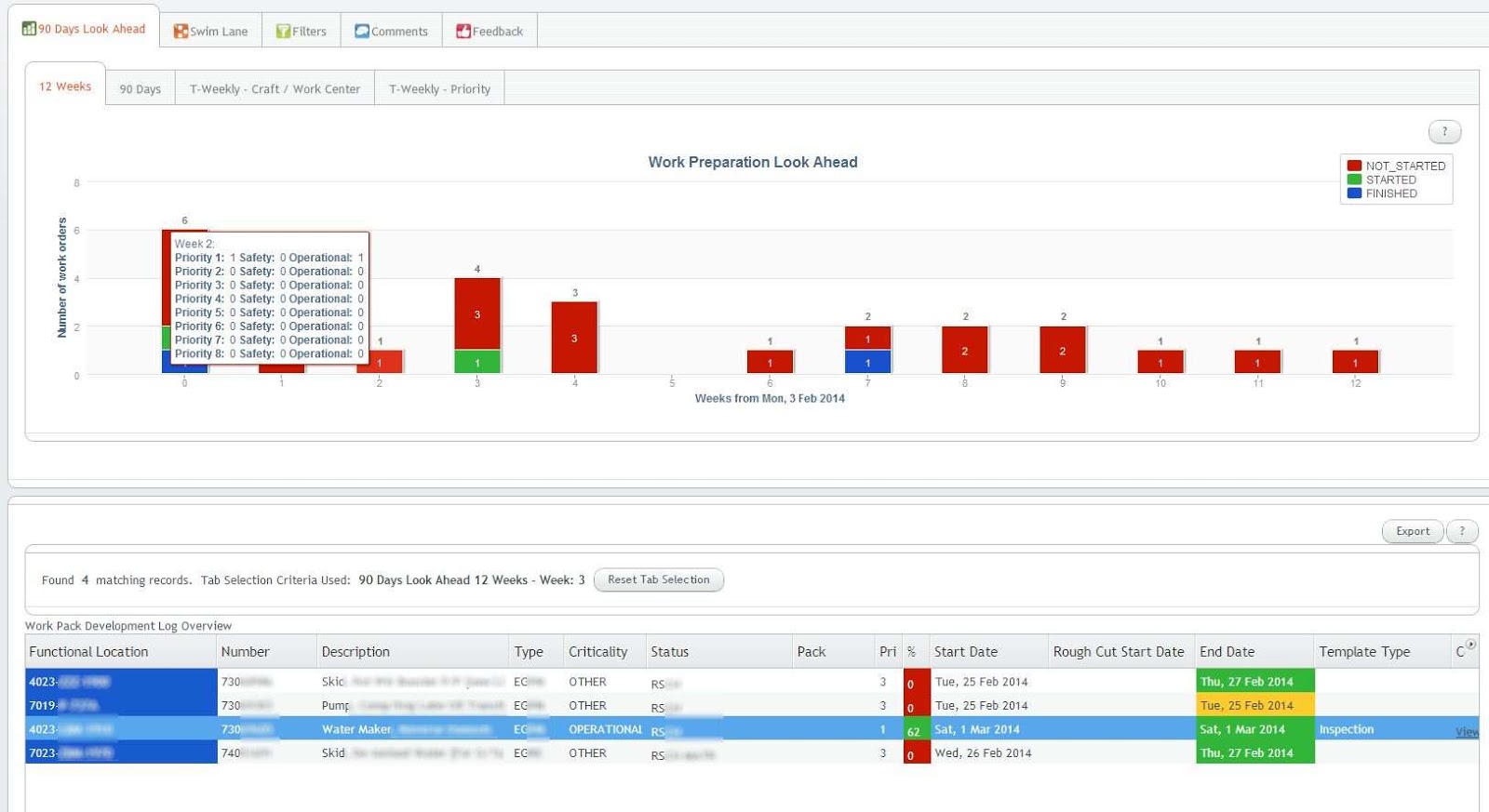
The Vaadin Charts 90 days look ahead graph shows the status for the coming 90 days. Clicking on a bar shows the orders at the bottom table for that day. A similar 12 weeks graph is available on another tab:


Different ways of looking at the status exist, for example these week-based graphs, the first one based on craft, the second one on priority:
Notice in the above graph the multiple y-axis: the bars are for the left y-axis, the lines for the right y-axis.

And other filters:


When clicking on a row in the bottom table, details for that order can be filled in:

Links (from a whitelist) and documents can be attached too (including drag 'n drop), and in the end a PDF can be generated with all the info (including the attachments + where the links are pointing to!) included:

Wednesday, June 18, 2014

Android and iOS app discovery and search engines overview

Introduction

Recently a friend of mine asked how to check if an app or type of app with certain functionality already exists. He had a great idea for an app (he thinks :) so wanted to figure out: does such an app already exist?
Entering the name of an app is not sufficient of course, you want to search on offered functionality too, since the name of the app might not match the functionality. E.g Tinder is a dating app, but the name Tinder doesn't show that (at least not in its early days!).

I knew there are a couple of websites and apps that provide that, but had a hard time coming up with more than one. This list is pretty ok, but already partly out of date.
So I decided to create this blogpost with a list of the current recent websites and their apps and some(!) app-only search apps that provide app discovery.

Main focus of this post will be on app search engine websites, not apps! Mainly because the research for an existing app you'd probably like to do behind a computer (laptop or PC), not a phone or tablet, since it requires quite some typing. E.g all types of ways of describing the functionality.
Also most focus will be on Android, but also some iOS search engines will be mentioned.

Below is a list of app search engines I found, including a screenshot and my short take on it. If any search engine is missing, please leave a comment and I'll check it out. If appropriate I'll add it to this page!

App discovery and search engines

1 Standard stores

Of course the standard app stores have their own search engine, either online and/or on the platform itself, e.g:


There are quite some more 3rd party app stores like SlideMe, but usually these are considered less important than the "big ones", so chances are minimal that there's an app in those stores which is not in the big app stores. But for adult content you mighthave to check those.

2 AppBrain

URL: http://www.appbrain.com/
Platforms: Android
Has app: yes


3 Quixey

URL: https://www.quixey.com/
Platforms: Android, iOS, Windows, Blackberry
Has app: yes


4 App Annie

URL: http://www.appannie.com/
Platforms: Android, iOS, Amazon, Mac
Has app: yes but can't tell from the screenshots if it includes searching etc


This is more intended for app analytics and ASO (app store optimization) and SEO but still usuable for checking what type of apps exist, e.g by keyword.
App Annie recently purchased Distimo, another well known app statistics/analytics platform.

Most parts are for free, "enterprise" is not.

5 AppGravity

URL: http://appgravity.com/
Platforms: Android, iOS
Has app: yes


6 AndroLib

URL: http://www.androlib.com/
Platforms: Android
Has app: no


Still refers to "Android Market" instead of Google Play.

7 AppsZoom

URL: http://www.appszoom.com/
Platforms: Android, iOS
Has app: yes


8 MobileDevHQ (formerly known as AppStoreHQ)

URL: http://www.mobiledevhq.com/
Platforms: Android, iOS
Has app: no


Similar to AppAnnie more intended for ASO and analytics and keywords optimilization, but can still come in handy. 

9 Regular search engines

More and more regular search engines are optimizing for finding apps. For for example Google, Apple and Amazon it's of course in their own interest to help people find apps for their platform.

10 App only

There are also many apps out there trying to help you find apps. I did not investigate those, but a query you could run to find a list is this one

11 DIY

If none of the above work for you, you could consider writing your own search engine/crawling engine. Here's a script for the Google Play store.


Saturday, February 8, 2014

Fairphone is in!

Yes it's in (well already for over a month), the Fairphone! Since I was one of the first 10.185 backers, a special edition with an extra message:


Wednesday, December 11, 2013

Vaadin TextFields in a Table empty/null value not propagated for required field

Setup

Problem

When you create a table in Vaadin with a .setTableFieldFactory(), and you have a Field which is set to .setRequired(true), and a user puts in an empty value for that field after first putting in a non-empty value, the field won't be set to that empty value when iterating through the table to read the current values.

Solution

Make sure you invoke .setInvalidCommitted(true) on that field to have the empty value also be passed through; i.e "committed" even though validation fails.

For example:

urlTable.setTableFieldFactory(new DefaultFieldFactory() {

    @Override
    public Field createField(final Container container, final Object itemId, final Object 
                    propertyId, Component uiContext) {

    if (URL_PROPERTY_ID.equals(propertyId)) {
        
        final TextField urlText = new TextField();
        urlText.setRequired(true);

        // Add the below line to have also the empty string be
        // passed on!!
        // See: https://vaadin.com/forum#!/thread/1129126
        urlText.setInvalidCommitted(true);
        urlText.setImmediate(true);
        urlText.setNullRepresentation("");
        urlText.setInputPrompt("Enter a URL");
        return field;

}

Note the bold line.

And for completeness here an example of the iterating over the table to get the current entered values:

List result = new ArrayList();
int sequence = 1;
for (Iterator iterator = urlTable.getItemIds().iterator(); iterator.hasNext();) {

    // Get the current item identifier
    String itemId = (String) iterator.next();

    // Now get the actual item from the table.
    Item item = linksTable.getItem(itemId);
    @SuppressWarnings("unchecked")
    Property urlProperty = item.getItemProperty(URL_PROPERTY_ID);
    String url = urlProperty.getValue();

    // Fill the object
    UrlInfo urlInfo = new UrlInfo();
    urlInfo.setUrl(url);
    // ... set other stuff
    result.add(urlInfo);
    sequence++;
}

return result;

Related resources

The forum thread that put me on the right track can be found here.
Long thread related to required vs validation problems can be found here.
@NotNull bean validator annotation combined with setRequired() also has some issues.


Wednesday, August 21, 2013

Migrating from MySQL 5.5 to 5.6.4 to have milliseconds/fractional seconds support

Before MySQL version 5.6.4, MySQL does not support milliseconds (more precise: fractional seconds) in TIME, TIMESTAMP and DATETIME!

In a project I was on, timestamps are used for versioning of entities via the JPA @Version annotation. So it's essential for correct optimistic locking, otherwise changes with a millisecond or bigger difference won't get a stale data exception. Since MySQL 5.6.4 milliseconds (fractional seconds) are supported by the newly introduced type TIMESTAMP(fsp), where fsp stands for fractional seconds precision. fsp ranges from 0 to 6 with 0 indicating there's no fractional part.

This blogpost describes how to migrate your current MySQL 5.5 version to 5.6.4, get it working correctly with fractional seconds support and problems that occurred.

Setup

- MySQL 5.5
- JPA 2.0
- Spring 3.1.2
- Hibernate 4.2
- Ubuntu 12.04
- Tomcat 7

JPA @Version annotation used for all entities:
@Version
@Column(nullable = false)
@Temporal(TemporalType.TIMESTAMP)
private Date version;


Possible solutions

  1. Put in an interceptor for Hibernate such that milliseconds are removed before inserting. But then you only have optimistic locking correctly working for updates that don't occur within a second. More details here
  2. Change the version field into a long, so don't store it as a TIMESTAMP. 
  3. Try to put something else smart in the application logic itself. 
  4. Put in a columnDefinition on the column: http://stackoverflow.com/questions/811845/setting-a-jpa-timestamp-column-to-be-generated-by-the-database
  5. Upgrade to 5.6.4.

Selected Solution

Together with the Product Owner it was decided to go for option 5. That means the minimal MySQL requirement for the application had to be upped to 5.6.4. That was acceptable; if a company is a MySQL shop, then usually they don't mind using a new(er) version of MySQL.
Option 4 was dismissed because that introduced a MySQL database dependency, which that project tries to avoid as much as possible.

Implementation

  1. Upgrade MySQL from 5.5 to 5.6.4. Basically following the steps from here: http://www.peterchen.net/2013/02/20/en-how-to-install-mysql-5-6-on-ubuntu-12-04-precise/
    The exact MySQL version I used was: http://dev.mysql.com/get/Downloads/MySQL-5.6/mysql-5.6.13-debian6.0-x86_64.deb/from/http://cdn.mysql.com/

  2. But a few more things are needed. For one thing, you need an up-to-date Connector/J, at least 5.1.24. Follow these steps to upgrade it:
    1. Download it from: http://dev.mysql.com/get/Downloads/Connector-J/mysql-connector-java-5.1.26.zip/from/http://cdn.mysql.com/
    2. Stop Tomcat
    3. Remove the old version:

      sudo rm /usr/share/tomcat7/lib/mysql-connector-java-5.0.8-bin.jar
    4. Put in the new version:

      sudo cp mysql-connector-java-5.1.26/mysql-connector-java-5.1.26-bin.jar /usr/share/tomcat7/lib/
    5. Restart Tomcat
    6. Done.

  3. Now you need to make sure columns are created as TIMESTAMP(fsp) to get the fractional precision, instead of TIMESTAMP which Hibernate uses by default. Decided was to go for millisecond accuracy, so TIMESTAMP(3). For that, a Hibernate dialect resolver was put in place that registers another column type for java.sql.Types.TIMESTAMP:

    public class FixMysql5Dialect extends MySQL5Dialect {

        public FixedMysql5Dialect() {
            registerColumnType(java.sql.Types.BOOLEAN, "bit");
            registerColumnType(java.sql.Types.TIMESTAMP, "timestamp(3)");
        }
    }

    Note also the boolean fix :)

    The resolver:
    ...
    private final DialectResolver standardDialectResolver = new StandardDialectResolver();

    @Override

    public Dialect resolveDialect(DatabaseMetaData metaData) throws JDBCConnectionException {

    Dialect dialect = standardDialectResolver.resolveDialect(metaData);

    if (dialect instanceof MySQL5Dialect) {

    return new FixedMysql5Dialect();

    }
    return dialect;
    .....

  4. Configure it in the Spring JavaConfig:

    map.put("hibernate.dialect_resolvers", MyHibernateDialectResolver.class.getName());

  5. Done

Troubleshooting


  • Problem: After restarting the application and loading the pre-existing testdata, an exception started occuring:

    java.sql.SQLException: Value '0000-00-00 00:00:00.000' can not be represented as java.sql.Timestamp
  • Cause: the SQL import scripts were using:

    INSERT INTO ct (ID, VERSION, NAME) VALUES (1, '1970-01-01 00:00:00.001', 'a');

    Looking in the database, it turns out the import wasn't able to be converted correctly anymore! They all appeared as:

    | 1 | 0000-00-00 00:00:00.000 | a

    After trying out a couple of combinations, it turns out that "it" definitely doesn't like 1 january 1970!! All below inserts do work:

    '2013-08-05 12:32:34.233'
    '2000-01-01 00:00:00.233'
    '1999-01-01 00:00:00.233'
    '1999-01-01 00:00:00.001'
    '1990-01-01 00:00:00.001'
    '1971-01-01 00:00:00.001'

    Also failing are '1970-01-01 00:00:00.000' and '1500-01-01 00:00:00.001'.

    If you watch carefully on the (incorrect) inserts, you see there's a warning (put in red for clarity):

    INSERT INTO ct (ID, VERSION, NAME) VALUES (19, '1970-01-01 00:00:00.001', 'Test19');
    Query OK, 1 row affected, 1 warning (0.01 sec)

    To see the exact warning execute:

    show warnings\G
    Then you see:

    *************************** 1. row ***************************
    Level: Warning
    Code: 1264
    Message: Out of range value for column 'VERSION' at row 1

    So the entered values are just not valid. Couldn't find out why they are not accepted, if you find it, leave it in the comments!!

    In the scripts we decided to use '1971-01-01 00:00:00.001' for the inserts.

Thursday, August 15, 2013

Refactor/rename package in Eclipse with Subclipse and SVN

Refactoring a package by giving it a new name can give quite annoying problems when trying to commit it from within Eclipse using the Subclipse plugin.

You can get (tree) conflicts, maybe even causing you to rollback all your changes and then step by step committing them.
Below is a set of steps you can follow that should not cause any problems if executed in this order :) In short: you do your refactor, then first commit only the deletions, and only then commit the additions (which are the moved files in their new package location).

Detailed steps

Set up and tested with: Eclipse Juno version, Subclipse plugin, SVN 1.6:

  1. Rightclick on your project and select Team --> Synchronize with Repository
  2. Select the incoming view
  3. Now note in the incoming view, it shows conflicts on some/most directories (packages) that were renamed. Just do an update on those.
  4. Go to the outgoing view
  5. If you now select all items with a '-' (the deleted ones) and then try to commit, you get an error on the commit: Tree remains in conflict. Notice the red/green icons on several directories (actually the ones that had a conflict in step 3), see screenshot:

    So those need to be resolved first.
  6. Right click on one of those entries (multiple select not supported for the Show Tree Conflicts operation) and select Team --> Show Tree Conflicts. That shows something like:

  7. Rightclick and select Resolve...
  8. On that next screen:

    select only Mark conflict resolved.
  9. Click Finish
  10. Now the entry is not marked red/green any more, and only shown with a '-' in the Synchronize screen! 
  11. Do that for all red/green arrows (conflicts)
  12. When done, right-click on all items marked with a '-' and select Commit. And that succeeds!
  13. Finally, commit now the ones marked with '+' (so the added ones)
  14. Really final step: note that sometimes some empty packages with the old name stay around. Deleting them in Eclipse and then trying to commit gives again conflicts(!). Those I just delete directly from the Repository perspective and do an update on those.
Bonus tip: sometimes when another team member has commited a new module, the Synchronize perspective will show the (compiled) /target dir and its items as needing to be committed. Even though the directory is already in the .svnignore file, since right-clicking on it won't allow you to add it. Solution: do an update on that target directory. After this it should be fine and it should not show up anymore on the next Synchronizes.

Saturday, July 27, 2013

JPA @Version annotation: when is the version updated?


In JPA you can annotate a field of an entity with @Version to specify that property as its optimistic lock value.
But the above documentation does not say when the version number is validated and updated (increased).
The short answer is: at commit time!

I came across this because I was having trouble passing on the updated version number back to the caller, after a merge() operation.

The setup

Example and the solution

A client class (not in a transaction) invokes the method 

   /** 
    * Updates the order and returns the new version number for the order
    *
    * @param order the entity to update. Must be provided with the current version of the order.
    *             If not provided, StaleObjectStateException will be thrown
    */
   Date updateMe(Order orderWithNewValues);

on a service class, which is annotated with Spring @Service and Spring @Transactional

That method invokes 

   /** 
    * Similar java doc
    */
   Date updateMe(SomeEntity orderWithNewValues)

in a DAO which is annotated with Spring @Transactional(propagation = Propagation.MANDATORY) and @Repository.  The DAO searches for the entity to update using its name, sets the version number to the currently known version number, updates it and should return the new version number.

The class Order is annotated (amongst other things) with @Version as follows:

   @Version
   @Column(nullable = false)
   @Temporal(TemporalType.TIMESTAMP)
   private Date version;
   ...
   DateTime getVersion() {
       return version;
   }

The implementation of the DAO method implementing the update originally was:

   Order order = orderDao.findByName(name);
   if (order == null) {
       throw new IllegalArgumentException("No order with name '" + name + "' exists");
   }

   Order updatedOrderNotManaged = new Order(order);
   updatedOrderNotManaged.setVersion(orderWithNewValues.getVersion());
   updatedOrderNotManaged.setTotal(orderWithNewValues.getTotal());

   Order updatedOrderManaged = orderDao.merge(updatedOrderNotManaged);

   return updatedOrderManaged.getVersion();


Expecting that the last line (return updatedOrderManaged.getVersion()) would return the new version number, since the non-managed entity was now managed.

But it isn't! What seems to be the reason is that:
  • The JPA implementation (in this case Hibernate) can do some caching, deferring the actual database access to a later moment, causing the changes to not hit the database yet.
  • Not hitting the database also doesn't cause the @Version to be "triggered" (it seems).
  • So the version is still at its old value!
But after the service method had returned the (old) version to the client calling it (so the transaction was committed), in the database you can see the new increased timestamp in the version column.

The solution is to force the JPA implementation to flush() to the database, such that the @Version annotation gets triggered and thus the version gets updated.
Therefor the following was added, just before the "return"  statement: 


   orderDao.flush();

That did it, now return updatedOrderManaged.getVersion()) is returning the updated version number. Should the transaction commit fail later, then no harm is done since the whole transaction is rolled back and the client should get an exception or similar so it knows it should ignore the returned version number.


Wednesday, July 10, 2013

Vaadin error: A connector with id 7 is already registered!


This post describes a short analysis and possible solution when getting the error java.lang.RuntimeException: A connector with id 7 is already registered!


Setup

  • Vaadin 7.0.4 with Spring using the SpringVaadinIntegration plugin 1.6.5 and Shiro 1.2.1
  • The UI class has @Component en @Scope("prototype") as annotations
  • All components extend CustomComponent
  • All components but one component also have the @Scope("prototype") annotation
  • One component, let's call that the HelpWindow, it extends Window, has no @Scope annotation, and thus is a Spring singleton. The reason for it being a singleton is that it seemed the only solution to always have a sub-window on top of another sub-window (using UI.addWindow()). At least one situation in the project made the sub-window appear beneath another sub-window sometimes...
  • No @VaadinView used anywhere.
  • Spring 3.1.2
  • Tomcat 7 as application server.

Scenario

This is the reproducible scenario that causes the A connector with id 7 is already registered! error to appear: 
  1. Log in for first time, so authentication is via Shiro: all fine, the HelpWindow is shown.
  2. Log out.
  3. Log in again. I can see the UI constructor and its init() getting invoked.
  4. Exception in the logfile:

    java.lang.RuntimeException: A connector with id 7 is already registered!
    ....... stuff deleted.....
    SEVERE: 

    java.lang.RuntimeException: A connector with id 7 is already registered!
    at com.vaadin.ui.ConnectorTracker.registerConnector(ConnectorTracker.java:131)
    at com.vaadin.server.AbstractClientConnector.attach(AbstractClientConnector.java:599)
    at com.vaadin.ui.AbstractComponent.attach(AbstractComponent.java:554)
    at com.vaadin.ui.Label.attach(Label.java:430)
    at com.vaadin.server.AbstractClientConnector.setParent(AbstractClientConnector.java:586)
    at com.vaadin.ui.AbstractComponent.setParent(AbstractComponent.java:457)
    at com.vaadin.ui.Table.registerComponent(Table.java:2350)
    at com.vaadin.ui.Table.parseItemIdToCells(Table.java:2337)
    at com.vaadin.ui.Table.getVisibleCellsNoCache(Table.java:2147)
    at com.vaadin.ui.Table.refreshRenderedCells(Table.java:1668)
    at com.vaadin.ui.Table.getVisibleCells(Table.java:3921)
    at com.vaadin.ui.Table.beforeClientResponse(Table.java:3155)
    at com.vaadin.server.AbstractCommunicationManager.writeUidlResponse(AbstractCommunicationManager.java:799)
    at com.vaadin.server.AbstractCommunicationManager.paintAfterVariableChanges(AbstractCommunicationManager.java:728)
    at com.vaadin.server.AbstractCommunicationManager.handleUidlRequest(AbstractCommunicationManager.java:599)
    at com.vaadin.server.VaadinServlet.service(VaadinServlet.java:315)
    at com.vaadin.server.VaadinServlet.service(VaadinServlet.java:201)
    at javax.servlet.http.HttpServlet.service(HttpServlet.java:728)
    at org.apache.catalina.core.ApplicationFilterChain.internalDoFilter(ApplicationFilterChain.java:305)
    at org.apache.catalina.core.ApplicationFilterChain.doFilter(ApplicationFilterChain.java:210)
    at org.apache.shiro.web.servlet.AbstractShiroFilter.executeChain(AbstractShiroFilter.java:449)
    at org.apache.shiro.web.servlet.AbstractShiroFilter$1.call(AbstractShiroFilter.java:365)
    at org.apache.shiro.subject.support.SubjectCallable.doCall(SubjectCallable.java:90)
    at org.apache.shiro.subject.support.SubjectCallable.call(SubjectCallable.java:83)
    at org.apache.shiro.subject.support.DelegatingSubject.execute(DelegatingSubject.java:383)
    at org.apache.shiro.web.servlet.AbstractShiroFilter.doFilterInternal(AbstractShiroFilter.java:362)
    at org.apache.shiro.web.servlet.OncePerRequestFilter.doFilter(OncePerRequestFilter.java:125)
    at org.springframework.web.filter.DelegatingFilterProxy.invokeDelegate(DelegatingFilterProxy.java:346)
    at org.springframework.web.filter.DelegatingFilterProxy.doFilter(DelegatingFilterProxy.java:259)
    at org.apache.catalina.core.ApplicationFilterChain.internalDoFilter(ApplicationFilterChain.java:243)
    at org.apache.catalina.core.ApplicationFilterChain.doFilter(ApplicationFilterChain.java:210)
    at org.apache.catalina.core.StandardWrapperValve.invoke(StandardWrapperValve.java:222)
    at org.apache.catalina.core.StandardContextValve.invoke(StandardContextValve.java:123)
    at org.apache.catalina.authenticator.AuthenticatorBase.invoke(AuthenticatorBase.java:472)
    at org.apache.catalina.core.StandardHostValve.invoke(StandardHostValve.java:171)
    at org.apache.catalina.valves.ErrorReportValve.invoke(ErrorReportValve.java:99)
    at org.apache.catalina.valves.AccessLogValve.invoke(AccessLogValve.java:936)
    at org.apache.catalina.core.StandardEngineValve.invoke(StandardEngineValve.java:118)
    at org.apache.catalina.connector.CoyoteAdapter.service(CoyoteAdapter.java:407)
    at org.apache.coyote.http11.AbstractHttp11Processor.process(AbstractHttp11Processor.java:1004)
    at org.apache.coyote.AbstractProtocol$AbstractConnectionHandler.process(AbstractProtocol.java:589)
    at org.apache.tomcat.util.net.JIoEndpoint$SocketProcessor.run(JIoEndpoint.java:312)
    at java.util.concurrent.ThreadPoolExecutor.runWorker(ThreadPoolExecutor.java:1145)
    at java.util.concurrent.ThreadPoolExecutor$Worker.run(ThreadPoolExecutor.java:615)
    at java.lang.Thread.run(Thread.java:722)

    The exception occurs at the moment UI.addWindow(helpWindow) is invoked (not included in this exception-dump).
  5. After this, even appending ?restartApplication to the URL won't save you anymore. Only a full restart of the application server (Tomcat) fixes the problem.
  6. BUT: if after the log out I press ctrl-F5 (so full browser refresh) once, the problem still occurs after logging in again.
  7. BUT: if after the log out I press ctrl-F5 twice, the problem does not occur! All works fine. 

Investigation and Solution

So very strange that Vaadin's ConnectorTracker thinks/sees the HelpWindow's connectorId already registered, because the user logged out and the UI's constructor and its init() method were invoked, so a completely new UI is created.
After pressing ctrl-F5 twice, I did see that the HelpWindow's connectorId is cleared (null).
Also changing the HelpWindow's scope to prototype fixed the problem, no exception; but prototype isn't an option for the project for above mentioned reason.

So something somewhere doesn't get fully cleared at logout time. Potentially the reasoning could be: since the HelpWindow is a singleton, Spring won't re-instantiate it (it's a singleton), Vaadin won't clear its connectorId either for some reason, so the ConnectorTracker (see the stacktrace) detects that it is already registered --> exception!

Several posts on the Vaadin forum indicated that the singleton vs prototype might be the problem. Like this one which indicates a potential problem right there. And in this one another caching-like problem is mentioned.

Also not "everything" getting cleared at logout was pointed out as a potential problem. So for that, the code invoked when logging out I changed from only doing currentUser.logout() and the setLocation() to:

// currentUser.logout() might also clear the Vaadin session, but better safe than sorry...
UI.getCurrent().getSession().close();
UI.getCurrent().getSession().getService().closeSession(VaadinSession.getCurrent());
UI.getCurrent().close();

Subject currentUser = SecurityUtils.getSubject(); // Shiro
currentUser.logout(); // Shiro

// It's apparently essential to do the redirect too
UI.getCurrent().getPage().setLocation(VaadinServlet.getCurrent().getServletContext().getContextPath());

For readability, the try/catch around each statement is omitted. And, as mentioned in the first comment, currentUser.logout() might already be sufficient to clear the session, did not further investigate this.

Together with a colleague another solution came to mind: try @Scope("request")! Using that as scope, within an HTTP request the HelpWindow bean exists only once, but a new one is created for each new HTTP request.
And yes, that did it! And it also keeps the 'sub-window on top of a sub-window' problem away.

Sufficient work-around for now!

PS: note that there might be something not 100% ok regarding scope in the SpringVaadinIntegration add-on; see this discussion on what the scope of the UI should be. The last comment (from the user pointing out this potential issue) also refers to using this post as a reference to integrating Spring with Vaadin....

Tip: talking about injection/CDI: integration Vaadin with JEE 6? This might be a good one to read.


Wednesday, July 3, 2013

Integrating Twitter 1.1 api in Android with oauth including app-only authentication

Introduction

One major change is that all API calls now have to be authenticated (and authorized) via OAuth: "user authorization (and access tokens) are required for all API 1.1 requests". That means any action on Twitter that is related to a user has to happen this way.

Luckily there is also a so called application-only (app-only) authentication for actions that don't require a user as a context. Those are requests on behalf of an application. Think about search and getting a timeline for a user. One thing that's definitely different from the other calls is that this app-only authentication has to use OAuth 2.0, while the user-context based authentication has to use OAuth 1.0a!

In this post I'll describe how to implement both, including a full working Android code example.


App-only Twitter 1.1 Authentication OAuth 2.0

Information about this principle can be found here. As said above, you can use it for accessing the Twitter API 1.1 endpoints that do not require a user action. For example searching for tweets falls in this category; just like getting a tweet from a user's timeline. Tweeting a status update does not fall in this category, because a user has to give permission for this. You can see if a Twitter API call supports application-only authentication if there's a rate-limit specified with it. E.g for the search it says on the right: 450/app. So that's accessible via the app-only API. But getting a user's direct messages isn't, it only has 15/user specified.

The problem with this userless-context API solution I had was my app was using the Signpost library for the Twitter 1.0 API. I preferably would have used that lib for this app-only authentication too, but the Signpost still does not support OAuth 2 yet...
Then I tried to use the Scribe library, which supports OAuth 2.0, but I couldn't get that working quickly. 
Therefore I went back to the basics and used plain HTTP POST and GET methods, using this blogpost as a starting point. All pieces to get it working are in that post, but not available as one complete code set, that's why I made this post. Plus you might come along a few problems too... also described below.

Making it work

Easiest is to refer to the above mentioned Crazy Bob's blogpost to get started and what's happening why.
In my attached example code (see bottom of this post) most of the logic occurs in OAuthTwitterClient.java. In OnCreate() the UI is set up, including the consumer, provider and client for the OAuth 1.0a using Signpost (see next section for details on that part).

When a user clicks on the top button of the application, named '1a) Request bearer-token via app-only oauth2') the getBearerTokenOnClickListener.onClick() method is invoked. There you see the bearer token getting retrieved via requestBearerToken(), as described in Crazy Bob's blogpost.
That should give the bearer token which you need as mentioned here
Then to get a tweet from a Twitter user (in the code I'm using 'twitterapi'), click on the second button named '1b) Get tweet from user via app-only oauth2'. That invokes its listener which invokes fetchTimelineTweet(), which in turn gets the tweet using the bearer token, after which the tweet is displayed on the screen.

Troubleshooting 

I ran into a few issues:
  1. When fetching the tweet, the getInputStream (in readResponse()) was giving a FileNotFoundException. Turns out that since Android 4 ICS (Ice Cream Sandwich), this can occur because the conn.setDoOutput(true) causes the request to be turned into a POST even though the specified request method is GET! See here. The fix is to remove that line.
  2. When invoking requestBearerToken() two times in a row on Android 1.5, the responseCode showed as -1 sometimes; mainly when waiting about 30 seconds before invoking it again. That turned out to be a known issue for Android before 2.2 Froyo. For that the method disableConnectionReuseIfNecessary() is put in place. 
  3. It seems a bearer token lasts "forever", until it is revoked/invalidated. Twitter can do that but you can do it yourself too, via the invalidate_token API call.
PS 1: no the code is not optimal, for example the error handling can be done a lot better
PS 2: and no the UI won't win any "Best Interface" prizes
PS 3: yes all network calls should be done on a non-UI thread really. Yup that's some homework for you too :)


User Context Twitter 1.1 Authentication OAuth 1.0a

For updating a user's status (i.e. tweeting), you have to be authenticated and the user has to have authorized you to perform those type of actions. Usually the user authorization happens by switching to a browser in which the user has to log in to Twitter and say whether the application is allowed to perform the requested actions.
Luckily, for this type of authentication still the Signpost library can be used since its based on OAuth 1.0a.

Making it work

After upgrading to the signpost-core-1.2.1.2.jar and signpost-commonshttp4-1.2.1.2.jars, everything almost worked immediately. Especially make sure to use CommonsHttpOAuthProvider as it says on the Signpost homepage in the Android section.

Since my app still runs on Android SDK 1.5 (yes!) I tested the solution on a 1.5 emulator.
But then I ran into my first problem, authentication failed with: javax.net.ssl.SSLException: Not trusted server certificate.
To get this working, I had to make sure all the Twitter Root CA certificates are known. For that I used this blogpost. See the class CrazyBobHttpClient for the implementation. After putting in all VeriSign certificates one by one (search for the string 'class 3 Public Primary Certification Authority - G' in the .pem file mentioned in this Twitter Developers Forum post to find all 5 of them).
In short, issue the following command to have each one added to your own keystore:

C:\>C:\jdk1.7.0_17\jre\bin\keytool -import -v -trustcacerts -alias 3 -file verisign_cert_class3_g5.cert -keystore twitterkeystore.bks -storetype BKS -provider org.bouncycastle.jce.provider.BouncyCastleProvider -providerpath bcprov-jdk16-145.jar -storepass ez24get

So in the above I'm adding the VeriSign G5 certificate. The -alias 3 you have to increase each time. And notice the password used: 'ez24get', you'll find that in the CrazyBobHttpClient class.

If you see:

Certificate already exists in system-wide CA keystore under alias
Do you still want to add it to your own keystore? [no]:  

answer with: yes

And do the same for the DigiCert certificates, you only need the 3 Root ones. You can find the separate certificates and keystore in the res/raw directory of the example application. The separate certificates don't have to be provided, I just left them there for reference.

After performing all these steps, I was able to authenticate and even tweet. Just as a test I switched back to the DefaultHttpClient(). And the authentication now goes fine using that implementation too! Strange, because AFAIK that one just uses the default system keystore, and before it gave the "not trusted server certificate error"... Strange to me. If anybody knows the reason why, please leave it in the comments!

PS: maybe even cleaner is to add your own created keystore to the existing keystore(s). See the comments at the top in the CrazyBobHttpClient.java.


Outstanding Issues

Well, issues.... more like questions: 
  • Why does the DefaultHttpClient() suddenly work (see previous section)?
  • It would be nice to have an example for app-only authentication using an OAuth 2.0 library like Scribe instead of using this low level POST/GET code.
  • In the LogCat I see these messages appear after each API call:

    07-01 18:59:03.575: W/ResponseProcessCookies(732): Invalid cookie header: "set-cookie: guest_id=v1%3A137270514572832152;  Domain=.twitter.com; Path=/; Expires=Wed, 01-Jul-2015 18:59:05 UTC". Unable to parse expires attribute: Wed, 01-Jul-2015 18:59:05 UTC
    Why do these appear?
  • It should be possible to get the Twitter Timeline for a given user using your application's private access tokens (and thus not requiring the app-only authentication). Of course this is not recommended, because that would mean you'd have to put these tokens in your application. But for some situations it could be an option. See this PHP code on how that can be done.


The Sample Code Application

You can find the complete source code here
It should run on anything from Android 1.5 and higher.
It has been tested by me on:
  • Android 1.5 emulator
  • Android 4.0 Samsung S2
  • Android 4.0 emulator
You might want to remove the scribe-oauth2.0-1.3.0.jar from the libs directory, just left it there for reference. Same goes for the certificates in the res/raw/ directory. Removal is not necessary, it just uses unnecssary storage.

How to run it

  1. Load the project in your favorite IDE or whatever you use to build Android applications.
  2. In OAuthTwitterClient change the values of CONSUMER_KEY and CONSUMER_SECRET to your own application keys.
  3. Also modify the CALLBACK_URL to your application's callback URL. Note: you can also make an OOB (out-of-bounds) call that doesn't require a callback URL, but that's for you to figure out, didn't spend time on that.
  4. Deploy it. You should see a screen like this:


  5. Press button 1a) to get a bearer token. After pressing it should look like:


  6. Press 1b) to get the tweet. That should look like:


  7. Press button 2a) to get authenticated and authorized to post a tweet on behalf of a user. When the browser opens, enter the credentials under which account the tweet should be performed (no screenshot for that one). Then authorize the app (click Authorize app):


    It should get back to:


    Note: I am getting a message that the certificate is not ok. This is I think because the quite old 1.5 emulator does not have that root certificate:


    Because the certificate looks fine: 
  8. Enter a tweet text.
  9. Press button 2b) to tweet the text above it. That should give you:


  10. At the bottom of the screen you can see some statuses of what's going on. If you see any error message, check the LogCat.
  11. That's it!
And here two examples of what it can look like after integration in an app, here in the free Android SongDNA app.
Showing all tweets with the words 'shakira' and 'underneath your clothes' in it.


And the different actions possible on each tweet:


Wednesday, April 17, 2013

Vaadin Charts add-on showing custom properties in tooltip hover

Recently I had to investigate if it is possible to show other data than the X and Y value when hovering over a stacked bar graph in the Vaadin Charts add-on. And yes it is possible!
Nowhere I could find an example on how to do this, so that's why I wrote this blogpost. Hope it helps some people :)

Setup:
- Vaadin 7.0.1
- Charts add-on 1.0.1. In version 1.0.0 you can't set the color of the stacked bars using PlotOptions and ContainerDataSeries. This version has a fix for that.
- Note: I had to manually modify some labels of the hover in the screenshot since I can't use the real data used in the project. Same goes for the code, did not check if it still compiles. Let me know if something essential is missing :) Oh yeah and this is all demo-code so no quality complaints please....

Goal:
- Be able to add a custom field to the hover. And even better: be able to add an array to the hover tooltip.

Here's a screenshot of what the goal was. Click on it for a larger image:


The code:
Notice the Grapes ok: 7 Total: 16 in the hover text. These are the standard x and y values you can show easily via:


        Tooltip tooltip = new Tooltip();
        tooltip.setFormatter("function() { return ''+ this.x +'"+ " '+ this.series.name +': '+ this.y 
+' '+'Total: '+ this.point.stackTotal;}");

        conf2.setTooltip(tooltip);


But also note the extra this.point.custom = 708. That's an example of adding a custom value. The tooltip code then looks like:


tooltip.setFormatter("function() {"return ''+ this.x +'"+ " '+this.series.name +': '+ this.y +' '+
'Total: '+ this.point.stackTotal + ' this.point.custom = ' + this.point.custom + "''"


And then below that line you see a set of table-like data: Quality 1: 2 Stored: 3 Interesting: 4. This is the data that comes from three arrays. The tooltip code then looks like this:


tooltip.setFormatter("function() { var qualityValuesArray = JSON.parse(this.point.qualities); " +
        "var storedValuesArray = JSON.parse(this.point.stored); " + 
        "var interestingValuesArray = JSON.parse(this.point.interesting); " + 
        "return ''+ this.x +'"+ " '+this.series.name +': '+ this.y +' '+
        'Total: '+ this.point.stackTotal + ' this.point.custom = ' + this.point.custom + " +
        "'
Quality 1: ' + qualityValuesArray[0]  + " + "'Stored: ' + storedValuesArray[0]  + " + "'Interesting: ' + interestingValuesArray[0]  + " +
        "'
Quality 2: ' + qualityValuesArray[1]  + " + "'Stored: ' + storedValuesArray[1]  + " + "'Interesting: ' + interestingValuesArray[1]  + " +
        "'
Quality 3: ' + qualityValuesArray[2]  + " + "'Stored: ' + storedValuesArray[2]  + " + "'Interesting: ' + interestingValuesArray[2]  + " +
        "'
Quality 4: ' + qualityValuesArray[3]  + " + "'Stored: ' + storedValuesArray[3]  + " + "'Interesting: ' + interestingValuesArray[3]  + " +
        "'
Quality 5: ' + qualityValuesArray[4]  + " + "'Stored: ' + storedValuesArray[4]  + " + "'Interesting: ' + interestingValuesArray[4]  + " +
        "'
Quality 6: ' + qualityValuesArray[5]  + " + "'Stored: ' + storedValuesArray[5]  + " + "'Interesting: ' + interestingValuesArray[5]  + " +
        "'
Quality 7: ' + qualityValuesArray[6]  + " + "'Stored: ' + storedValuesArray[6]  + " + "'Interesting: ' + interestingValuesArray[6]  + " +
        "'
Quality 8: ' + qualityValuesArray[7]  + " + "'Stored: ' + storedValuesArray[7]  + " + "'Interesting: ' + interestingValuesArray[7]  + " +
        "'.';}");


The span can also be replaced by a HTML b tag of course.
Too bad you can't use the setHTML() for better formatting, like putting in a HTML table tag. This is a known issue, see here.

Essential in constructing the data is to use the BeanItemContainer, ContainerDataSeries and the addAttributeToPropertyIdMapping() in which you can put custom class (bean) OrderChartItem:


 /**
  * Class with custom value and 3 arrays to be displayed in tooltip
  */
    public class OrderChartItem {

     private static final int NR_QUALITIES = 8;
     
     private final String name;
  private final int x;
  private final Number y;
  private final int someValue;
  
  private final Number[] quality = new Number[NR_QUALITIES];
  private final Number[] stored = new Number[NR_QUALITIES];
  private final Number[] interesting = new Number[NR_QUALITIES];

  public OrderChartItem(String name, int x, Number y, int someValue) {
   this.name = name;
   this.x = x;
   this.y = y;
   this.someValue = someValue;
   
   for (int i = 0; i < NR_QUALITIES; i++) {
    quality[i] = i + 2;
    stored[i] = i + 3;
    interesting[i] = i + 4;
   }
  }

  public String getName() {
   return name;
  }

  public int getX() {
   return x;
  }

  public Number getY() {
   return y;
  }

  public int getSomeValue() {
   return someValue;
  }

  public List getQualities() {
   return java.util.Arrays.asList(quality);
  }
  public List getStored() {
   return java.util.Arrays.asList(stored);
  }
  public List getInteresting() {
   return java.util.Arrays.asList(interesting);
  }
    }


I made the arrays the same size because of its table data, but that doesn't have to be of course.

The basic mechanism is:
  1. Set up a BeanItemContainer with values of OrderChartItem. Take special care when putting in 0 values. The graph then shows the number 0. To avoid that, put in 'null' as a value.


    BeanItemContainer containerGood = new BeanItemContainer(OrderChartItem.class);
    containerGood.addBean(new OrderChartItem("some name good", 1, null, 701));


     So the OrderChartItem has the properties that can be reached from the tooltip Javascript. Note the OrderChartItem just gets some name, later it is overwritten by setting the ContainerDataSeries names:


    seriesGood.setName("good");


  2. Then wrap each BeanItemContainer in a ContainerDataSeries:


    ContainerDataSeries seriesGood = new ContainerDataSeries(containerGood);


  3. Then add the custom properties for each container. First the one value:


    seriesGood.addAttributeToPropertyIdMapping("custom", "someValue");


    Then the arrays:
    
    
    seriesGood.addAttributeToPropertyIdMapping("qualities", "qualities");


  4. And add the series to the configuration:


    conf2.addSeries(seriesGood);


In summary: the OrderChartItem is used as data-provider by adding them to the ContainerDataSeries. The properties-mappings of the custom OrderChartItem are then added to the series, after which they are accessible in the tooltip Javascript. Note the "trick" of using JSON.parse() in the formatter and the List getQualities() to get the arrays in the correct format.

Full source code can be found here.
The widgetsets directory has been cleared out because of distribution issues.