Showing posts with label ios. Show all posts

Wednesday, December 2, 2015

iOS9 / iOS 9 / iOS 9.1 / ATS 9: An SSL error has occurred and a secure connection to the server cannot be made due to old sha1 signed certificate

In iOS 9 and higher apps, a higher level of ciphers is required for a certificate for Forward Secrecy.

Before iOS 9, it was possible to let a site within a webview forward/redirect to another SSL protected site.
For example it was possible to let another site redirect to this one in iOS 8: https://www.securesuite.co.uk/

But since iOS 9 it is not allowed anymore and you'll get an error like:

An SSL error has occurred and a secure connection to the server cannot be made." UserInfo={NSUnderlyingError=0x7f9855dcb520 {Error Domain=kCFErrorDomainCFNetwork Code=-1200 "An SSL error has occurred and a secure connection to the server cannot be made." UserInfo={_kCFStreamErrorDomainKey=3, NSLocalizedRecoverySuggestion=Would you like to connect to the server anyway?, _kCFNetworkCFStreamSSLErrorOriginalValue=-9802, _kCFStreamPropertySSLClientCertificateState=0, NSLocalizedDescription=An SSL error has occurred and a secure connection to the server cannot be made., NSErrorFailingURLKey=https://www.securesuite.co.uk


You'll just see a blank/white screen in the webview; no errors or whatsoever on the screen.

The by-default supported list in iOS 9 and higher can be found here: https://developer.apple.com/library/prerelease/ios/documentation/General/Reference/InfoPlistKeyReference/Articles/CocoaKeys.html#//apple_ref/doc/uid/TP40009251-SW35

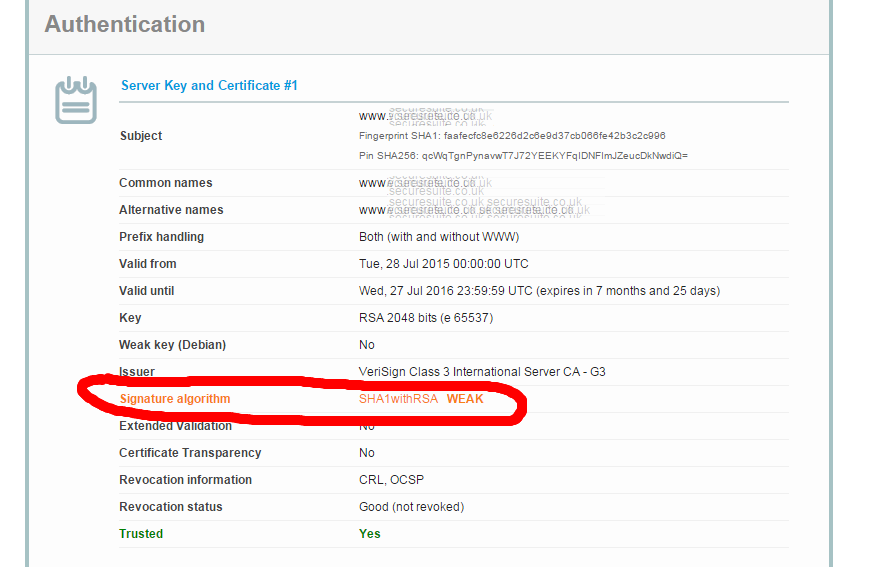
You can test easily whether a webpage/site is accepted at this site: https://www.ssllabs.com/ssltest/analyze.html

So when run for the above mentioned securesuite site, it tells us even in red the signature is still using the old SHA-1:


The site also even checks different clients like browsers and mobile operating systems like Android and iOS. And see the error in the Handshake Simulation section for ATS 9/ iOS 9: Client requires SHA2 certificate signatures

Running it against https://www.mastercard.com, which has SHA-2 as signature algorithm, the forwarding does work in iOS 8 and ios 9+: 
And the iOS 9 client also likes it:

To still be able to have iOS 9 and higher apps work with those less-secure sites which still use SHA-1, you can specify which domains are "ok-ish", i.e whitelist per domain. 
In the sections in https://developer.apple.com/library/prerelease/ios/documentation/General/Reference/InfoPlistKeyReference/Articles/CocoaKeys.html#//apple_ref/doc/uid/TP40009251-SW35 you can read how to whitelist: "Allowing Insecure Connection to a Single Server" and "Allowing Lowered Security to a Single Server" and "Using ATS For Your Servers and Allowing Insecure Connections Elsewhere".


Wednesday, June 18, 2014

Android and iOS app discovery and search engines overview

Introduction

Recently a friend of mine asked how to check if an app or type of app with certain functionality already exists. He had a great idea for an app (he thinks :) so wanted to figure out: does such an app already exist?
Entering the name of an app is not sufficient of course, you want to search on offered functionality too, since the name of the app might not match the functionality. E.g Tinder is a dating app, but the name Tinder doesn't show that (at least not in its early days!).

I knew there are a couple of websites and apps that provide that, but had a hard time coming up with more than one. This list is pretty ok, but already partly out of date.
So I decided to create this blogpost with a list of the current recent websites and their apps and some(!) app-only search apps that provide app discovery.

Main focus of this post will be on app search engine websites, not apps! Mainly because the research for an existing app you'd probably like to do behind a computer (laptop or PC), not a phone or tablet, since it requires quite some typing. E.g all types of ways of describing the functionality.
Also most focus will be on Android, but also some iOS search engines will be mentioned.

Below is a list of app search engines I found, including a screenshot and my short take on it. If any search engine is missing, please leave a comment and I'll check it out. If appropriate I'll add it to this page!

App discovery and search engines

1 Standard stores

Of course the standard app stores have their own search engine, either online and/or on the platform itself, e.g:


There are quite some more 3rd party app stores like SlideMe, but usually these are considered less important than the "big ones", so chances are minimal that there's an app in those stores which is not in the big app stores. But for adult content you mighthave to check those.

2 AppBrain

URL: http://www.appbrain.com/
Platforms: Android
Has app: yes


3 Quixey

URL: https://www.quixey.com/
Platforms: Android, iOS, Windows, Blackberry
Has app: yes


4 App Annie

URL: http://www.appannie.com/
Platforms: Android, iOS, Amazon, Mac
Has app: yes but can't tell from the screenshots if it includes searching etc


This is more intended for app analytics and ASO (app store optimization) and SEO but still usuable for checking what type of apps exist, e.g by keyword.
App Annie recently purchased Distimo, another well known app statistics/analytics platform.

Most parts are for free, "enterprise" is not.

5 AppGravity

URL: http://appgravity.com/
Platforms: Android, iOS
Has app: yes


6 AndroLib

URL: http://www.androlib.com/
Platforms: Android
Has app: no


Still refers to "Android Market" instead of Google Play.

7 AppsZoom

URL: http://www.appszoom.com/
Platforms: Android, iOS
Has app: yes


8 MobileDevHQ (formerly known as AppStoreHQ)

URL: http://www.mobiledevhq.com/
Platforms: Android, iOS
Has app: no


Similar to AppAnnie more intended for ASO and analytics and keywords optimilization, but can still come in handy. 

9 Regular search engines

More and more regular search engines are optimizing for finding apps. For for example Google, Apple and Amazon it's of course in their own interest to help people find apps for their platform.

10 App only

There are also many apps out there trying to help you find apps. I did not investigate those, but a query you could run to find a list is this one. 

11 DIY

If none of the above work for you, you could consider writing your own search engine/crawling engine. Here's a script for the Google Play store.

Saturday, April 7, 2012

Why cancel-button now also first on Android?

Just wondering about this big time...

Why is Android switching the standard buttons order for Android 4.0 and higher? See for example this screenshot, the cancel button is now the first button!
I was always taught that what the user most likely wants to do should be first, and so the dismissive button last.
And Cancel is usually not what to user wants to do!

Apple is doing it also in their iOS, is Android now just plainly copying it?
Definitely prefer Cancel at the end, (western) reading occurs from left to right, so now one always has to read/skip the dismissive button!

From the expert the conclusion is just to be consistent. That means at least within the Android platform it is not consistent between pre 4.0 and 4.0+... I think an unneeded and unnecessary change.

Monday, September 26, 2011

Segmented Button Control in Android

For an Android project I did a little while back I needed a pair of so-called segmented buttons, as they are named in iOS (see for example the official iOS API for it).

The idea is that when you select one of the buttons, it usually shows just about the same related data but in a different way (at least that's my translation of what it should do).
The Android version of it which I provide below looks currently most like the third and fourth example in the above image. But of course you can change the code to style it like the others too.

Android does not have this control out of the box. Luckily, I found a reference to the source of the Foursquared app.
In there, a segmented button control is created! Big thanks for the creators of Foursquared for sharing the code and thus of the segmented button control :)

Since the Foursquared app is quite big, I extracted the segmented buttons code from it and made it an Eclipse project, for your and my convenience. It's now just one Activity and the widget.
You can get it from here and use it anyway you like, following the Foursquared source Apache License 2.0 rules of course.
Here's two screenshots of what it will show:


Above shows at startup by default the Recent button is selected


Above shows after clicking on the Nearby button

Please not that I kept it as basic as possible; for example you'll keep seeing the progress indicator from layout/empty_loading.xml, which of course should be replaced with actual data. I also did not go through all the drawables etc to see which ones are needed and which are not, so you'll still have to clean those up.
Code has been tested on 2.1-update1.