Showing posts with label sha1. Show all posts

Wednesday, December 2, 2015

iOS9 / iOS 9 / iOS 9.1 / ATS 9: An SSL error has occurred and a secure connection to the server cannot be made due to old sha1 signed certificate

In iOS 9 and higher apps, a higher level of ciphers is required for a certificate for Forward Secrecy.

Before iOS 9, it was possible to let a site within a webview forward/redirect to another SSL protected site.
For example it was possible to let another site redirect to this one in iOS 8: https://www.securesuite.co.uk/

But since iOS 9 it is not allowed anymore and you'll get an error like:

An SSL error has occurred and a secure connection to the server cannot be made." UserInfo={NSUnderlyingError=0x7f9855dcb520 {Error Domain=kCFErrorDomainCFNetwork Code=-1200 "An SSL error has occurred and a secure connection to the server cannot be made." UserInfo={_kCFStreamErrorDomainKey=3, NSLocalizedRecoverySuggestion=Would you like to connect to the server anyway?, _kCFNetworkCFStreamSSLErrorOriginalValue=-9802, _kCFStreamPropertySSLClientCertificateState=0, NSLocalizedDescription=An SSL error has occurred and a secure connection to the server cannot be made., NSErrorFailingURLKey=https://www.securesuite.co.uk


You'll just see a blank/white screen in the webview; no errors or whatsoever on the screen.

The by-default supported list in iOS 9 and higher can be found here: https://developer.apple.com/library/prerelease/ios/documentation/General/Reference/InfoPlistKeyReference/Articles/CocoaKeys.html#//apple_ref/doc/uid/TP40009251-SW35
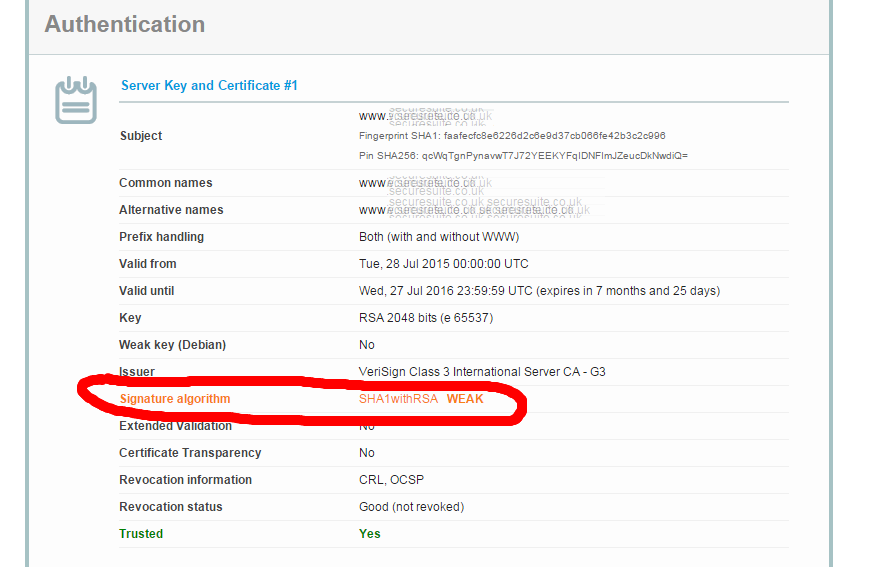
You can test easily whether a webpage/site is accepted at this site: https://www.ssllabs.com/ssltest/analyze.html

So when run for the above mentioned securesuite site, it tells us even in red the signature is still using the old SHA-1:


The site also even checks different clients like browsers and mobile operating systems like Android and iOS. And see the error in the Handshake Simulation section for ATS 9/ iOS 9: Client requires SHA2 certificate signatures

Running it against https://www.mastercard.com, which has SHA-2 as signature algorithm, the forwarding does work in iOS 8 and ios 9+: 
And the iOS 9 client also likes it:

To still be able to have iOS 9 and higher apps work with those less-secure sites which still use SHA-1, you can specify which domains are "ok-ish", i.e whitelist per domain. 
In the sections in https://developer.apple.com/library/prerelease/ios/documentation/General/Reference/InfoPlistKeyReference/Articles/CocoaKeys.html#//apple_ref/doc/uid/TP40009251-SW35 you can read how to whitelist: "Allowing Insecure Connection to a Single Server" and "Allowing Lowered Security to a Single Server" and "Using ATS For Your Servers and Allowing Insecure Connections Elsewhere".


Sunday, January 11, 2009

Best of this Week Summary 29 December - 11 January 2009

  • Interesting comparison whether and when to use SOAP or REST.

  • OpenSocial now has Java, PHP, Ruby and Python client libraries available.

  • A few weeks ago, PKI which uses MD5 as cryptographic hash function, has now officially been broken at the hackers convention Chaos Communication Congress 2008. Six Certificate Authorities still give out MD5-signed certificates as mentioned in the article. Since 2004 it is already known that MD5-collisions can be created for different data. Therefore, certificates should be issued with at least SHA-1 encryption. Here's a summary of what an MD5 collision is and what Mozilla and Microsoft issued as advisories. Additionally some (other) SSL issues are described.

  • Nice summary of lessons learned during a project using GWT, Axis and JPA. Some more comments here.

  • Paper by Kate McKinley (a researcher at iSec Partners, a San Francisco security firm) on the privacy protection mechanisms of FireFox, Chrome, IE and Safari. Conclusion: "We find current browsers are unable to extend tracking protection to third party plug-ins such as Google Gears and Adobe Flash. Some of these require no user prompting under common configurations and even expose tracking data saved with one browser sites visited by a different browser. [...] Safari on Windows fared the worst of all in these tests with respect to private browsing, and did not clear any data at all, either before entering or after exiting the private mode. On OS X, Safari’s behavior was quirky; in no case was the HTML 5 database storage cleared before or after private browsing.".