Sunday, May 10, 2009

Best of this Week Summary 04 May - 10 May 2009

  • Reference to an AJAX framework analysis/comparison result by Matt Raible (for example known for his framework of frameworks: AppFuse). Compared were Dojo, Ext JS, GWT, and YUI. Check also the comments.

  • Beginners level host and Java performance tuning concepts.

  • Handy PHP profiler and debugging tool/library. Helps you with logging, memory usage, double includes, page execution time and database activity monitoring.

  • Nice presentation on scalable web architectures from Cal Henderson, (ex) Flicker architect. Including horizontal vs vertical, architecture, sessions, load balancing, queuing, relational data, caching, H(ighly) A(vailable) data, federation, serving and storing files, CDN, real-world examples.

  • SpringSource has created Roo, a sophisticated round-tripping code generator that should make it quicker and easier to create and evolve Spring applications.

  • Funny: how to measure code quality: WTFs/minute :)


    Via.

  • You as a developer can now go social on IBM's myDeveloperWorks, a social network spun off of developerWorks.

  • An introduction on how one could formalize a SOA using WS-CDL, including a few real-world insurance based uses.

  • Yahoo has just released a major update for their innovative YQL. "The Yahoo! Query Language lets you query, filter, and join data across any web data source or service on the web. Using our YQL web service, apps run faster with fewer lines of code and a smaller network footprint. YQL uses a SQL-like language because it is a familiar and intuitive method for developers to access data. YQL treats the entire web as a source of table data, enabling developers to select * from Internet." The update adds "Execute", with which "developers now have full control of how the data is fetched into YQL and how it’s presented back to the user. With Open Data Tables, developers can build tables that manipulate, change, and sign the URLs to access almost any protected content, allowing YQL access and combining data across a variety of different authenticated services such as Netflix or Twitter. Developers can call multiple services and data sources within Execute to join and mashup data however they desire, letting Yahoo! do the work rather than their applications. Data can be tweaked and manipulated into an optimal format for applications to consume." Another example of what is possible can be found here. Check also this article for more explanations.

Sunday, May 3, 2009

Best of this Week Summary 27 April - 03 May 2009

Sunday, April 26, 2009

Best of this Week Summary 20 April - 26 April 2009

  • The big bigger biggest (sad?) news this week was of course Oracle going to buy Sun (here's Oracle's announcement). Rod Johnson (from SpringSource) is wondering what Oracle actually did buy. He concludes luckily one of the great strengths of Java is its developer and open source community, thus Oracle does not own the future of Java. Makes sense.

    Alef Arendsen (previously SpringSource, now JTeam) wonders which company/group will be the next, since only a few large opensource bodies are left: "the Apache Software Foundation (ASF), products in the Eclipse Foundation, products carying the JBoss name and last but not least, a broad set of products under the SpringSource umbrella".

    Sun "invited Oracle president Charles Phillips and chief corporate architect Edward Screven to an employee-only town hall last Wednesday", answering employee questions. In short: Oracle loves Sun's software (Java, MySQL) and hardware, but the future is unclear for OpenOffice and Sun's cloud effort.

  • A beginners tutorial on how to integrate GWT with PHP using XML as the "bridge" between the two technologies.

  • Manage your Amazon S3 with freeware CloudBerry Explorer. Makes it for example easy to move buckets between the US and Europe.

    Cloudkick is a free tool which allows you to migrate your Amazon EC2 AMIs to to Slicehost (owned by Rackspace).

Sunday, April 19, 2009

Best of this Week Summary 13 April - 19 April 2009

Sunday, April 12, 2009

Best of this Week Summary 06 April - 12 April 2009

Sunday, April 5, 2009

Best of this Week Summary 24 March - 05 April 2009

  • How can you make sure your site can handle peak-loads? This article lists the possibilities:

    • Over-provisioning (estimating what the peak will be).

    • Under-provisioning.

    • Right-sizing: estimate for a short period in time, then scale up or down: flexible scaling and auto-scaling.

    How this can be achieved? Add a middleware virtualisation layer that helps the application take advantage of these new dynamically added resources. The article also describes in detail how to add auto-scaling to your existing application, including a description how to try it out on GigaSpaces XAP which uses EC2.

  • Quite amazing, Salesforce.com runs on only about 1000 servers (and that's mirrored, so only really about 500 servers). Salesforce has more than 55K enterprise customers, 1.5M individual subscribers, 30M lines of third-party code and hundreds of TBs of data.

  • Here's a list of criteria when selecting a SOA testing tool.

  • A nice introduction to Hibernate's second-level cache.

  • Five tips for successfully deploying Maven. Including a bunch of pros and cons in the comments.

  • On a keep-an-eye-on-this-innovation side note, Digg introduced a interesting (new?) way of a URL shortener like TinyURL, and at the same time attract traffic. Just prefix any URL with http://digg.com/, and voila, a shortened URL appears including a Digg toolbar. Below I entered http://digg.com/http://ttlnews.blogspot.com/ in the address bar:


Sunday, March 29, 2009

Best of this Week Summary 23 March - 29 March 2009

  • Need to know whether a collection is modified concurrently, which causes the ConcurrentModificationException? Check this handy wrapper solution here.

  • The second article in the Transaction strategies series. "Using examples from the Spring Framework and the Enterprise JavaBeans (EJB) 3.0 specification, explained is how the transaction models work and how they can form the basis for developing transaction strategies ranging from basic transaction processing to high-speed transaction-processing systems".

  • For the Amazon EC2 now a free AWS Eclipse plugin is available. It facilitates remote development, deployment, and debugging Java applications on Amazon Web Services.

  • Three common mistakes to avoid when implementing XML and webservices: don't make your messages too large, don't create too fine-grained services, and don't forget to create an XML schema.

  • Javascript is getting more and more important the last couple of years, so here's a bunch of best practices and efficiency tips.

Sunday, March 22, 2009

Best of this Week Summary 16 March - 22 March 2009

  • Great article by Dion Hinchcliffe with 10 emerging technologies every software architect has to know about. In short:

    1. Cloud computing

    2. Non-relational databases

    3. Next-generation distributed computing

    4. Web-oriented architecture (WOA)

    5. Mashups

    6. Open supply chains via APIs

    7. Dynamic languages (e.g Rails, PHP compared to Java/.Net)

    8. Social computing

    9. Crowdsourcing and peer production architectures

    10. New Application Models (e.g the symantic web, opensocial, widgets)

  • Elaborate explanation of managing boilerplate text (e.g. titles, button labels, prompt, error messages, tool tips) in JSF applications. This includes more advanced locale requirements, like certain text that needs to be different when shown to junior and senior users.

  • Here's a nice diagram with an overview of what activities are needed to create a website, from idea to support and everything in between.


  • Always annoyed that you have to manually close a resource like InputStreams, Connections etc? And that the first exception might be surpressed by the second in the finally block? Here's a suggested solution: the Automatic Resource Management pattern by Joshua Bloch.

  • Ten more Eclipse shortcuts you maybe didn't know...

  • Of course you've heard/read that Microsoft has released IE8 last week. Here's a bunch of tips when migrating your site from IE7 to IE8.

  • Ever need to create a UUID/GUID? Here's a few offline generators compared. uuidgen is an online UUID generator supporting version 1 and 4. A handy FAQ on UUIDs with some more depth can be found here.

Sunday, March 15, 2009

Best of this Week Summary 09 March - 15 March 2009

  • A table-based quick review of the following RIA frameworks: GWT 1.5, Laszlo 4.2, pure Javascript and Flex 3.2.

  • A short introduction on how ActionScript 3 differs (and not) from Java.

  • A wiki constructed with over four dozen architects: 97 things every software architect should know. Also now available as a book. It includes advice such as:

    • Don't Put Your Resume Ahead of the Requirements (Nitin Borwankar)

    • Chances Are, Your Biggest Problem Isn't Technical (Mark Ramm)

    • Communication Is King; Clarity and Leadership, Its Humble Servants (Mark Richards)

    • Simplicity Before Generality, Use Before Reuse (Kevlin Henney)

    • For the End User, the Interface Is the System (Vinayak Hegde)

    • It's Never Too Early to Think About Performance (Rebecca Parsons)


  • An introduction to Object Oriented CSS.

  • Sample chapter from Thomas Erl's latest SOA Design Patterns book, and an interview with him. He "talks about the main benefits of having a pattern catalog, SOA and Web services, the current state of SOA, the difference between SOA and service orientation, and the role of patterns in SOA adoption".

  • A series of five articles on setting up a Java Wicket project and implementing a frontend with it.

  • Handy piece of (alpha) software to test IE8 RC1, IE7, IE6 and IE5.5 on Vista and XP. Note that it looks like Microsoft is releasing IE8 this coming week, so get ready...

Sunday, March 8, 2009

Best of this Week Summary 02 March - 08 March 2009

Sunday, March 1, 2009

Best of this Week Summary 17 February - 01 March 2009

  • A relatively new type of mashups are so called clipping mashups. Instead of building a mashup against some official API, a clipping mashup just parses the final content in the presentation, thus including CSS, Javascript etc. Links can be rewritten, new elements injected. The presentation doesn't have to follow for example portal JSR-168 standards.
    An example use case would be that you could use it to (temporarily) fix a bug in a system (not necessarily owned by you) until the official next release comes out.

  • Eight architectural styles described. Handy overview including which one could be when appropriate.

  • Summary of migration project from JDBC to Hibernate. Valid comment at the bottom is that iBatis might be a better solution when you have to work from an existing schema.

  • Additional tips and articles for the Wicket in Action book. For example this article on how to do a partial Ajax repaint of newly created repeater items (e.g adding 1 row dynamically to a table or list with a "+" button). This in contrast to rendering all rows in a table when repainting the WebMarkupContainer as in the example described here.

  • Nice step-by-step introduction to asynchronous processing in Java 5 using Futures, ExecutorServices, CompletionService, Callback interfaces and ThreadPools. Here's part 2 where it's being used in combination with Javascript to improve the user experience.

Saturday, February 21, 2009

Best of this Week Summary 16 February - 22 February 2009

Sunday, February 15, 2009

Best of this Week Summary 09 February - 15 February 2009

Sunday, February 8, 2009

Best of this Week Summary 02 February - 08 February 2009

  • In SOA lessons learned for Web 2.0 "two experienced SOA architects look at the new world of Web 2.0 technologies with a critical eye and present five best practices that can help you be more successful in adopting Ajax, REST, and other Web 2.0 technologies as part of your SOA."

  • A quick comparison between Echo2 and GWT. Both enable you to create a rich internet application with only Java using a component-based approach. Wicket is also component based, but requires still to work with HTML; not necessarily a negative thing! For example, how will you split the work between the user interface designer and developers with Echo2 and GWT?

  • A nice extensive summary of Model Driven Development misperceptions and challenges. Five challenges and five misconceptions in total.

  • A whitepaper named "Centralized Service-Oriented Architectures without ESB" which shows how to create service-oriented architecture in a Google-like way, that is services around huge data repository, but without ESB. It is based on experience of the writers in data warehouses, Wiki and telecommunication systems. Thus, proposed is not really an ESB, but an architecture that's more like a centralised repository with distributed caching. Of course this comes with its own set of pros and cons, as mentioned in the whitepaper.

Sunday, February 1, 2009

Best of this Week Summary 26 January - 01 February 2009

Friday, January 30, 2009

How far do you move your mouse cursor per day on average?

So, just how far do you move your mouse cursor in 20 weeks on your screen? My numbers in meters from mousing at work in the last five months of 2008 are shown below! Can you beat them?


Period


Machine_A


Machine_B


Total


04aug - 08aug


2548


588


3136


11aug - 15aug


944


3614


4558


18aug - 22aug


1362


3122


4484


25aug - 29aug


3028


1272


4300


01sep - 04sep


846


3403


4249


08sep - 12sep


1475


2231


3706


15sep - 19sep


1614


1005


2619


22sep - 26sep


2308


312


2620


29sep - 03oct


2636


1091


3727


06oct - 10oct


1335


1547


2882


13oct - 17oct


1176


1298


2474


20oct - 24oct


1533


1349


2882


27oct - 31oct


1736


555


2291


03nov - 07nov


1486


2405


3891


10nov - 14nov


10


3930


3940


17nov - 21nov


39


3984


4023


24nov - 28nov


0


2914


2914


01dec - 05dec


0


3026


3026


08dec - 12dec


0


4181


4181


15dec - 19dec


51


3800


3851


Totals


----


----


69764


Note that I was working on two machines for most of the time (no, not using the two mouses in parallel ;-), and four days a week except for three days in 1-4sept.

Some statistics derived from above table are:
  • I did a whopping 69764 meters of mousing in 20 weeks

  • In 20 weeks of 4 days per week I moused on average 872.05 meters per day

  • It can be clearly seen from the table that I stopped using Machine A in the week ending 14 September.

  • On average I moused 3488.2 meters per week


I used Modometer 2.0. It's the lightest one. A bit heavier is Mouse Odometer, which also allows you to easily see how much distance you covered compared to several landmarks like the Grand Canyon, or your own defined landmarks.

Could this measurement be used to see how productive a person is? If so, I'd be gaming with my mouse all day ;-)


Sunday, January 25, 2009

Best of this Week Summary 20 January - 25 January 2009

Sunday, January 18, 2009

Best of this Week Summary 12 January - 19 January 2009

Thursday, January 15, 2009

Setting up an Amazon AMI with Java and MySQL on EBS using the AWS Management Console

Introduction

In this post I'll describe the steps I performed to create my own Amazon Machine Image using the AWS Management Console and Windows XP as my local machine.
Just recently Amazon released their AWS Management Console. It's still in beta, but it makes life already so much easier: before it was available, you had to use quite a few scripts to get your own AMI ready.

The final AMI will have installed on it:

  • Fedora Core 8

  • 32-bit architecture

  • Java JDK 7 (1.7.0)

  • JEE 5

  • Tomcat 5.5.27

  • Apache 2.2.9

  • MySQL 5.0.45

I also will setup MySQL on Elastic Block Storage such that you can shutdown the AMI and not lose your MySQL data.
In the end you should be able to deploy for example a Java .war file (if correctly assembled of course) with the following frameworks without any problem:

  • Spring 2.5

  • Hibernate 3.2.5

  • Wicket 1.3

  • Sitemesh 2.2.1

  • Quartz 1.6.2

For the steps described below, I'm assuming you've already setup your keys and know how to start an AMI and get access to it via a browser and putty. If you don't know how to do this, on the AMC homepage there's a good introductionary video on how to do this.

Starting up an instance

You can start with a very basic AMI with only an OS installed on it, or use one that has already a lot more software installed on it.
As a starting point I used the publicly available Java Web Starter AMI. Notice that you can lookup AMIs without being logged in into AWS.
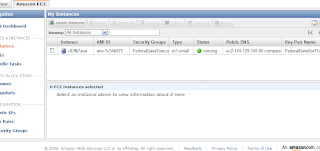
Start the instance such that you see something like this:

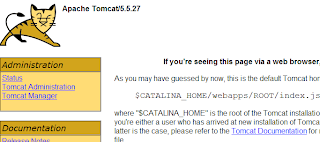
Check that Tomcat is running by going to the public IP of the instance. In my case I had to go to http://ec2-174-129-150-80.compute-1.amazonaws.com/. And I do see Tomcat:


Setting up MySQL and Tomcat passwords

In the basic AMI I'm using, MySQL root has no password and the Tomcat Manager login is admin/password. You don't want that in your final version, so let's change that. First login with putty to the instance (don't forget to use the ppk version of the key). You can login as root w/o a password because the key takes care of the authentication. Then change the passwords:
  1. MySQL password: login to mysql:


    mysql -u root


    And execute:


    GRANT ALL ON *.* to 'root'@'localhost' IDENTIFIED BY 'mysecretpassword'.


    Note that we're only allowing root access from the localhost (the AMI itself) and of course replace the 'mysecretpassword' text for your own password. Double check that you can now login with the new password. If not, you might have to restart the AMI (all changes are lost) and try again.

  2. Tomcat password:


    cd /usr/share/tomcat5/conf.


    Edit tomcat-users.xml, change the password field with value 'password' where it says username="admin" to your desired new password. Restart Tomcat to let the change take effect: /etc/init.d/tomcat5 restart. Go to your instance again with your browser and check that the new Tomcat Manager login works.


If there's anything else you like to change on your AMI, you should do it now, for as long as you don't terminate the AMI instance. Tip: Reboot is fine btw, that keeps the AMI settings!

Setting up MySQL on Amazon EC2 with Elastic Block Store

As a basis for these steps I'll be using "Running MySQL on Amazon EC2 with Elastic Block Store". The steps given in there are written prior to the Amazon AWS Management Console being available, so here I'll describe the changes necessary using the AMC. The steps in the article are also specificly for Ubuntu 8.04 LTS, but as you can see from the AMI I use as a starting point, I'm using Fedora 8. Only some of the commands differ, for the rest the steps work for both OSs. Í'll also be setting up Ext3 as filesystem, not XFS.
  1. Create an EBS volume with the AMC: click on Volumes on the left and click on the 'Create Volume' button. Enter the required capacity. AFAIK as long as you're not using the datablocks, you're not charged. So I put in 25GB as size. Select a zone (don't know how much it matters which one you pick, just make sure you stay in the same zone as your AMI). This should result in something like this:
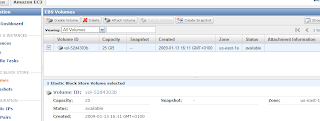

    Now attach the volume to the instance as device /dev/sdf (in the original article sdh is used) via the 'Attach Volume' button. When successful, the 'Attachment Information' status field has changed to "attached":
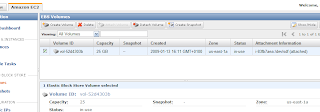

  2. Now let's format the volume and mount it. For that I deviated from the article and followed the steps you can also see when you click on the 'Help' button on the (current) EBS Volumes page in AMC. Thus execute in your putty session:


    mkfs -t ext3 /dev/sdf


    Hit OK on any questions. Then create a directory to mount the EBS volume on. Let's use a more distintive name than '/vol'. Let's create:


    mkdir /ebsmnt


    Then mount it:


    mount /dev/sdf /ebsmnt


    Note: at my first effort, I wanted to use /mnt/data (in the Volumes 'Help' button in the AMC they also give /mnt as an example), so I created that directory. But: the bundling command you'll see below does not include the /mnt directory by default! So then the /mnt/data directory doesn't exist on the new AMI, and then the auto-mount from fstab at bootup of the AMI will always fail for that reason!

  3. Make sure the mount is performed at startup by adding it in /etc/fstab:


    /dev/sdf /ebsmnt ext3 defaults 0 0


  4. Backup the new config file to the EBS into its own separate directory, maybe you need it some time:


    mkdir /ebsmnt/configs
    rsync -a /etc/fstab /ebsmnt/configs/


Now let's tell MySQL to use the EBS volume to store its databases.
  1. Stop MySQL:


    /etc/init.d/mysqld stop


    And to be safe:


    killall mysqld_safe


  2. Move the existing database files. Since there isn't much yet except a couple of test databases, not much needs to be done. First let's make a separate dir for MySQL on the EBS volume:


    mkdir /ebsmnt/mysql


    Then:


    cd /ebsmnt/mysql
    mkdir lib log


    And start moving stuff:


    mv /var/lib/mysql /ebsmnt/mysql/lib/
    mkdir /var/lib/mysql # Note that we need this dir for the mysql.sock file
    chown mysql:mysql /var/lib/mysql # Give it again the correct permissions
    mv /var/log/mysqld.log /ebsmnt/mysql/log/


  3. Tell MySQL to look on the mounted EBS from now on. Edit /etc/my.cnf and change it as below. The '# Was: ' indicates wat was there originally:


    [mysqld]
    # Was: datadir=/var/lib/mysql
    datadir=/ebsmnt/mysql/lib/mysql
    socket=/var/lib/mysql/mysql.sock
    user=mysql
    # Default to using old password format for compatibility with mysql 3.x
    # clients (those using the mysqlclient10 compatibility package).
    old_passwords=1

    [mysqld_safe]
    # Was: log-error=/var/log/mysqld.log
    log-error=/ebsmnt/mysql/log/mysqld.log
    pid-file=/var/run/mysqld/mysqld.pid


    Note that I put the log-error file also on the mount. The reason for this is that I want to have to logfile saved even when I shutdown an instance. If you don't care, you can leave it as it was.
    Another advantage I found out by practice is that when you've set the log-error like above, you can't detach the volume because MySQL is still accessing that logfile. So you can't accidentally detach, maybe leaving MySQL in an inconsistent state, which is a good thing (I mean not leaving MySQL in an inconsistent state).
    In that case you'll have to stop your instance w/o detaching it first (this makes sure MySQL shutsdown first). Update: as far as I can tell from /etc/rc.d, unmounting from fstab is done as the last thing, so doing a 'Terminate' of the instance to automatically let the shutdown sequence do the unmount and unattach of the volume should be safe.
    Note also that I didn't modify the mysql.sock socket file. Advantage is that I can keep using mysql and mysqladmin the way they are. If you would change the location of the socket file, say to /ebsmnt/mysql/lib/mysql/mysql.sock, then you will have to start mysql and mysqladmin with the '-S ' option.

  4. Backup the new config file to the EBS, just to be safe:


    rsync -a /etc/my.cnf /mnt/configs/


  5. Restart MySQL again:


    /etc/init.d/mysqld start


    You can check everything is going ok by tailing the logfile (on the mount of course):


    tail -f /ebsmnt/mysql/log/mysqld.log


  6. To see later on that the data is still available after having terminated the AMI, create an example database:


    mysql -p -e 'CREATE DATABASE esb_test_database'


So now the database is setup on the EBS. If you want to create snapshots, you can do that via the AWS Console or follow the instructions in the mentioned article, which also includes automated snapshots and cleaning up everything that has been created in EBS when following the above steps (handy to know, because otherwise you'll be charged for using it until the end of time! hahahahaaa).

So now the AMI is how I want it to be. Let's store it on S3 to make it persistent.

Bundling the new Linux AMI

This part is based upon Bundling a Linux or UNIX AMI from the online EC2 Developer Guide. There's currently almost no AWS Management Console facilities to do this, so we'll have to use the AMI Tools on the host AMI.

  1. Installing the AMI Tools: luckily they are already installed on the AMI we're using (how you'd think it got created? :-). Try this command to see that they are indeed installed (well of course that only proves this one is installed ;-):


    ec2-bundle-image --manual


    If you're using an AMI that doesn't have these tools installed, follow the steps in section 'Installing the AMI Tools' in the article.

  2. Bundling an AMI Using the AMI Tools: Let's do the bundling in /tmp:


    cd /tmp


    Then to bundle execute:


    ec2-bundle-vol --prefix Fedora8-JEE5-JDK7-Tomcat55-MySQL50 -k
    <private_keyfile> -c <certificate_file> -u <user_id>


    Note that I specify a prefix. By default it's 'image', so you'll get 'image.manifest.xml'. When you look at all the AMIs out there, they should be more descriptive than that, so I used Fedora8-JEE5-JDK7-Tomcat55-MySQL50.
    The other parameters are explained in the article. The user_id you can find in the AMC under the 'Your Account --> Account Activity' menu.
    Your private_keyfile is the pk*.pem file, which you need to upload to the AMI (host). The same goes for the cert*.pem file. Note I put them in /mnt so they won't get put on the new AMI, which you don't want!
    An example pscp copy from Windows command prompt to get the files over would be:


    pscp -i Fedora8.ppk pk*.pem cert*.pem
    root@ec2-174-129-150-80.compute-1.amazonaws.com:/mnt/


    Fedora8.ppk is the filename of the key generated for putty with puttygen, as clearly described in the before-mentioned video on the AMC homepage.
    You can accept all the defaults at the prompts.
    The warnings:


    "NOTE: rsync with preservation of extended file attributes failed. Retrying
    rsync without attempting to preserve extended file attributes..."


    and


    "NOTE: rsync seemed successful but exited with error code 23. This probably means
    that your version of rsync was built against a kernel with HAVE_LUTIMES defined,
    although the current kernel was not built with this option enabled. The bundling
    process will thus ignore the error and continue bundling. If bundling completes
    successfully, your image should be perfectly usable. We, however, recommend that
    you install a version of rsync that handles this situation more elegantly.
    "

    are (apparently) no serious problem, so these can be ignored.


    Note that a file with the same name as the --prefix parameter gets created in the directory where you started the command.
    Notice from the manual of the above command, that it skips /mnt (amongst others), so in case you mounted it there, the command won't include the whole mounted EBS in the bundle (luckily)!
    Note also that it seems the script is smart enough to not include the mounted /ebsmnt data either. If you want to be really sure, umount it first before running the bundle command.
    Running the command takes about 5-10 minutes.
    The message


    "Unable to read instance meta-data for product-codes"


    at the end does not seem to be a serious problem, I haven't found any problems at least :-).

Uploading a Bundled AMI

Here you can just follow the steps in the article, thus:


ec2-upload-bundle -b <bucket> -m Fedora8-JEE5-JDK7-Tomcat55-MySQL50.manifest.xml
-a <access_key> -s <secret_key>


The two keys should be under the menu 'Your Account --> Access Identifiers' in the AWS Mangement Console.
You can imagine being a directory in your S3 storage. Let's use "mybucket" as name.

Registering the AMI

There are two ways of registering. Via the AMC is described first. Then the old way via the Amazon EC2 API command line tools as in the article is described.

Via AWS Console
  1. Go to the 'AMIs' page and click the 'Register New AMI' button.

  2. In the popup enter the path to your above uploaded manifest file, including the bucket. So the whole path becomes:


    http://s3.amazonaws.com:80/mybucket/Fedora8-JEE5-JDK7-Tomcat55-MySQL50.manifest.xml


    Thus the popup would look something like this:
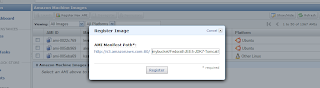


  3. Hit 'Register' to register the AMI. Too late for this tutorial I noticed this 'Register New AMI' button, thus here my personal practical experience ends for this option. I used the command line tools as described below. But I guess the result will be the same: a registered AMI!

Via Amazon EC2 API command line tools

For this I used the steps described here in the AWS Developer Guide.
For this you need to download and install the Amazon EC2 API command line tools on your local machine and a Java Runtime, I just used the Java 5 JDK.
Then run:


ec2-register mybucket/Fedora8-JEE5-JDK7-Tomcat55-MySQL50.manifest.xml


where mybucket is the you specified in the above 'ec2-upload-bundle' command.
It returns the id of the created AMI, e.g.


IMAGE ami-aabb5cc3


Now check that you can find it in the AMIs 'Owned By Me' in the AMC by searching for the above AMI ID ami-aabb5cc3. And yes there it is:
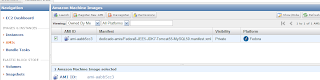

If you want, you can make it public such that other users can see it etc. But I won't describe that here.

That's it! And as final step:

Let's see if the new AMI actually works

Let's see if it starts up, the EBS volume can be connected to it and the newly created test database is still there.
First terminate the running (modified) AMI. Note that you can't detach, since MySQL still uses the volume!
Start the new AMI. Now the problem is that you can't attach until Fedora OS is starting to boot. But /ebsmnt can't be mounted until it is attached! Thus MySQL can't find its data.
So what you can do is run the 'ec2-attach-volume' command until it succeeds, or check the instance status until it reaches a "specific intermediate state" and then run the ec2-attach-volume command. This way you "hope" that the attachment succeeds before the mounting. I never managed to get this working.
The safest solution seems to attach the volume when the AMI has reached status 'running', and then reboot the instance.
Of course you can put this all in scripts to automate it as much as possible.

Note that my AWS Mangement Console did not show my newly running AMI instance when trying to attach a volume via the AMC. There might be some delay in status updates(?). The command 'ec2-attach-volume' did work in that case. An example of that command on your local workstation:


ec2-attach-volume -d /dev/sdf -i i-ec8f0e85 vol-52d4303b


Also don't forget to use the same zone for the volume and the instance, otherwise you also might not see the running instance in the 'Attach' popup window.

Done

Did you notice BTW what a large amount of memory you get, even for a small AMI instance:


Mem: 1747764k total, 176724k used, 1571040k free, 12236k buffers
Swap: 917496k total, 0k used, 917496k free, 64340k cached


Tip: for managing your AMI and other data that you (want to) store on Simple Storage Service S3, you can either use the more manual tools from Amazon or the great graphical Amazon S3 Firefox Organizer (S3Fox) Firefox plugin.