Sunday, June 22, 2008

Best of this Week Summary 16 June - 22 June 2008

Wednesday, June 18, 2008

How to sign a Firefox 3 addon

Of course you've noticed that Firefox 3 has been released (and that it didn't go that smoothly, trying to break the world record).


One of the major changes in the new FF3 release is that add-ons (plugins, extensions, whatever you wanna call it :-) need to either use an HTTPs updateLink, or if it is an HTTP updateLink, you need to sign the .xpi. The exact info on how to do this is quite scattered, so here I summarize it all in one place, in three steps! :-)

Below I'll focus on Step 2 mentioned in the high level migration steps: providing secure updates.

Step 1
Add the updateKey tag to install.rdf inside the em:updateKey tag. For details see here. Follow the mentioned McCoy link. In short: create a key with the tool, rightclick on the key you created, select Copy and put that inside em:updateKey tags within install.rdf, below em:updateURL.

Step 2
Create the .xpi and add its sha1 hash (right click on the .xpi + select properties in Windows.) to update.rdf as mentioned here. Note that you should put the em:updateHash below each em:updateLink you have in your update.rdf. Also don't forget the sha1: prefix.

Step 3
Add the signature to update.rdf. See here for an example signature. Select the key you used in Step1 in the McCoy tool. Click Sign in the menu. You'll be prompted to select your update.rdf. It will then generate (and overwrite!) your update.rdf, with the em:signature in it. I guess you can reuse this generated update.rdf for next updates (you'll need to re-hash and re-sign it when you update it), but to be save I also made a backup copy of my original update.rdf).

All in all not too complex, but the information was scattered. Useful in getting my mind around it and how it all relates was this thread.

Sunday, June 8, 2008

Best of this Week Summary 31 May - 08 June April 2008

  • Interesting article on how to do estimates with Use Cases.

  • The Google Ajax APIs will be available via cached versions for faster load times, stored at Google's servers. Hmmm, doubt that you want to depend on that...

  • An insight in Google's datacenters. Definitely worth reading. Google's core software consists of: GFS, BigTable and MapReduce.

  • The OpenAjax Alliance has created a set of papers "as a guide to help Web developers and IT managers understand and evaluate Ajax, define a successful Ajax strategy, and become familiar the important role OpenAjax plays in the development of the Ajax market". This one is an interesting one as it describes Ajax for mobile devides. On the other hand, browsers like Opera can already handle (some form) of regular Ajax, so is it worth making the distinction?

Sunday, June 1, 2008

Google Friend Connect vs MySpace Data Availability vs Facebook Connect

More and more users are not spending time on one website anymore. And users are getting "tired" of entering their contacts ("social network") every time again and again. The big social websites are realizing that and have created their own solutions to that. Well, potentially not their own solutions, but more their own branded solutions for what's defined by the Dataportability group.

The three announcements were:

Google's FriendConnect. It should give users a shortcut to social connections they have built on different social networks. The user can login with their Facebook, Plaxo etc accounts, allow the FriendConnect enabled site to retrieve the friends on that site, and if they're online, the user can interact with them. FriendConnect will use open standards like OpenID and oAuth. Biggest disadvantage is that an iFrame will be provided as the solution, so no API will be made available. Note that this makes Google the big switch between all these social networks! Since they don't really have a (big) social network site, this is their way of getting a piece of the cake: sitting right between all the social network sites! Some other concerns can be found here.
MySpace Data Availability. A bunch of launch partners will be able to access MySpace user data and be able to present it outside the regular MySpace widgets. MySpace users should be able to revoke the rights of the third party anytime. The third party is not allowed to store the retrieved user data. The good thing here also is that it will be made available via a REST API.


Facebook Connect. In short, the new API will give third parties' users the ability to transport the relationships from their Facebook accounts to the third parties' website. Compare it with what's now already available for Facebook applications (running on the Facebook platform) being made available for third parties. Immediately a big "chick fight" broke out, because apperently Google's Friend Connect is not respecting Facebook's user privacy control, as Facebook blocked FriendConnect! But it might just be Facebook protecting it's own turf :-)


Relationship with Dataportability.org
"The DataPortability Workgroup is actively working to create the ‘DataPortability Reference Design’ to document the best practices for integrating existing open standards and protocols for maximum interoperability (and here’s the key area) to allow users to access their friends and media across all the applications, social networking sites and widgets that implement the design into their systems."
So, let's hope the above initiatives will comply with the standards defined by the DataPortability Workgroup.


Relationship with OpenSocial
Both Google and MySpace are in the OpenSocial Foundation ("a common API for social applications across multiple websites. Built from standard JavaScript and HTML"). For MySpace their Data Availability project is outside the OpenSocial framework, but will stay involved in it too and incorporate when available.


The current status
All three are announcements are kind of the "branded" version of DataPortability implementations within the respective organisation. The furthest seems to be MySpace:
Facebook: no technical specifications released
MySpace: rolling out with only a few launch-partners
Google: not ready to launch yet.

Sunday, May 25, 2008

Best of this Week Summary 19 May - 25 May April 2008

  • Wow, that's quick: Spring now already supports oAuth. For a refreshment on a practical example of oAuth, see this TSS article.

  • Two great JavaOne2008 summaries here and here.

  • Opera's answer to Firefox's Firebug: Dragonfly.

  • MyOpenID now gives you the ability for an additional security check with your mobile phone(!) when logging in with your OpenID. When signing in, you'll instantly get a call on the phone number you setup at MyOpenID and you have to answer with pressing '#'. Nice!

Sunday, April 27, 2008

Best of this Week Summary 12 May - 18 May April 2008

Best of this Week Summary 05 May - 11 May 2008

Best of this Week Summary 28 April - 04 May 2008

Best of this Week Summary 21 April - 27 April 2008

  • How Yahoo! is transforming itself into an open and social platform, allowing developers access to internal assets of Yahoo. A first example of this is SearchMonkey. Below a screenshot of their new architecture Yahoo Open Strategy.


  • Two initiatives that could improve the chances of OpenID becoming more mainstream: IDSelector (also mentioned here) and Confident's RecognitionAUTH, which you can see implemented at MyVidoop (mentioned in a previous post).

  • Amazon announced its Fulfillment Web Service API, which allows merchants to automatically store inventory in Amazon's warehouses and ship orders to customers. Again, Amazon is one of the frontrunners in this area...

Monday, April 21, 2008

Best of this Week Summary 13 April - 20 April 2008

Not that much news this week (is it vacation already??? ;-)

Saturday, April 12, 2008

Best of this Week Summary 7 April - 12 April 2008

Sunday, April 6, 2008

Best of this Week Summary 31 March - 6 April 2008

Sunday, March 30, 2008

Best of this Week Summary 25 March - 30 March 2008

  • What is required to start building an RIA + SOA application, and how you could enable these activities. A potential answer could the Appcelerator platform mentioned in the article.

  • Nice collection of open source software testing tools (and news and discussion :-). These are the listed Javascript unittesting tools.

  • For the coders: the number of types in the .NET framework visualized (I know, I know, .NET but it's a nice insight anyway ;-)

  • Comparison of performance on many browsers of the Backbase Javascript engine and some widgets. In general interesting to see how these browsers compare. Includes IE8, Firefox 3 Nightly Build and Safari Nightly Build.

  • Three open source SOAP testing tools compared: Eviware SoapUI 1.6, PushToTest TestMaker, and WebInject's WebInject. Conclusion: The writer prefers "[...] the middle balance struck by soapUI. The skeletal tests created by soapUI's wizard were easier to flesh out than those built by TestMaker. And, if I needed to do something elaborate and off the wall, I could always call upon soapUI's Groovy capabilities – funny name aside, they do their job well." "In terms of how these products compare to commercial Web service testing tools, I'd say it's a mixed bag. They are, of course, inexpensive (free), and work well for easy to moderately-difficult jobs; on the other hand, they're somewhat less user-friendly than commercial tools and if you need to do something complex, you have to build it yourself."

  • Five commercial SOAP testing tools compared: AdventNet's QEngine, Crosscheck Networks SOAPSonar, iTKO’s LISA, Mindreef's SOAPscope Server, and Parasoft's SOAtest. Conclusion: "If your testing involves more than just Web services, and your development is primarily Java, then tools such as LISA or SOAtest are worth considering [...]. If, however, you are only interested in SOAP-based Web service testing, and your QA staff is relatively new to the technology, SOAPscope is the obvious choice." But maybe you want to let it depend on how you want to build the tests: by coding or visually with a GUI? This is what SOAPSonar, LISA, and SOAPscope have done. The writer favors coding tests and SOATest came out as winner.

Monday, March 24, 2008

Best of this Week Summary 17 March - 24 March 2008

  • What should you use in your SOA project: a BPEL process or an ESB?

  • Part 4 in a series on SOA Design: why and how you should use canonical models in SOA. "The canonical data model defines the structure of an organization's information."

  • SpringSource just released their SpringSource Tool Suite. Notice that it is different from Spring IDE. For example it helps you find common pitfalls and best Spring best-practices violations.

  • Yahoo! has released new performance best practices for building webpages.

  • Ways how you can run Firefox 3 beta 4 and Internet Explorer 8 while still being able to easily switch back to FF2 and IE 7.

  • The new OpenHub spec version 1.1 from the OpenAjax Alliance now also includes IBM's contributed Secure Mashup framework (SMash). SMash provides for secure handling of third-party mashup components. OpenHub can be used by developers to "integrate multiple toolkits within the same Web page while toolkit developers can use it to allow toolkits to talk to other toolkits."

Sunday, March 9, 2008

Setup and Installation Ubuntu Development Environment with VMWare Part 2

This is the second post in my series on how to setup a development environment on Ubuntu 7.04 (Feisty Fawn) with VMWare 6.02. In this post I'll be detailing how I setup Eclipse 3.3 (Europa), thus with WTP and PDT. I'll also describe my experiences with Europa 3.2 (Callisto), because I tried that too, in case I couldn't get 3.2 working...

Install Sun Java JDK 5

Since I want to use Java 5 in Eclipse, I first installed the JDK via: 'sudo apt-get install sun-java5-jdk', which installs it in /usr/lib/jvm/java-1.5.0.sun. Make sure you use the Java 5 JDK by setting it via "sudo update-alternatives --config java'.

Install Eclipse 3.2 Callisto with WTP

Installation of Eclipse 3.3 is not supported via the repositories. But first I wanted to try to get 3.2 running anyway.
Step 1 - Installation steps Eclipse 3.2 and setup JDK
Substep 1a - Installed Eclipse 3.2 Callisto via 'sudo apt-get install eclipse' and that worked fine.
Substep 1b - I then installed WTP via Eclipse's own Software Updates mechanism. You might want to install it to "/usr/local/lib/eclipse" to make the plugins available for other users. After this, you can find Eclipse 3.2 in the menu Applications/Programming/Eclipse.
Substep 1c - Then set JDK 5 in Eclipse as the one to use (instead of the default GCJ; is not the greatest performance wise apparently).

Install Eclipse 3.2 Callisto with PDT

Apparently it is not really supported, see here and here. So I did try it for a bit but gave up when I found those two statements.

Install Eclipse 3.3 Europa with WTP and PDT

Since I couldn't get it to work with 'get-apt' nor by downloading the .gz, extracting and setting symbolic links to give all users access to it, I followed these steps, which only make it available for the current user:
Step 2 - Installation of Eclipse 3.3 Europa
Substep 2a - Followed the steps in the User Installation section. I used the zip from here.
Substep 2b - Added WTP as I also did above for 3.2. Select what you want. don't forget: expand nodes otherwise 'Get Required' won't search in them!! I also let the plugins installed in the default (Eclipse installation) directory, because we only want the plugins for this special 3.2 version.
Substep 2c - Installed the PDT plugins as described here. It was complaining missing required ODA runtime 1.5.1. To fix that I manually had to select the appropriate checkbox, see screenshot below.


Issues resolved

One problem I was having is that after starting up Ubuntu it always gave the message "There was an error loading the theme Human. Can't open file /usr/share/gdm/themes/Human/Human.xml". I tried changing it in the menu System/Preferences/Themes, but again it showed up. I also tried 'sudo apt-get human-theme', but after reboot the message still appeared. Then I tried removing and adding the feisty themes as mentioned here: 'sudo apt-get remove feisty-gdm-themes' and 'sudo apt-get install feisty-gdm-themes'. Of course I first made a VMWare snapshot before trying this! Actually, the 'remove' said I didn't have the themes installed. And indeed, after a reboot, the message was gone!

Best of this Week Summary 03 March - 09 March 2008

  • Good article on Premature Code Optimization and the often made (invalid) conclusion: 'as a developer I don't need to optimize until the code is finished'.

  • Practical use of Java in four web conferencing products described. Including integration with Flash.

  • A talk with the director of engineering at Google about OpenSocial. Most interesting point is that indeed OpenSocial is not to interconnect social networks. Unless they are Social Graph enabled, but there is no site that supports it yet. Google also released the Contacts API this week.

  • Related to that is Higgins: "An open identity framework designed to integrate identity, profile and social relationship information across multiple sites, applications and devices. Supports multiple identities because you don't want to use the same identity for MySpace as for your financial sites." Contributors include the big names like Google, IBM and Oracle.

Sunday, March 2, 2008

Saturday, February 23, 2008

Best of this Week Summary 18 February - 23 February 2008

  • Nice overview showing how a Ruby on Rails Facebook application named "Friends for Sale" scaled to handle 200 requests/second and 300M page views per month. Includes the used hardware, software, # of visitors etc.

  • This is a short article describing Comet, one of the better known technologies to push events from the server to the browser client. Also explains the name Comet (I for example thought it was a software product, not a technology).

  • Reference to a thorough thesis (conclusions in the article) on performance of AJAX applications for 12 frameworks on mobile devices. Also 5 larger AJAX websites on mobile devices were compared.

  • Nice (but not very elaborate) comparison of 9 features and benchmark of four JEE 5 servers: JBoss 4.x (OSS), Glassfish 2.1 (OSS), WebSphere 2.0 CE (OSS) and WebLogic 10. Check the reference to the jRealBench (zip) benchmarking tool.

  • IBM has just opened their Jazz tool for beta. This post is a short description of installing and using it. Jazz "is a collaborative development environment product based on Eclipse, designed to support the application of RUP, which is itself an interative software development process framework built around iterative". But as you can see in the comments, it's not really restricted to RUP.

Sunday, February 17, 2008

Best of this Week Summary 11 February - 17 February 2008

  • Jaxer is an interesting new approach to development that brings Javascript, DOM, HTML and CSS to the server! An example of its use is that it helps you to reuse your validation logic on client and server. Here's some hands-on experiences.


  • TrustBearer is connecting the (hard) real world with the (software) virtual world for OpenID authentication via hardware token, smart card or biometric reader.

  • Some experiences from using Amazon's EC2. Check also the comments. This week though EC2 and S3 were not performing as they should be. Amazon gave an explanation for the outage (in short: an accidental DDOS).

Sunday, February 10, 2008

Best of this Week Summary 28 January - 10 February 2008

  • Interesting idea mentioned in this post: the very basic site inursite.com validates your markup daily and you get sent the result via email or RSS. Of course during the building your site should already validate, but this site can help for Continous Integration of your front-end.

  • Great overview of Javascript/AJAX performance issues in all major browsers (except Opera). You can use this information to know where to focus your Javascript optimizations on.

  • This week several BIG names joined OpenID: Google, Verisign and IBM.

  • Google's just released Social Graph API. It tries to find public relationships between people's accounts.

Sunday, January 27, 2008

Setup and Installation Ubuntu Development Environment with VMWare

In this posting I'll describe my steps and experiences during the setup of a development environment for Java and PHP on Ubuntu 7.04 using VMWare Workstation 6.02. I expected it to go a lot smoother than it actually did. With this post I hope I might save somebody some time because of de steps described here :-)

The desired final setup:

  • HP Pavilion DV6000 laptop with 2G RAM, 1.6Ghz, 110G HD, AMD 64b.
  • VMWare Workstation 6.02.
  • Ubuntu 7.04 (Feisty Fawn).
  • I never used Ubuntu before.
  • I wanted a clean VMWare image with Java 5, PHP 5, Eclipse 3.3, MySQL, Tomcat and SVN installed.
  • Gnome desktop.
My initial goal was to use Ubuntu 7.10, but I couldn't get that installed because of an error that VMWare WS gave. Not really suprising because 7.10 is not in the list of supported guest operating systems. Thus I switched to 7.04.

I suggest you read all the steps first before starting, because I'll also list the trial/error I came across...

This first post is purely about the Ubuntu and VMWare setup. In a next post I'll be describing the development tools installation and setup (Eclipse, Java etc.)

Installation

Step 01 - Downloaded Ubuntu 7.04
Step 02 - Downloaded VMWare Workstation 6 (v6.02 to be exact)
Step 03 - Installed VMWare WS, using the trial license key. I already had several VMWare 5.5 images and they all migrated successfully. Great!
Step 04 - Created a new Virtual Machine with 16G of diskspace. Didn't select "Allocate now", thus letting it grow, so not directly reserving 16G of diskspace.
Step 05 - Selected Ubuntu 64-bit.
Step 06 - Used Bridged networking (gives you least setup-fuss)
Step 07 - Since I didn't want to burn a CD from the downloaded Ubuntu .iso image, I just let the CD-drive of the Virtual Machine point to the .iso image: Select Edit virtual machine settings. Select the CDROM. Select Use ISO image. Browse to the path where you downloaded the Ubuntu 7.04 image and select the file. After installation you have to undo this setting of course. See here for full instructions.
Step 08 - Powered on the VM. Ubuntu install is started.
Step 09 - I selected a hostname
Step 10 - It picked UK timezone. You can change it later if you want/need to.
Step 11 - I let it detect the keyboard itself. It did it correctly.
Step 12 - Partitioning setup:

My first idea was to do a "full production/very flexible" partitioning like this:



But that I considered too complex for my development server setup. So I used this partitioning:
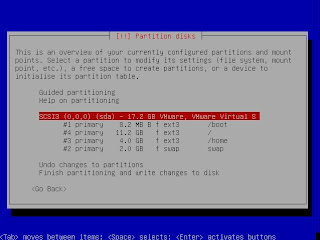

Note that in the end (see below) I set the /boot to 50M (instead of the shown 8.2M) and that for /boot I set the Bootable flag to true.

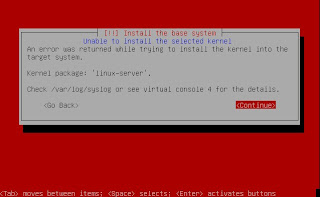
Step 13 - After partitioning, the install process wanted to install the software. There I got stuck a bit. I got some generic errors, saying I should look into /var/log/syslog. I thought I couldn't do that because I hadn't installed anything, so no OS yet, so no filesystem yet. So I tried installing other versions (non 64-bit etc) with the same partitioning setup (8.2M for boot). But everytime I got a similar error. An example of this error:


Then I saw I could see the syslog file by opening a very basic prompt (either after restarting or after cancelling the error; can't remember anymore :-(
In that logfile it showed it was running out of diskspace. So it turned out the 8.2M for /boot was too little! So I set it to 50M and the installation all worked like a charm. Note that at this point I also tried Ubuntu 7.10. It still did not work even after a bootdisk of 50M: it just hang when trying to extract/install libntfs or something, probably the Samba server..., so I gave up on that one at this point. Note that 7.04 did ask me for less additional software to install (e.g. no SAMBA server).

Gnome, VMWare Tools Installation

Step 14 - So now I had a terminal with login prompt. By default, Ubuntu does not let you login as root. There's even no password. You can set one with "sudo passwd root" after logging in as the admin user, which you specified during installation. Note that the first password you get prompted when issuing "sudo" for, is the password of the user you're logged in as! Thus at this point the non-admin user you specified during the installation process.

Step 15 - So the basics are setup now: a crips clean Ubuntu 7.04 installation. A good point to make a VMWare snapshot so I did.

Step 16 - Now I needed Gnome desktop, thus I did the following steps. I actually wanted to issue startX myself but in the end, when I got all the things mentioned in the next steps, Gnome started by itself during booting :-( I basically followed the steps mentioned here.
Substep 16a - sudo apt-get install ubuntu-desktop
Substep 16b - sudo apt-get install gdm
Substep 16c - sudo /etc/init.d/gdm start
Substep 16d - sudo dpkg-reconfigure xserver-xorg
BUT I found out that it does indeed download OpenOffice etc, which I didn't want. So I rolled back to my previous snapshot (that's what they are for!! I'm lovin' it! :-)
So I did this as mentioned in the thread to only install the minimal:
Substep 16aa - sudo apt-get update
Substep 16bb - sudo apt-get install gnome-core
But then startX didn't work, it gave errors like it couldn't find XServer. So I did this:
Substep 16aaa - sudo apt-get install x-window-system-core
Substep 16bbb - sudo apt-get install xserver-xorg
Substep 16ccc - I did NOT do : sudo apt-get install gnome-desktop-environment

Step 17 - Used as resolutions: 1280x800, 1024x768, 800x600, 640x480. I actually forgot I have 1280x800, which got met unfocused letters. I manually added it in /etc/X11/xorg.conf, as mentioned here. That worked, all texts were in focus again.

Step 18 - Then I did the VMWare Tools installation:
Substep 18a - Installed VMWare tools on guest via VM engine tab: Install VMWare Tools as is mentioned in ws6_manual.pdf p125-p128 and further.
Substep 18b - Then mounted the cdrom with: mount /dev/cdrom /media/cdrom0
Substep 18c - cd /tmp
Substep 18d - Unzip and tar the VMWare tools *.gz file
Substep 18e - umount /dev/cdrom
Substep 18f - cd to vmware-tools-distrib
Substep 18g - ./vmware-config-tools.pl
Substep 18h - etc. That all worked fine.

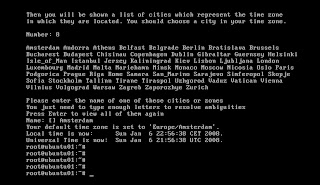
Step 19 - The time used by the OS was still not ok (remember I selected UK timezone). I even set the VMWare time of the guest (Ubuntu) to sync with the host, but it didn't change it. Finally I figured out on Ubuntu you can use tzconfig (got that from here. Yup, it asks you a couple of questions and then you're set! See also this screenshot:


Step 20 - Then I found out switching to another user in the Gnome desktop didn't work, it gave an error like this: "Couldnot run command gdmflexiserver."
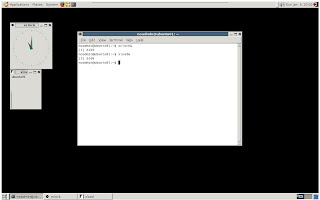
Substep 20a - So I did do the command 'sudo apt-get install gnome-desktop-environment'. The desktop now looked a bit better, slicker and got some more Administration menu items like System log etc. Also now games, movie layer, evolution (email). And now Switch user gives: "GDM (Gnome display manager) is not running". After logout at least now the font-size is back to normal in terminal mode (it used to get very large).
Substep 20b - I just gave up on this part for the time being. I did notice that the desktop is now started automatically after reboot. Not really what I wanted but too much hassle to try to fix it.
Substep 20c - So the end result was:


Additional repositories

Step 21 - Usually you don't only want the default installed repositories that apt-get uses. Thus you can add more via this:
Substep 21a - Selected the ones I wanted on this website. I selected: default ones, amd64bit, Ubuntu backports project.
Substep 21b - Clicked Create Sources list. It generates a repositories file in the correct format, which I put in sources.list in the steps below.
Substep 21c - Backed up my previous sources.list file: sudo mv /etc/apt/sources.list /etc/apt/sources.list_orig
Substep 21d - Pasted the generated list in the file: sudo vi /etc/apt/sources.list
Substep 21e - Told apt-get you updated the sources: sudo apt-get update

Outstanding issues

Step 22 - Some other issues I still have:
Substep 22a - When I do System/Logout, it seems to kill Firefox the hard way (instead of nicely killing), since after starting X again, it says Firefox exited unexpectedly...
Substep 22b - It also turns out you can't save your session in the second workspace; you'd have to use Devil's Pie. Or what you could do as intermediate solution: start all in the first workspace, drag the ones you want to the other workspace(s) after startup... You have to drag it between the workspaces, you can't drag it onto the "big" screen.
Substep 22c - The default font was not looking great. You can quite easily change it, but I don't remember the URL where I read how to do it... :-(

So, that concludes this first installation and setup post. In a next post I'll continue on installing Eclipse 3.3 (Europa) and PDT related plugins (PHP support in Eclipse w/o completely installing PDT) and Java.

Best of this Week Summary 21 January - 27 January 2008

  • Nice routing pattern for webservices that need to provide both synchronous and a-synchronous calls. You can even make the router such that depending on certain criteria (like load, response time), it will either turn the call into an a-synchronous call when needed. Disadavantage of this approach is of course that the caller has to be able to support both an a-synchronous and a synchronous version of each call. Related patterns you can find in these seven Self-Service: select application patterns.

  • An effort to give answer to the question whether Tomcat is an application server or not. GREAT introduction to JEE btw, so good read for beginners or as a refresher. The answer: Tomcat does not support the entire Java EE stack: no distributed transactions, EJBs, and JMS.

  • IBM made their Jazz tool available for the public. It can be used to "build a scalable, extensible team collaboration platform for integrating work across the phases of the development lifecycle." Note that it is not fully opensource yet. There's also a Mylyn connector available for Jazz.

  • Version 3.0.0 of HTML Purifier has been released. It will scan your HTML for malicious XSS code, check for compliance and will try to fix your code.

  • Summary of a statement made by Bruce Eckel in this article that Java should not change much anymore: it should stop growing and just become stable, and Sun should focus on optimizing/extending the JVM. Interesting considerations.

  • And finally for this week, for the developers among us, a bunch of shortcut keys in Eclipse you might not know about.

  • The Open Source hardening Project of the US Homeland Security department together with Coverity has led to the milestone where in 11 opensource projects all main bugs have been fixed. These 11 have been moved up to the new level Rung 2. Here you can see all the results of the scan.

Saturday, January 19, 2008

Best of this Week Summary 14 January - 20 January 2008


Sunday, January 13, 2008

Best of this Week Summary 07 January - 13 January 2008

  • The DataPortability.org is a quite recently started organisation that is trying to define the end-to-end data portability of identity, making use of existing technologies (like RSS, OpenID etc) as much as possible. Biggies that joined this organisation already are for example Google, Facebook and Plaxo.

  • Great article on the motivations and issues on the apparent move to the new web development platforms and architectures like PHP, Ruby, RoR, REST and WOA. Also includes a simple example how you can really quickly create a RoR application and use its auto-generated REST API.

  • Nice story/blog of a (Ror) webapp Pulse (it is a web-based cash flow management tool that allows you to easily monitor the heartbeat of your small business -- your cash) that was built in one month. Includes tools used etc. They used Basecamp to communicate and collaborate between teammembers during the project.

  • Here's a good bunch of Javascript optimalisation tips for IE from Cyra Richardson, Senior Program Manager Lead on the IE team.

  • Impressive stats on the data Google processes using MapReduce technologies for their indexing and searching.

  • Short piece on how The Burton Group sees REST might be replacing SOA. Interesting is the example that explains how REST requires a different way of thinking (though I don't agree you should completely let the OO mindset go):
    Quote: "A REST application to turn on and off the lights in your building will require you to design a URI for every light bulb and then you send it on/off messages," [...] "It's not like I have a single service that manages all my light bulbs. It's a very different approach to designing a system. And it's going to be really hard for developers to get their hands around it."

Sunday, January 6, 2008

The Future of OpenID

This is my final post in a series on OpenId. Previous posts you can find here, here, here and here.

This last post is about where OpenID is going to or might be going to, and related technologies/things that come to mind. Of course I can't see in the future, but the points described below seem quite viable to me...
Finally I'll list some more links related to OpenID I couldn't place in any other post before.

Of course you've seen the release of the OpenID 2.0 specifications. See here for what has changed from OpenID 1.0 and 1.1. One thing it supports now natively is XRI.

An intesting new specification is Open Authenthication. It provides an open standard for API access delegation. OpenID does not support this, thus this protocol seems to be a good complement for it when using APIs. OAuth has not been made an extension to OpenID because "OAuth attempts to provide a standard way for developers to offer their services via an API without forcing their users to expose their passwords (and other credentials). If OAuth depended on OpenID, only OpenID services would be able to use it, and while OpenID is great, there are many applications where it is not suitable or desired. Which doesn’t mean to say you cannot use the two together. OAuth talks about getting users to grant access while OpenID talks about making sure the users are really who they say they are. They should work great together."

Related to identity is being able to pass human relationships using hyperlinks. For that XFN (XHTML Friends Network) was introduced, a simple HTML microformat. Can OpenID identities in some way be integrated with this? Six Apart is trying with this demo of the so-called Social Graph.

A very relevant question is whether OpenID can converge with SAML, which both have for example different levels on user experience and (not) being a trust system. In the article some interesting viewpoints/potential next steps are discussed.

Of course the outstanding issues I wrote about in this post still apply; can they all get resolved and will this increase general acceptation of OpenID?

An interesting approach is the one Vidoop takes via MyVidoop. It is an OpenID provider, but it works with images instead of passwords. See more details here and definitely check the comments, especially this one and the ones below it. Also this one from Sam Sethi is worth reading.

And finally, here's a bunch of miscelleneaous links related to OpenID I couldn't place in any of my other posts, but are still interesting:


Well, that concludes my series on OpenID. I hope you found it useful in some way or another!

Saturday, December 29, 2007

Best of this Week Summary 17 December - 29 December 2007

  • Always interesting, a look inside "the kitchen of": the people from 37signals.com have provided some inside-info on the architecture of some of their sites: Backpack en Basecamp. For
    example they are using RoR, MySQL, S3 and memcached.

  • Post (related to the ESB entry in my post last week) regarding the rise of Tomcat as "application" server, in relation with the rise of Spring. Comparing Tomcat with WebLogic and WebSphere is more like comparing Oracle with MySQL. Tomcat is still not at the same level in certain areas as WebLogic and WebSphere, though it is making progress in these areas: clustering and high availability.

  • There's a new revised version of the free e-book from Microsoft on the most important security engineering activities that you should have in your development process: The Developer Highway Code. Written by Paul Maher (Microsoft UK) and Alex Mackman (CM Group Ltd).

  • Great news, version 2.0 of SoapIU has just been released. Improvements include webservice WSDL coverage and WS-Security completely refactored.

Sunday, December 23, 2007

Best of this Week Summary 16 December - 23 December 2007

  • Nice set of 10 lessons learned from designing and building a high transaction database (Microsoft SQL Server). The system was required to support 35K tps.

  • Reasonable comparison of 3 open source applicationservers: JBoss 4.2, Geronimo 2 and Tomcat 6. Geronimo comes out as most complete. Tomcat is a bit odd in this comparison, it is more a servlet/web-container than a full applicationserver. Glassfish for example would have fitted better here. Here's some The ServerSide feedback on it.

  • In this article Paul Fremantle discusses the fundamentals of the Enterprise Service Bus concept. His point is that the model of ESB sometimes might be converting into an anti-SOA pattern: the conversion of the formats happens in the ESB instead of happening at the service providers (the endpoints). Thus you would need a central ESB team that needs to deal with each application, its format and protocol the ESB needs to interface with. Note that the author is owner of the WSO2 ESB, his company and also works on Apache Synapse. As he claims these tools are designed from the ground up to match the original idea of SOA: the owners of the services take responsibility to define a clean and simple interface.

Saturday, December 15, 2007

Best of this Week Summary 10 December - 15 December 2007

  • Good summary of somebody using GWT for three months and the pros and cons found.

  • Short intro to Amazon's new offering SimpleDB, which is its third offering besides S3 (Simple Storage Service) and EC2 (Elastic Compute Cloud). It provides "a simple web services interface to create and store multiple data sets, query your data easily, and return the results".

  • Nice set of best programming practices for Spring.

Sunday, December 9, 2007

Best of this Week Summary 03 December - 09 December 2007

  • Interview with Bruce Schneider, Internet security guru on security (duh), privacy, electronic voting, encryption, passwords and more. One of the ways to attack identity theft is to not rely on authenticating the person, but on authenticating the transaction, as credit card companies do. Another thing he mentions is to *write down your passwords*, which is contradictionary to what you read everywhere; but he says, just put the paper in a safe place like your wallet! And because you write it down, you will more likely pick a strong password.

  • Summary of this week's held Google Web Toolkit conference "Voices that matter".

  • Nice inside view on how BT uses social software like RSS, Wiki, Podcasts etc. on their intranet.

  • Pattern specification of the requester side caching pattern and its implementation.
    The requester side caching pattern is one of mediating the interaction between one or more clients and one or more data providers. The mediation consists of holding data items that have been produced by the provider(s) and using them to support requests from the client(s).

  • Finally the OpenID 2.0 specifications have been made final and released!

Sunday, December 2, 2007

Best of this Week Summary 26 November - 2 December 2007

  • Nice article on designing to facilitate unittesting, e.g. using interfaces to decouple an implementation class from its dependency.

  • Here's a couple of reasons when to use and when not to use stored procedures. Most of the time it is not such a good idea to use them, except for example when having data-intensive/abstract computations, or batch-oriented operations.

  • Interesting post on how PayPal is transacting 1500 USD per second(!) every day, and that their system is completely build in-house, running on thousands single-rack Unity servers. By using this kind of chunks (instead of a mainframe approach) they can upgrade a lot cheaper, because the servers are so cheap. This distributed, highly redundant Linux approach make the system a lot less vunerable to failures. A big benefit they have using open source is that it is a lot cheaper to have a development environment that is exactly the same as the production environment, therefore reducing the chance of inconsistent results and bugs caused by difference in environments.