Wednesday, September 27, 2023

SpringDoc OpenAPI Swagger generated Swagger API shows incorrect class with same name

Introduction

When you have multiple classes with the same name in your classpath, SpringDoc with Swagger API annotations potentially picks the wrong class with the same name when generating the Swagger UI documentation.


Suppose you have these classes:

  • org.example.BookDto
  • org.example.domain.BookDto
     

And you specified your endpoint like this, where you want to have it use org.example.BookDto:

  @Operation(summary = "Get a list of books for a given shop")
  @ApiResponses(
    value = [
      ApiResponse(
        responseCode = "200",
        description = "A list of books",
        content = [Content(mediaType = "application/json",
                    array = ArraySchema(schema = Schema(implementation = BookDto::class)))]
      )
    ]
  )
  @GetMapping("/books/{shopId}")
  fun getBooksByShopId(
    @Parameter(description = "Shop to search for")
    @PathVariable shopId: Long
  ): List<BookDto> {
    return bookService.getBooksByShopId(shopId)
      .map { BooksMapper.mapDto(it) }
  }

Then whatever it finds first on the classpath will be visible in https://localhost:8080/swagger-ui.html. Not necessarily the class you meant, it might pick org.example.domain.BookDto.  

Setup:

  • Spring Boot 3
  • Kotlin 1.8
  • Springdoc OpenAPI 2.2.0
     

Solution

Several solutions exist:

Solution 1

Specify in your application.yml:

springdoc:
 use-fqn: true


Disadvantage: the Swagger documentation in the swagger-ui.html endpoint has then the fully specified package classpath + classname in it. Looks ugly. 

Solution 2

Setting it in the @Bean configuration:

import io.swagger.v3.core.jackson.TypeNameResolver
  @Bean
  fun openAPI(): OpenAPI? {

    TypeNameResolver.std.setUseFqn(true)
    return OpenAPI()
      .addServersItem(Server().url("/"))
      .info(
        Info().title("Books Microservice")
          .description("The Books Microservice")
          .version("v1")
      )
      .externalDocs(
        ExternalDocumentation()
          .description("Books Microservice documentation")
          .url("https://github.com/myproject/README.md")
      )
  }

Disadvantage: also in this solution the Swagger documentation in the swagger-ui.html endpoint has then the fully specified package classpath + classname in it. Looks ugly.

Solution 3

You can create your own ModelConverters, but that is much more work. Examples here:  https://github.com/swagger-api/swagger-core/wiki/Swagger-2.X---Extensions#extending-core-resolver and https://groups.google.com/g/swagger-swaggersocket/c/kKM546QXGY0

Solution 4

Make sure for each endpoint you specify the response class with full class package path:

@Operation(summary = "Get a list of books for a given shop")
  @ApiResponses(
    value = [
      ApiResponse(
        responseCode = "200",
        description = "A list of books",
        content = [Content(mediaType = "application/json",
                    array = ArraySchema(schema = Schema(implementation =
org.example.BookDto::class)))]
      )
    ]
  )
  @GetMapping("/books/{shopId}")
  fun getBooksByShopId(
    @Parameter(description = "Shop to search for")
    @PathVariable shopId: Long
  ): List<BookDto> {
    return bookService.getBooksByShopId(shopId)
      .map { BooksMapper.mapDto(it) }
  }

 See the bold Schema implementation value for what changed.


Wednesday, August 23, 2023

Unknown application error occurred Runtime.Unknown - Startup issue AWS Serverless Lambda

Introduction

Trying to invoke a deployed AWS Serverless Lambda on AWS, I was getting this error CloudWatch when trying to invoke the lambda via an SQS event, published by another service in my landscape:
 
2023-08-15T15:20:44.047+02:00 START RequestId: ab924ff5-236c-5b09-8a29-12a0b9447e41 Version: $LATEST
2023-08-15T15:20:45.223+02:00 Unknown application error occurred
  Runtime.Unknown
  Unknown application error occurred Runtime.Unknown
2023-08-15T15:20:45.223+02:00 END RequestId: ab924ff5-236c-5b09-8a29-12a0b9447e41


That's all. No more details. Nothing appeared in Datadog to which my CW logging is forwarded to. But the lambda ran fine when running it locally in IntelliJ using the SAM AWS Toolkit, with me logged in with my IAM role.
Adding logging or a try/catch wouldn't do anything, since this error appears already before the lambda even gets invoked.
 
Setup:
  • AWS Serverless Lambda
  • IAM
  • IntelliJ AWS Toolkit
  • Kotlin 1.8.10
  • CloudWatch
  • Datadog
  • AWS Parameter Store
  • KMS
  • SSM
  • SQS


Solution

Then I tried to trigger the lambda via the AWS console by manually creating the SQS event and sending it on the SQS queue the lambda is listening to. There I did get the details of the error shown:

{
  "errorMessage": "User: arn:aws:sts::100004:assumed-role/my-lambda-role-acc/my-lambda is not authorized to perform: ssm:GetParameter on resource: arn:aws:ssm:eu-west-1:
100004:parameter/abc/apikey because no identity-based policy allows the ssm:GetParameter action (Service: AWSSimpleSystemsManagement; Status Code: 400; Error Code: AccessDeniedException; Request ID: 657c62f2-3527-42e0-8ee4-xxxxxxxx; Proxy: null)",
  "errorType": "com.amazonaws.services.simplesystemsmanagement.model.AWSSimpleSystemsManagementException"
 
See this screenshot: 


The reason it worked locally is probably because there I'm logged in with a different IAM account (with more permissions) than when the lambda is deployed in the AWS cloud.

Then after fixing that by adding the path abc/apikey to the key as resource, I got this error:
{
  "errorMessage": "User: arn:aws:sts::
100004:assumed-role/my-lambda-role-acc/my-lambda
is not authorized to perform: kms:Decrypt on resource: arn:aws:kms:eu-west-1:
100004:key/ff841b70-5038-6f0b-8621-xxxxxx because no identity-based policy
allows the kms:Decrypt action (Service: AWSKMS; Status Code: 400; Error Code: AccessDeniedException; Request ID: aaa5a8d0-d26e-5051-7ac0-xxxxxxxx; Proxy: null)
(Service: AWSSimpleSystemsManagement; Status Code: 400; Error Code: AccessDeniedException; Request ID: f807b8d7-826e-4d4c-9b5c-xxxxxxx; Proxy: null)",
  "errorType": "com.amazonaws.services.simplesystemsmanagement.model.AWSSimpleSystemsManagementException"
}


So the KMS decrypt is not allowed (no permission for) on that specific AWS Parameter Store entry abc/apikey.

The fix here was to add the action for the correct resource, see the items in bold:

  statement {
    sid    = "AllowReadingParameterStoreParameters"
    effect = "Allow"

    actions = [
      "ssm:DescribeParameters",
      "ssm:GetParameter",
      "kms:Decrypt"          
    ]

    resources = [
      "arn:aws:ssm:eu-west-1:100004:parameter/abc/apikey",
      "arn:aws:kms:
eu-west-1:100004:key/*
    ]
  }

Note that the error gave away already a little on how to name that resource. Be aware that this way you potentially give more Decrypt access than you want...

Misc:
Other tips to try if you ever have this Runtime.Unknown error (but did not try): Instrumenting Java code in AWS Lambda.
And some more generic tips for troubleshooting during/before invocation.
And while executing: https://docs.aws.amazon.com/lambda/latest/dg/troubleshooting-execution.html
 

Friday, July 21, 2023

Too many open files in AWS Lambda serverless troubleshooting

Introduction

One of my Kotlin lambdas was throwing Too many open files exceptions and thus logging errors, but only nightly, when it got bursts of SQS messages to process. 


To find out what was causing these errors, I followed these steps:
  1. Read up on what can be the causes
  2. Determine what/where in the code is not closing the file descriptors
  3. Find a solution to the issue
  4. Then fix the issue
After reading up, it turned out that it can be actual files not getting closed, but open connections also use file descriptors, so they count for the total number of open File Descriptors (FDs).

I also found out that for AWS Lambda Serverless, the maximum open file descriptors is fixed to 1024. Normally in Linux systems you can modify that limit e.g with the ulimit  command, but not in the lambdas execution runtimes. Thus a quick fix of increasing the open files limit wasn't possible.

Important to know too when analyzing this problem is that "... Lambda doesn't send more than one invocation at a time to the same container. The container is not used for a second invocation until the first one finishes. If a second request arrives while a first one is running, the second one will run in a different container. When Lambda finishes processing the first request, this execution environment can then process additional requests for the same function. In general, each instance of your execution environment can handle at most 10 requests per second. This limit applies to synchronous on-demand functions, as well as functions that use provisioned concurrency. In you're unfamiliar with this limit, you may be confused as to why such functions could experience throttling in certain scenarios." Partially from: https://docs.aws.amazon.com/lambda/latest/dg/lambda-concurrency.html  My addition: note that in the above mentioned 10 requests per second performance, still those 10 requests are handled sequentially!!

Note that no events were lost in the end when the exceptions occurred; AWS lambda recovered by itself by providing the events again from the queue, since these were not processed due to the exception. It also scaled up the number of instances significantly, probably due to the burst and it detecting that messages were not getting processed sufficiently quick.

To the determine the cause of the open file descriptors, I tried several options to find out how many and which files are opened by what:
  1. Try by using a Java MXBean
  2. Try the File Leak Detector library
  3. Try via Linux commands
  4. Force Garbage Collections
  5. Examine the code for potential spots where files and connections are reopened over and over again
Not tried but could be an option to explore: track the network connections created, e.g get the open connections count from OkHttpClient. Something like this: OkHttpClient().newBuilder().build()..dispatcher().runningCallsCount()

Setup
  • AWS lambda

  • Kotlin 1.8.10

  • Java 17

  • Retrofit2

  • IntelliJ

  • Gradle


Java MXBean open files detection

This option only supports showing the amount of open file descriptors. Not which part(s) of the lambda have a given file descriptor in use.
val os: OperatingSystemMXBean = ManagementFactory.getOperatingSystemMXBean()
if (os is UnixOperatingSystemMXBean) {
  logger.info("Number of open fd: " + (os as UnixOperatingSystemMXBean).openFileDescriptorCount)
}

Found via: https://stackoverflow.com/questions/16360720/how-to-find-out-number-of-files-currently-open-by-java-application

Note the call will fail at the moment the Too many files error starts to happen, because logging and many other calls require a file descriptor; and the MXBean itself probably too.... So all you can see is that number of open file descriptors increase and increase up to the exception.

File Leak Detector open files detection

I used v1.13 since v1.15 was not available on Maven Central.
First you have to get this library on the command line when starting the Lambda. But after supplying the java agent to the command line of the AWS lambda like this:

java -javaagent:lib/file-leak-detector.jar

the error during startup was:

Failed to find Premain-Class manifest attribute in lib/file-leak-detector-1.13.jar

Error occurred during initialization of VM

agent library failed to init: instrument

That error shows up because the MANIFEST.MF file is missing the Premain-Class entry, which tells the runtime what the main method is to start the agent.


I tried some other paths to verify the path was correct; if the path is incorrect you get a message like “Error opening zip file or JAR manifest missing”.

(note that I already had a -javaagent argument on the command line for Datadog. Both added caused the deployment to fail with a timeout; didn't further investigate why, I just removed that Datadog -javaagent for now)

And indeed when I looked inside  the MANIFEST.MF of the file-leak-detector-v1.13.jar, no such entryI then downloaded the source code of the library from Github and noticed another jar file getting created: file-leak-detector-1.16-SNAPSHOT-jar-with-dependencies.jar

(note here I switched to v1.16-snapshot just to have the latest)

And in there, the Premium-Class is set!

Premain-Class: org.kohsuke.file_leak_detector.AgentMain

I then decided to add the new jar locally to the build of the lambda, for testing purposes, as described here: https://stackoverflow.com/questions/20700053/how-to-add-local-jar-file-dependency-to-build-gradle-file

The jar was put in the 'libs' directory which I created in the root directory of the (IntelliJ) Gradle project.  Gradle depencency: implementation files('libs/file-leak-detector-1.16-SNAPSHOT-jar-with-dependencies.jar')

After that, the File Leak Detector started up fine, as can be seen from these messages:

File leak detector installed

Could not load field socket from SocketImpl: java.lang.NoSuchFieldException: socket

Could not load field serverSocket from SocketImpl: java.lang.NoSuchFieldException: serverSocket

Note the last two messages are due to Java17+ not allowing this anymore, you can find more details about this when searching for those exact error messages in the File Leak Detector source code.

I then did have SocketExceptions appear at the nightly runs too like “Caused by: java.net.SocketException: Too many open files” so I couldn't tell too much yet. It seems the lib-file-leak-detector is then not dumping the open files, probably because the above mentioned Java 17+ issue. Or something else went wrong, at least I couldn't see any dumps in AWS CloudWatch though.

So I set up my own listener from the library, so I could then dump the open files whenever I wanted. It is possible, but no full example is given; the *Demo.java examples give some ideas away. Here's what I used:

logger.info("Is leak detector agent installed = " + Listener.isAgentInstalled()")
if (Listener.isAgentInstalled()) {
  try {
    val b = ByteArrayOutputStream()
    Listener.dump(b)
    logger.info("The current open files Listener dump = $b")
    val currentOpenFiles = Listener.getCurrentOpenFiles()
    logger.info("The current open files Listener list size = ${currentOpenFiles.size}")
    
    var jarFilesCounter = 0
    currentOpenFiles.forEach {
      when (it) {
        is Listener.FileRecord -> {
          if (!it.file.name.endsWith("jar")) {
            logger.info("File named " + it.file + " is opened by thread:" + it.threadName)
          } else {
            jarFilesCounter++
          }
        }
        else -> logger.info("Found record by Listener is not a file record, skipping")
      }
    }
    logger.info("Of the open files, $jarFilesCounter are .jar files, those were skipped in the logging of the list of files currently open")
    b.close()
  } catch (ex: Exception) {
    logger.error("Dump of current open files failed with exception: ", ex)
  }
} else {
  logger.info("Leak detector agent is not installed, so not dumping open files")
}
Note I skipped the jars during logging, which I noticed count for a lot of the open files listed.

The Listener.dump() lists all open files, instead of showing how many times a given file is opened. I couldn't find anything mentioning the library does support this; would be a very useful feature.

I noticed the open files count was always lower than when using the MXBean. My guess is that the MXBean does count the open Socket connections too. And thus is much more precise. 

Linux commands open files detection

There are two ways in Kotlin (and Java) to execute a command on the command line:

    p = Runtime.getRuntime().exec(command)

and

    val pb = ProcessBuilder(command, arguments)
    val startedProcess = pb.start()

I tried both ways. My goal was to use the 'lsof' command, but that was not available in the lambda runtime. Then I tried to get the user of the process. And the process ID of the lambda itself. Then via /procs/fd one could find what files are kept open by a give PID.

These commands worked:

      val pb = ProcessBuilder("sh", "-c", "echo $$")

      val startedProcess = pb.start()


      val pb = ProcessBuilder("sh", "-c", "ls -al")
      val startedProcess = pb.start()

      val pb = ProcessBuilder("sh", "-c", "ls -al /proc")
      val startedProcess = pb.start()

      p = Runtime.getRuntime().exec("id -u $userName")


These didn't work:

      p = Runtime.getRuntime().exec("/proc/self/status")
      p = Runtime.getRuntime().exec("echo PID  = $$")
      p = Runtime.getRuntime().exec("$$")
      val pb = ProcessBuilder("echo", "$$")
      val pb = ProcessBuilder("$$")
      p = Runtime.getRuntime().exec(command)  // Exited with value 2, so probably invalid command

When I got the PID, I tried this to get the open FDs by this PID in different ways, but that failed:

      val pb = ProcessBuilder("sh", "-c", "ls -al /proc/$pidFound/fd")

After listing all files in the current directory via this command:

      val pb = ProcessBuilder("sh", "-c", "ls -al /proc")

I saw that none of the numbers (PIDs) listed there were matching the found PID!  At this point I stopped further exploring this option, since then I wouldn't find the open files in /proc/$pidFound/fd anyway....

Force GC

A theory why the Too many open files error is appearing was that the Java runtime doesn't get enough time to clean up (garbage collect) the opened file descriptors. 
So to test this theory, I forced a Garbage Collect after each 50 invocations of the lambda instance. Of course calling System.gc() doesn't fully guarantee it will happen right at that moment, e.g when the runtime is too busy it will happen later.
To cater for that I also added a Thread.sleep() call.  Yes this solution normally is a potential performance killer, but an option to verify the theory. This is the code I used:

   nrOfInvocationsOfThisLambdaInstance++
      if (nrOfInvocationsOfThisLambdaInstance % 50L == 0L) {
        logger.info("$nrOfInvocationsOfThisLambdaInstance % 50 == 0, so going to garbage collect")
        try {
          System.gc()
        } catch (e: Throwable) {
          logger.error("Unable to garbage collect due to: ${e.message}. Full details in the exception.", e)
        }
        logger.info("$nrOfInvocationsOfThisLambdaInstance % 50 == 0, so going to runFinalization")
        try {
          System.runFinalization()
        } catch (e: Throwable) {
          logger.error("Unable to runFinalization due to: ${e.message}. Full details in the exception.", e)
        }

        logger.info("Going to sleep() so it hopefully gets time to GC...")
        try {
          Thread.sleep(5000)
        } catch (i: InterruptedException) {
          // ignore
        }
   }

And indeed, the Too many open files error was gone!  But this couldn't really be the final acceptable solution of course.

Examine the code for keeping files open

See below.

Solution

So at this point I only had some idea of how many open files there were at a certain point. I saw the number using the MXBean solution go up to about 1023 and then the Too many open files error started to appear.
In the code I did find a spot where it was opening and reading a configuration file on each incoming request!  After moving that code into an object class (or init{} block, or val variable at class level), the Too many open files error started to appear already much later (as in: the number of open files count went up much slower and the exception occurred less).
So I was moving into the right direction!   Also, the errors were all SocketExceptions now.  After investigating the code some more and more, I noticed the OkHttpClient was getting created each time an HTTP request to an external third party was made (which is relatively slow of course).   After also moving this part into an object class, the error was completely gone!

Conclusion: the tools gave some more insights on what was going on, and I learned quite few things on how/where/when file descriptors are used in lambdas, but in the end the problem was found during plain old code examination :)

Friday, April 21, 2023

OWASP Dependency Check plugin suppressions.xml examples

Introduction

One of the features of the OWASP dependency check plugin is to be able to suppress reported vulnerabilities, for example because they are false-positives for your configuration, or no new version is available yet, so you want to suppress the alert for a certain period of time.


Those suppressions you specify in the suppressions.xml file. The format is specified here.

But not all possibilities of suppressing have examples. Especially those where you just want to exclude a whole set of packages, e.g. everything of the Spring framework starting with 'spring-', like 'spring-webflux', 'spring-web' etc for a given version.

After some trial and here I came up with some more additional useful examples.

Solution

Setup

  • Kotlin 1.8.10
  • Gradle
  • Spring Boot 2.7.9
  • failBuildOnCVSS set to 7
  • OWASP plugin versions tested: 7.2.1, 8.0.0

Examples

Reported vulnerabilities as HIGH

  • logback-core-1.3.0.jar
  • logback-classic-1.3.0.jar
Suppressions:
  • <packageUrl regex="true">^pkg:maven/ch\.qos\.logback/logback-core@1.3.*$</packageUrl>
    Will not show logback-core anymore in the report as HIGH.

  • <packageUrl regex="true">^pkg:maven/ch\.qos\.logback/logback.*@1.3.*$</packageUrl>
    Will not report neither logback-core nor logback-classic anymore as vulnerabilities.
Full example of the suppression:

    <suppress until="2023-10-01Z">
        <notes><![CDATA[
        No new version exists yet for any version after this version.
        ]]></notes>
        <packageUrl regex="true">^pkg:maven/ch\.qos\.logback/logback.*@1.3.*$</packageUrl>
        <vulnerabilityName>CVE-2021-42550</vulnerabilityName>
    </suppress>


Reported vulnerabilities as HIGH

  • spring-webflux-5.3.25.jar
  • spring-messaging-5.3.25.jar
Suppressions:
    • <packageUrl regex="true">^pkg:maven/org\.springframework/spring-.*@5.3.25$</packageUrl>
      Will not report neither of the two as vulnerabilities anymore.
    Notice the ".*" used!

    Full example of the suppression:

        <suppress until="2023-10-01Z">
            <notes><![CDATA[
            No new version exists yet for any version after 5.3.26, which has the same issue.
            ]]></notes>
            <packageUrl regex="true">^pkg:maven/org\.springframework/spring-.*@5.3.25$</packageUrl>
            <vulnerabilityName>CVE-2023-20860</vulnerabilityName>
            <vulnerabilityName>CVE-2016-1000027</vulnerabilityName>
        </suppress>


    And here some examples that don't work:
    • <packageUrl regex="true">^pkg:maven/ch\.qos\.logback/logback-*@1.3.*$</packageUrl>
      Shows both logback-core and logback-classic again in the report.

    • <packageUrl regex="true">^pkg:maven/ch\.qos\.logback/logback*@1.3.*$</packageUrl>
      Shows both logback-core and logback-classic again in the report.
    Another thing to know from here: the vulnerabilities report can show an issue as MEDIUM, while the vulnerability reports as a 8.5 in the CVSSv2 ranking, while the CVSSv3 rates it at 6.6. So the report seems to take only the CVSSv3 value into account for the Highest Severity level.


    Thursday, March 16, 2023

    Datadog: Malformed _X_AMZN_TRACE_ID value Root - also known as X-Amzn-Trace-Id

    Introduction

    Since 14 March 2023 suddenly my AWS lambdas started to log this error:

    datadog: Malformed _X_AMZN_TRACE_ID value: Root=1-6411cb3d-e6a0db584029dba86a594b7e;Parent=8c34f5ad8f92d510;Sampled=0;Lineage=f627d632:0

    Note that the lambda processing was finishing normally, this metrics logging to Datadog is happening apparently in the background.


    Setup

    Investigation

    After a lot of searching, I found out that the datadog-lambda-java library was causing the issue, since that same day the issue was reported here in its Github repository.
    Which also seems to point to the code that is the culprit: the length != 3 is assuming that the trace field will always consist of exactly 3 parts. But its specifications allow for more, so it seems AWS added another part.
    The definition of the header can be found here and here where the examples still have 3 elements (parts separated by a ';'), but can now be 4.

    Solution

    A patch has been posted, but as the 3rd comment says, the library is deprecated anyway. Here is the upgrade guide.
     
    UPDATE 24 March 2023: the patch has been applied and a new release has been made! See https://github.com/DataDog/datadog-lambda-java/pull/90 for the 1.4.10 release.


    Wednesday, February 15, 2023

    AWS SAM CLI FileNotFoundError: WinError 3: The system cannot find the path specified .class class Kotlin 1.7 Windows 10

    Introduction

    The AWS SAM CLI command 

    sam.cmd build MyFunction --template C:\techie\workspace\my-function\local\template.yaml --build-dir C:\techie\workspace\my-function\local\.aws-sam\build --debug 

    fails in an IntelliJ commandline terminal due to this 

    FileNotFoundError: [WinError 3] The system cannot find the path specified 

    error.


    Setup

    - Windows 10 Pro laptop

    - IntelliJ 2022

    - Kotlin 1.7

    - Java 11 at least for compilation

    - Serverless lambda written in Kotlin

    - AWS SAM CLI, version 1.67.0

    - AWS Toolkit plugin for IntelliJ 

    Investigation

    First I tried to install SAM AWS CLI using HomeBrew (formerly Brew) in WSL 1 (ubuntu) under Windows 10 using these steps: 

    https://docs.aws.amazon.com/serverless-application-model/latest/developerguide/install-homebrew.html

    But that failed during Homebrew installation. Probably upgrading to WSL 2 would fix that. But then I also realized: IntelliJ then doesn't know about that at all, since SAM CLI is then installed in WSL, not in Windows.

    It kept on saying after running brew postinstall --verbose --debug gcc

    ==> Installing aws-sam-cli from aws/tap

    Error: An exception occurred within a child process:

      Errno::EFAULT: Bad address - /home/linuxbrew/.linuxbrew/bin/gcc-12

    And also:

    Warning: The post-install step did not complete successfully

    You can try again using:

      brew postinstall gcc

    Also trying brew postinstall --verbose --debug gcc didn't succeed.  This error mentioned here was also applicable: https://github.com/orgs/Homebrew/discussions/4052

    I also didn't dare wsl --update because other configurations I already had set up might fail after that. Guess I will do that at a more quiet moment :)

    So then I went for the manual installation in Windows, as found here: https://docs.aws.amazon.com/serverless-application-model/latest/developerguide/install-sam-cli.html

    In IntelliJ you then have to set the path to the executable to where you installed it:


    So IntelliJ will use the Windows AWS SAM CLI, not the one in the terminal (WSL 1).

    Than I ran my command, first outside IntelliJ to be able to control the parameters more easily:

    C:\Users\techie>C:\Amazon\AWSSAMCLI\bin\sam.cmd build MyFunction --template C:\techie\workspace\my-function\local\template.yaml --build-dir C:\techie\workspace\my-function\local\.aws-sam\build --debug

    But that gave this error:

    FileNotFoundError: [WinError 3] The system cannot find the path specified: 'C:\\Users\\techie\\AppData\\Local\\Temp\\tmpmjdhug40\\7c98ad184709dded6b1c874ece2a0edea9c55b0a\\build\\classes\\kotlin\\test\\com\\mycompany\\myfunction\\domain\\MyServiceTest$should register valid make this a long text to exceed this successfully$2.class'

    First I thought it was due to spaces in the test-methodname. But replacing them with an underscore didn't work either. Or maybe case-insensitive-ness; but my test-methodname is all lowercase.

    I tried many things to exclude the whole test-class from the process, because why is it even included during the sam build command? 

    Options I tried were:

    1. Setting GRADLE_OPTS before running the command -x test, similar to the MAVEN_OPTS example here: https://github.com/aws/aws-sam-cli/issues/1105#issuecomment-777703158
    2. Excluding the test-file or even just all tests in build.gradle, like:

      jar {

        sourceSets {

              main {

                  java {

                      exclude '**/TestExcludeClass.java'

                  }


                  kotlin {

                      exclude '**/TestExcludeKotlinClass.kt'

                  }

              }

          }

      }

      Note that excluding everything with 'exclude '**/*.kt'  did make the sam build fail, so the changes were taken into account.
    3. In build.gradle add: excludeTestsMatching "com.mycompany.myfunction.lambda.MyServiceTest"
    4. test.onlyIf { ! Boolean.getBoolean(skipTests) } and then specifying as GRADLE_OPTS="-DskipTests=true"

    It seems the initial step of the sam build (JavaGradleWorkflow:JavaGradleCopyArtifacts) just takes all .class files anyway, even test classes.

    I tried turning off Telemetry That did have no affect on the error.

    Solution

    Then I found this comment: https://github.com/aws/aws-sam-cli/issues/4031#issuecomment-1173730737

    Could it be that, that the path is just too long? Typical Windows limit so that could definitely be it.

    And yes after applying below command in PowerShell as an Administrator

    New-ItemProperty -Path "HKLM:\SYSTEM\CurrentControlSet\Control\FileSystem" `-Name "LongPathsEnabled" -Value 1 -PropertyType DWORD -Force

    it worked!

    Detailed explanation: https://learn.microsoft.com/en-us/windows/win32/fileio/maximum-file-path-limitation?tabs=powershell#enable-long-paths-in-windows-10-version-1607-and-later

    The command ran fine! This is then the output:

    Build Succeeded

    Built Artifacts  : ..\..\techie\workspace\my-function\local\.aws-sam\build

    Built Template   : ..\..\techie\workspace\my-function\local\.aws-sam\build\template.yaml

    Commands you can use next

    =========================

    [*] Validate SAM template: sam validate

    [*] Invoke Function: sam local invoke -t ..\..\techie\workspace\my-function\local\.aws-sam\build\template.yaml

    [*] Test Function in the Cloud: sam sync --stack-name {{stack-name}} --watch

    [*] Deploy: sam deploy --guided --template-file ..\..\techie\workspace\my-function\local\.aws-sam\build\template.yaml


    Wednesday, December 21, 2022

    Where to find .gitattributes on Windows 10/11 using Git, IntelliJ 2022 and WSL Ubuntu to fix CRLF (\r\n) command not found: convert to LF line endings on checkout

    Introduction

    Problem: when checking out a project in IntelliJ in Windows, all files are checked out with Window's newline CRLF (\r\n).

    But if you then open a terminal in IntelliJ which runs WSL (Ubuntu) and you want to run a bash script like this shell script, you'll get this error:

    #!/bin/sh

    set -e

    [unrelated stuff deleted]

    It will fail with: 

    ./deploy.sh: line 2: $'\r': command not found

    : invalid optione 3: set: -

    set: usage: set [-abefhkmnptuvxBCHP] [-o option-name] [--] [arg ...]

    Those errors are caused by the shell script having CRLF instead of just LF, which Ubuntu/Mac OS expects.

    Sidenote: I made softlink from /bin/sh to bash in my system because dash does not support several features, see here


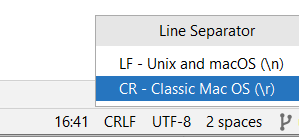
    So I tried setting IntelliJ's Code Style to use \n for newlines and line endings and line separator, also for new projects like mentioned here.

    But still after creating a new project from Git, all files including the above script was set to CRLF. You can see this at the bottom of the screen in this screenshot:


    I also realised that I don't want all files to have just LF, because I noticed doing that manually, on my commit of those files, I had to commit these too, as the newline changed. But I didn't want to bother other teammembers on Mac Books with this unnecessary change. Similar to what happens when you do a dos2unix on the file.
    So the next to try was to get Git on my machine to handle it correctly. And thus hopefully IntelliJ too.
    The .gitattributes file seemed a very good candidate: a suggestion was to change the git config 'core.autocrlf'. But that meant all the local files were getting changed still if I understood correctly, which I don't want.

    Solution

    It cost a lot of effort to find out where the gitattributes file is currently; and I wanted to change it for all my Git commands in the future, not just for one project.
    What I wanted to change it to is mentioned here:

    # Convert to LF line endings on checkout.
    *.sh text eol=lf
    **/*.sh eol=lf

    Those lines specify to change all end of lines (newlines) of files ending with .sh to be checked out with a LF (\n).
    I also added the 3rd line myself, to specify subdirectories, but maybe that was not needed.

    It was hard to find the correct location for the gitattributes (or .gitattributes file which made it all more confusing), this official Git text wasn't super-clear on it: 

    Finally I found my gitattributes file on Windows here:

    C:\git\etc\gitattributes

    C:\git is actually where I installed the Git client. And it is the one IntelliJ uses (but not the one the terminal shell in IntelliJ uses!) 

    And there were already quite a few settings in there like:

    *.RTF diff=astextplain
    *.doc diff=astextplain
    *.DOC diff=astextplain

    I just appended these:

    **/*.sh eol=lf
    *.sh eol=lf

    Restarted IntelliJ to be sure. And yes, after a complete full new checkout of my Git project, Java and Kotlin files were still having CRLF line endings, and my shell script had the LF ending.

    Sunday, December 18, 2022

    Docker build with Git command running in CircleCI failing with: Fatal: No names found, cannot describe anything, invalid argument, for "-t, --tag" flag: invalid reference format

    Introduction

    Context: Docker, CircleCI, Github.

    The Docker build command 

    docker build -f .circleci/Dockerfile -t $AWS_ACCOUNT_ID.ecr.$AWS_DEFAULT_REGION.amazonaws.com/${CIRCLE_PROJECT_REPONAME}:`git describe --tags` -t $AWS_ACCOUNT_ID.ecr.$AWS_DEFAULT_REGION.amazonaws.com/${CIRCLE_PROJECT_REPONAME}:${CIRCLE_BUILD_NUM} -t $AWS_ACCOUNT_ID.ecr.$AWS_DEFAULT_REGION.amazonaws.com/${CIRCLE_PROJECT_REPONAME}:${CIRCLE_SHA1} .

    was failing with this message:

    fatal: No names found, cannot describe anything.

    invalid argument "********************************************/my-project:" for "-t, --tag" flag: invalid reference format

    See 'docker build --help'.

    Exited with code exit status 125

    Solution

    You'd expect the Docker command maybe being syntactically incorrect. But the error message is referring to something else: it turns out the git describe --tags command gave the fatal message.
    The cause was that there was no git-tag set at all on the Github project yet.   After manually creating a release (including a tag) on Github and running the above build command again, the docker build command succeeded.

    Wednesday, November 30, 2022

    Flyway FlywayValidateException Validate failed: Migrations have failed validation. Detected failed migration to version 1 solution, please remove any half-completed changes then run repair to fix the schema history

    Introduction

    Setup:
    • Spring boot 2.7.4
    • Kotlin 1.7.20

    Flyway dependencies:

    plugins {
        id "org.flywaydb.flyway" version "9.6.0"
    }

    project(":application") {
      dependencies {

          dependencies {

              implementation "org.flywaydb:flyway-core:9.6.0"
              implementation "org.flywaydb:flyway-mysql:9.6.0"
      }
    }

    With only this Flyway script V1__initial_script present in the Spring Boot application:

    create table order
    (
        id                 varchar(255) primary key,
        orderId        bigint(20)    not null
    );

    create index order_id_idx on order(orderId);

    create table order_entry
    (
        id              varchar(255) primary key,
        orderid     bigint(20) not null,
        desc              varchar(255) not null,
        UNIQUE (oderId),
        constraint fk_orderId foreign key (orderId) references order (id)
    );

    gave this error:

    Invocation of init method failed; nested exception is org.flywaydb.core.api.exception.FlywayValidateException: Validate failed: Migrations have failed validation
    Detected failed migration to version 1 (initialize schema).
    Please remove any half-completed changes then run repair to fix the schema history.
    Need more flexibility with validation rules? Learn more: https://rd.gt/3AbJUZE

    See also the below screenshot:


    So the error is very vague. I also knew for sure that the schema script was the very first Flyway script to be run for that database, so it could not be the case that I edited the script after it already had run before succesfully.

    Solution

    The error code documentation doesn't tell much either. No details at all. 

    But when I ran the contents of the above script on the SQL command line in DBeaver you get the exact details of the problem:

    org.jkiss.dbeaver.model.sql.DBSQLException: SQL Error [3780] [HY000]: Referencing column 'orderId' and referenced column 'id' in foreign key constraint 'fk_orderId' are incompatible.
    at org.jkiss.dbeaver.model.impl.jdbc.exec.JDBCStatementImpl.executeStatement(JDBCStatementImpl.java:133)
    ...

    So Flyway just doesn't log the details of the error at all. I also tried the Flyway validate in a bean, to see if I could inspect the exception hopefully returned in the validateWithResult variable:

      @Bean
      fun myFlyway(dataSource: DataSource): String {
        val flyway = Flyway.configure().dataSource(dataSource).load()
        val validateWithResult = flyway.validateWithResult()
        logger.info("Flyway validate = ${validateWithResult}");
      }

    But that only showed again the high level error:

    Migrations have failed validation
    Error code: FAILED_VERSIONED_MIGRATION
    Error message: Detected failed migration to version 1 (initialize schema). Please remove any half-completed changes then run repair to fix the schema history.

    I found out that older Flyway versions used to have a bug not showing the whole exception,
    But even in this most version 9.6.0 the full exception is not logged.

    I also tried configuring Flyway with outputting JSON as mentioned here and here:

    flyway {
        outputType="json"
    }

    But outputType can't be used here. Didn't further investigate how to specify that parameter, the @Bean has no option for it. Maybe it is possible via application.yml...

    Though it seems it should be possible via configuration files and environment variables.

    Thus in the end the solution for me was to run the script manually against the database to see what the exact error is. Running repair is also not the correct suggestion, because the script just contained some syntax/semantic errors. It looks like a Flyway bug that the exact error details aren't logged by default, and I couldn't get it to do that either.


    Wednesday, November 16, 2022

    Spring JDBC and MySql using UUIDs in Java and VARCHAR(36) in database incorrect string value solution

    Introduction

    Using H2 as initial embedded database for a Spring Boot application worked fine. H2 is very forgiving in many situations and of course only tries to emulate the real target database, in this case MySql 8.0.
    So after connecting my Spring Boot application to MySql, this error started to appear when inserting a row in a table with a java.util.UUID property as 'id' field:  

        java.sql.SQLException: Incorrect string value: '\xAC\xED\x00\x05sr...' for column 'id' at row 1

    A quick internet search showed that potentially my character set and collate setting for the tables were using 3 bytes instead of 4 for UTF-8 storage.
    But the database, tables and columns all had utf8mb4 specified as CHARACTER SET and COLLATE, since I'm using MySql 8.0. So that 3 vs 4 bytes for UTF-8 issue did not apply for me. 

    Solution

    Then I found this blog https://petrepopescu.tech/2021/01/how-to-use-string-uuid-in-hibernate-with-mysql/ that at least when using Hibernate, it doesn't know how to convert UUIDs to strings (varchars), and you need to specify a Hibernate-provided converter. But the Hibernate annotation of course did not work for Spring Data JDBC.

    Luckily there is a way to write your own converters for Spring JDBC datatypes.

    Implementing that fixed that initial error message. Note the example in the above post is missing the @Configuration annotation on the MyJdbcConfiguration class.

    But then the error happened again during this custom JdbcTemplate select query:

        String query = "SELECT DISTINCT r.id, user_id FROM recipe r WHERE user_id = ?";
        List<Object> parameterValues = new ArrayList<>();
        parameterValues.add(userId);
        Object[] parameterValuesArray = parameterValues.toArray();
        jdbcTemplate.query(query, parameterValuesArray, new JdbcRecipeRowMapper());


    This was the output of that query, including the parameters used in the query:

    Executing prepared SQL statement [SELECT DISTINCT r.id, user_id, r.name, vegetarian, number_of_servings, instructions, r.created_at, r.updated_at FROM recipe r INNER JOIN ingredient i ON r.id = i.recipe_id WHERE user_id = ? AND vegetarian = ? AND number_of_servings = ? AND instructions LIKE ? AND  i.name IN (?) ]
    2022-09-14 15:46:38.062 TRACE 16148 --- [nio-7000-exec-2] o.s.jdbc.core.StatementCreatorUtils      : Setting SQL statement parameter value: column index 1, parameter value [e26b2a0a-3d2c-442f-8fa1-f26336d5a9d3], value class [java.util.UUID], SQL type unknown
    2022-09-14 15:46:38.068 TRACE 16148 --- [nio-7000-exec-2] o.s.jdbc.core.StatementCreatorUtils      : Setting SQL statement parameter value: column index 2, parameter value [true], value class [java.lang.Boolean], SQL type unknown
    2022-09-14 15:46:38.068 TRACE 16148 --- [nio-7000-exec-2] o.s.jdbc.core.StatementCreatorUtils      : Setting SQL statement parameter value: column index 3, parameter value [3], value class [java.lang.String], SQL type unknown
    2022-09-14 15:46:38.068 TRACE 16148 --- [nio-7000-exec-2] o.s.jdbc.core.StatementCreatorUtils      : Setting SQL statement parameter value: column index 4, parameter value [%Step%], value class [java.lang.String], SQL type unknown
    2022-09-14 15:46:38.068 TRACE 16148 --- [nio-7000-exec-2] o.s.jdbc.core.StatementCreatorUtils      : Setting SQL statement parameter value: column index 5, parameter value [spinach], value class [java.lang.String], SQL type unknown
    2022-09-14 16:06:37.952 DEBUG 19748 --- [nio-7000-exec-2] o.s.jdbc.core.JdbcTemplate               : SQLWarning ignored: SQL state 'HY000', error code '1366', message [Incorrect string value: '\xAC\xED\x00\x05sr...' for column 'user_id' at row 1]

    So that only shows a warning message at DEBUG level, not even as an error, so at first I missed it completely! The query just returned 0 results.

        SQLWarning ignored: SQL state 'HY000', error code '1366', message [Incorrect string value: '\xAC\xED\x00\x05sr...' for column 'user_id' at row 1]

    Makes sense though that this custom query has the same issue, since my string-based query of course does not use the converters that I configured earlier.
    So I had to change the third line to explicitly convert the value to a string, so Spring JDBC will pass it on as a string:

            parameterValues.add(userId.toString());

    Note: maybe implementing a placeholder interface for each repository like this would also have fixed it for the Spring generated methods/queries like save(), remove() etc, e.g: interface RecipeRepository extends Repository<Recipe, UUID>. Did not try that out.

    Other related links used to get to the above solution:


    Thursday, October 13, 2022

    Migrating Java 17 Spring Boot 2.7.3 application to Kotlin 1.7.20

    Introduction

    This blogpost describes the challenges encountered when migrating a Java 17 Spring Boot 2.7.3 application to Kotlin 1.7.20. 

    Other libraries/tools used in the project:
    - Swagger (OpenAPI 3.0.3)
    - Spring boot 2.7.3
    - Liquibase
    - H2 in mem + file based
    - JUnit5 with Mockito and Mockito-Kotlin
    - MySql 8.0
    - Actuator
    - Maven 3
    Tip: after migration of most of the .java files manually, I found this Spring tutorial which helps to avoid having to add 'open' to @Component, @Service etc annotated classes.
    It includes the kotlin-spring-plugin and Kotlin JPA plugin to support Kotlin features better, including support for JSR-305 annotations + Spring nullability annotations. Usually you'd also want to include jackson-module-kotlin for serialization and deserialization of Kotlin classes.
    Note that my application uses generated Java classes from an OpenAPI 3 Swagger yaml file, which are returned in the REST API, so therefore not needed.

    Total code reduction after migration:
    Java: 4718
    Kotlin: 2860

    So about 44% reduction in code. Not bad.

    Steps

    Convert POJOs

    As first I converted a simple POJO which in my case had @Data and @Builder Lombok annotations.
    Open that POJO Java file. Hit ctrl-alt-shift-k. Or, find it in the IntelliJ 'actions' search panel:


    Then make sure to rebuild to project by enforcing Maven to rebuild if it didn't do that.
    Then I had to redo it on the POJO class.

    I was a bit surprised what came out:

        @Builder
        @Data
        class Ingredient {
            private val name: String = null
            private val recipeId: UUID = null
            private val createdAt: LocalDateTime = null
            private val updatedAt: LocalDateTime = null
        }

    I would have expected the Lombok annotations to be gone. But on the other hand IntelliJ can't know how to fix them I guess (see below for more on Lombok migration).
    And maybe because of the @Data it made all fields private...

    I did do expect more like this:

        @Builder
        @Data
        class Ingredient(val name: String, recipeId: UUID, createdAt: LocalDateTime, 
                            updatedAt: LocalDateTime)

    But even when I remove the Lombok annotations, still the fields are created as private fields, not as part of the primary constructor... Maybe because of the other annotations on some of the fields, like @Id and @Version?

    I manually converted it some more, into this:

        data class Ingredient(val name: String, val recipeId: UUID, val createdAt: LocalDateTime, val         
                            updatedAt: LocalDateTime)

    Then I converted all uses of the Builder in the Java class to the regular (primary) constructor of the Kotlin data class. E.g:

        new Ingredient(ingredient, recipeId, createdAt, createdAt)

    Doing this for all POJOs would be quite some work. And later on, you want to convert those Java instance creations to Kotlin constructors anyway, with named parameters.
    So I didn't do this for all classes, I started to skip this step of replacing builders with constructors.

    Now first let's try to rebuild the project with 'mvn clean install' for example.

    That gave an error: the newly created Kotlin Ingredient class (symbol) could not be found.   Note that IntelliJ was able to find all dependencies just fine.
    The answer to that can be found here
    I applied the solution where you move your .kt file into its new src/main/kotlin/x/y/z package. Make sure to mark that src/main/kotlin directory as a source directory in IntelliJ.

    But still an error: 

        Cannot find symbol (Ingredient)

    So that didn't fix it, so applied the accepted solution, so to make sure the compilation order is Kotlin then Java.
    After this change in the pom.xml, IntelliJ couldn't find the Spring Boot application class anymore. 'mvn clean install' ran up to the tests, but many failed due to:

        java.lang.NoClassDefFoundError: kotlin/reflect/full/KClasses 

    See next section below for how those were fixed.
    I changed also in the Kotlin plugin in the pom.xml the JVM target to: <jvmTarget>1.17</jvmTarget>
    After that, IntelliJ compiled fine again.

    Then trying to run the application with 'mvn spring-boot:run' gave this error:

        Compilation failure
        Unknown JVM target version: 1.17
        Supported versions: 1.6, 1.8, 9, 10, 11, 12, 13, 14, 15, 16, 17, 18

    So the <jvmTarget> needs to be 17 (not 1.17) apparently. And then it almost started, but I got the same error as when running the tests:

        java.lang.ClassNotFoundException: kotlin.reflect.full.KClasses

    Note also this warning showed up during the build, that needs to be checked and fixed, because it refers to Kotlin JDK8 and we use Java 17:

        [INFO] Scanning for projects...
        [WARNING] 
        [WARNING] Some problems were encountered while building the effective model for com.project:kotlinrecipes:jar:1.0.0
        [WARNING] 'dependencies.dependency.(groupId:artifactId:type:classifier)' must be unique: org.jetbrains.kotlin:kotlin-stdlib-jdk8:jar -> duplicate declaration of version ${kotlin.version} @ line 159, column 15
        [WARNING] 
        [WARNING] It is highly recommended to fix these problems because they threaten the stability of your build.


    Fixing the Java tests Part 1

    Fixing the tests with the error java.lang.ClassNotFoundException: kotlin.reflect.full.KClasses

    Adding this dependency, as also mentioned here, fixed it:

    <dependency>
    <groupId>org.jetbrains.kotlin</groupId>
    <artifactId>kotlin-reflect</artifactId>
    <version>${kotlin.version}</version>
    </dependency>

    Outstanding question for this stdlib dependency for me was, why is Kotlin stdlib using Java 8?

    <dependency>
    <groupId>org.jetbrains.kotlin</groupId>
    <artifactId>kotlin-stdlib-jdk8</artifactId>   // Can't this be Java 17?
    <version>${kotlin.version}</version>
    </dependency>

    And: the Kotlin standard library kotlin-stdlib targets Java 6 and above. There are extended versions of the standard library that add support for some of the features of JDK 7 and JDK 8.
    And when you include kotlin-stdlib-jdk8, it will pull kotlin-stdlib-jdk7 and kotlin-stdlib
    And also note: https://stackoverflow.com/questions/65731542/why-is-there-no-kotlin-stdlib-jdk11. So basically, all fine since Kotlin just doesn't use any API from Java's JDK higher than 8.

    After this, the application started fine, connected to the MySql Docker instance and the REST endpoints worked all fine.

    Migrating the Spring Boot application class

    The IntelliJ converter worked fine. The @Bean annotation in that class was migrated correctly too. Constants were correctly put in a companion object {} block.
    But when starting the application this message showed up:

        org.springframework.beans.factory.parsing.BeanDefinitionParsingException: Configuration problem: @Configuration class 'RecipesApplication' may not be final. Remove the final modifier to continue.

    Strange: it says the class might not be final, remove the final modifier... Sounds contradicting!
    I made the class 'open' (because the default is public final) and then it worked.

    Then for the @Bean I got:

        org.springframework.beans.factory.parsing.BeanDefinitionParsingException: Configuration problem: @Bean method 'encoder' must not be private or final; change the method's modifiers to continue

    I made the method 'encoder' also 'open' and then it worked.

    If you have other issues, check this post for more tips. 

    Migrating a Spring Boot @RestController

    I applied the IntelliJ converter. Its result was pretty good. Inheritance from the OpenAPI 3 generated Java code was correctly applied. 
    I had to add the Kotlin logging to replace the @Slf4j static logger, see here.
    Note the default static 'log' field generated by @Slf4j is after applying that named private val logger = KotlinLogging.logger {}. But you can name it as you want of course.

    When running the application, again the controller also had to be made open, to allow it to be subclassed (as can be seen in the tip in the introduction section, Spring and some other frameworks require classes to be open (extendable)).
    After this change, the controller worked fine.

    I also modified the generated code a bit by adding a @NotNull annotation (for something which had already a '?' so was incorrect anyway I realized afterwards), but then at runtime only I sadly got this error:

        javax.validation.ConstraintDeclarationException: HV000151: A method overriding another method must not redefine the parameter constraint configuration, but method UserController#loginUser(JwtRequest) redefines the configuration of UsersApi#loginUser(JwtRequest).

    Removing the incorrectly added @NotNull fixed that problem; and it is unnecessary in combination with the '?' too anyway.

    Migrating @Component service

    Got this error after adding the logger:

        java.lang.NullPointerException: Cannot invoke "mu.KLogger.info(String)" because "this.logger" is null

    Strange, the @RestController did not have that issue. Though that one is overriding a (generated OpenAPI 3) class.
    This question triggered me, so I added the 'open' keyword to the methods in the @Component class, to make it non-final so Spring has access to it with its proxies too.

    That worked.

    Converting Spring @Repository

    For interfaces, the question was: a findByUsername(username) can return null when it doesn't find the user. How to best define that in Kotlin? Allow null to be returned (but at least the caller then has to handle the null possibility)? Or use Optional in that case? Or is there another better solution?
    No clear best answer to me, e.g: https://discuss.kotlinlang.org/t/how-to-deal-with-database-null-return-according-kotlin-null-safety-feature/2546
    I went for having the repo return '?'. But another repo already was using Optional, so left that there too. Will have to decide on consistency here...
    See this post on how null can be seen positively and also the String.toIntOrNull() function extension built into Kotlin! :) Based on that, I went for allowing repository functions to return 0.
     

    Converting @MappedCollection(idColumn = "RECIPE_ID")

    Only had to make sure using the arrayOf() and using a MutableSet because you usually want to add elements to the child (collection):

            @OneToMany(cascade = arrayOf(CascadeType.ALL), orphanRemoval = true, 
                        targetEntity = Ingredient::class)
            @JoinColumn(name = "recipe_id")
            var ingredients: MutableSet<Ingredient> = HashSet<Ingredient>(),

    Use @NotNull or not

    Is it useful to have the @NotNull annotation, while it is only done at runtime? And doesn't Kotlin also throw an exception when you pass in a null value to a parameter that is already non-nullable by default (i.e it doesn't have the '?' appended to its type)?
    Seems like double because Kotlin inserts the @NotNull into the code
    Maybe you'd put it in when Java code is calling your Kotlin code, to make it more explicit - and the Java code can then validate on it?

    Converting @Configuration class

    A class annotated with that has also to be open: 

        @Configuration
        internal open class JdbcConfig : AbstractJdbcConfiguration() {...}

    I noticed the Kotlin converter from IntelliJ didn't like always comments at the end of a line of Java code. Sometimes the '()' of a method call were then put on the wrong line.

    Fixing the Java tests Part 2

    While still as Java code, some failed with this:

        org.mockito.exceptions.base.MockitoException: 
        Cannot mock/spy class com.project.kotlinrecipes.user.infra.JwtUserDetailsServiceImpl
        Mockito cannot mock/spy because :
         - final class

    So that was easy, I made those classes 'open'.

    I also had to make methods 'open' used in Mockito.when() matchers, because otherwise it complains: 

        org.mockito.exceptions.misusing.InvalidUseOfMatchersException: 
        Invalid use of argument matchers!
        0 matchers expected, 1 recorded:

    But also verify() started to fail:

        verify(jwtTokenUtil, Mockito.times(0)).validateToken(isA(String.class), isA(UserDetails.class));
        java.lang.NullPointerException: Parameter specified as non-null is null: method
        com.project.kotlinrecipes.infra.security.JwtTokenUtil.validateToken, parameter userDetails

    That also meant added the 'open' keyword to that method.

    Converting JUnit 5 tests with Mockito to Kotlin

    IntelliJ's auto-converter works pretty good. Except that it converts

        private JdbcIngredientRowMapper jdbcIngredientRowMapper;

        @BeforeEach
        public void setUp() {
            jdbcIngredientRowMapper = new JdbcIngredientRowMapper();
        }

    to:

        private var jdbcIngredientRowMapper: JdbcIngredientRowMapper? = null

        @BeforeEach
        fun setUp() {
            jdbcIngredientRowMapper = JdbcIngredientRowMapper()
        }

    But it can be made nullsafe by changing it to:

        private lateinit var jdbcIngredientRowMapper: JdbcIngredientRowMapper
        
        @BeforeEach
        fun setUp() {
            jdbcIngredientRowMapper = JdbcIngredientRowMapper()
        }

    I also introduced the `test description` notation, e.g:

        @Test
        fun `Should map row`() {}

    I use in some tests:

        @ParameterizedTest
        @MethodSource("filterNullPermutations")

    That filterNullPermutations has to be a static method. IntelliJ made it a companion object with that method 'private'. I added @JvmStatic to make it accessible for the @MethodSource.

    I had to add mockito-kotlin library for better interoperability for this case:  
    ArgumentMatchers.isA(class) for Kotlin methods that don't allow null values be put in (which isA() and any() for example can return).
    And by adding this library I could now also use 'whenever' instead of '`when`'.

    isA(MyClass.class) in Java had to be converted to:  

        whenever(jwtTokenUtil.generateToken(isA<UserDetails>))).thenReturn(BEARER_TOKEN_VALUE)

    Or even shorter:

           whenever(jwtTokenUtil.generateToken(isA())).thenReturn(BEARER_TOKEN_VALUE)

    using the mockito-kotlin library, which creates an instance (instead of the regular mockito which can return null). See here for more explanation. 

    Replaced all mock() with Kotlin style: val mockBookService : BookService = mock()

    The generated code did not work for this TestRestTemplate.exchange() call in Java:

            // Set up find parameters
            Map<String, String> uriVariables = new HashMap<>();
            uriVariables.put("vegetarian", "true");
            uriVariables.put("numberOfServings", "3");
            uriVariables.put("includedIngredients", "onion");
            uriVariables.put("excludedIngredients", "fish");
            uriVariables.put("instructions", "First");

            HttpHeaders headers = new HttpHeaders();
            headers.set(HttpHeaders.ACCEPT, MediaType.APPLICATION_JSON_VALUE);
            HttpEntity<?> entity = new HttpEntity<>(headers);

            // When
            ResponseEntity<List<RecipeResponse>> foundRecipesEntity = testRestTemplate.exchange("/recipes/findByFilter?vegetarian={vegetarian}&numberOfServings={numberOfServings}&includedIngredients={includedIngredients}&excludedIngredients={excludedIngredients}&instructions={instructions}",
                    HttpMethod.GET, entity, new ParameterizedTypeReference<>() {}, uriVariables);


    Became after IntelliJs converter applied:

            // Set up find parameters
            val uriVariables: MutableMap<String, String?> = HashMap()
            uriVariables["vegetarian"] = "true"
            uriVariables["numberOfServings"] = "3"
            uriVariables["includedIngredients"] = "onion"
            uriVariables["excludedIngredients"] = "fish"
            uriVariables["instructions"] = "First"
            val headers = HttpHeaders()
            headers[HttpHeaders.ACCEPT] = MediaType.APPLICATION_JSON_VALUE
            val entity: HttpEntity<*> = HttpEntity<Any>(headers)

            // When
            val foundRecipesEntity: ResponseEntity<List<RecipeResponse>> =
                testRestTemplate.exchange<List<RecipeResponse>>("/recipes/findByFilter?vegetarian={vegetarian}&numberOfServings={numberOfServings}&includedIngredients={includedIngredients}&excludedIngredients={excludedIngredients}&instructions={instructions}",
                    HttpMethod.GET, entity, object : ParameterizedTypeReference<List<RecipeResponse?>?>() {}, uriVariables
                )

    But .exchange() was red underlined, no matching method to invoke found. I had to change it into this:

            // Set up find parameters
            val uriVariables: MutableMap<String, String> = HashMap()
            uriVariables["vegetarian"] = "true"
            uriVariables["numberOfServings"] = "3"
            uriVariables["includedIngredients"] = "onion"
            uriVariables["excludedIngredients"] = "fish"
            uriVariables["instructions"] = "First"
            val headers = HttpHeaders()
            headers[HttpHeaders.ACCEPT] = MediaType.APPLICATION_JSON_VALUE

            // When
            val foundRecipesEntity: ResponseEntity<List<RecipeResponse>>? =
                testRestTemplate.exchange(
                    "/recipes/findByFilter?vegetarian={vegetarian}&numberOfServings={numberOfServings}&includedIngredients={includedIngredients}&excludedIngredients={excludedIngredients}&instructions={instructions}",
                    HttpMethod.GET, HttpEntity("parameters", headers),
                    typeReference<List<RecipeResponse>>(), uriVariables
                )

    With the typeReference method added (you can also do it inline BTW):

        private inline fun <reified T> typeReference() = object : ParameterizedTypeReference<T>() {}

    And after some more cleaning up this worked too (can you spot the differences with the generated Kotlin from IntelliJ?):

            // Set up find parameters
            val uriVariables: MutableMap<String, String> = HashMap()
            uriVariables["vegetarian"] = "true"
            uriVariables["numberOfServings"] = "3"
            uriVariables["includedIngredients"] = "onion"
            uriVariables["excludedIngredients"] = "fish"
            uriVariables["instructions"] = "First"
            val headers = HttpHeaders()
            headers[HttpHeaders.ACCEPT] = MediaType.APPLICATION_JSON_VALUE
            val entity: HttpEntity<*> = HttpEntity<Any>(headers)

            // When
            val foundRecipesEntity: ResponseEntity<List<RecipeResponse>> =
                testRestTemplate.exchange(
                    "/recipes/findByFilter?vegetarian={vegetarian}&numberOfServings={numberOfServings}&includedIngredients={includedIngredients}&excludedIngredients={excludedIngredients}&instructions={instructions}",
                    HttpMethod.GET, entity,
                    typeReference<List<RecipeResponse>>(), uriVariables
                )


    Note that MockK can be the next improvements to the Kotlin code, to allow more Kotlin-style of notation.

    Method documentation generation

    I noticed my IntelliJ 2022.2.1 does not generate @param, @return etc documentation when typing /** above a (private) function definition.

    Miscellaneous

    I still have a few references to Java classes in the code, like this one:

            httpSecurity.addFilterBefore(jwtRequestFilter, UsernamePasswordAuthenticationFilter::class.java)

    Could not find a way to avoid having to reference a Java class in Kotlin this directly.

    And at the end of the process I removed all Lombok annotations and its dependency in the pom.xml.

    Bonus tip

    Spring's Kotlin extensions overview can be found here.